Week 3.2 - 2R Robotic Arm Challenge
AIM: Write a program in Matlab to simulate the forward kinematics of a 2R Robotic Arm.
Objective:
- Solve the problem of forward kinematics of 2R Robotic arm and understand the movement of manupulator.
- Creation of animation of 2R robotic arm.
Introduction: Robotic arm is basically a manupulator. It is usually programable with same function of human arm. In 2R robotic arm two links are joint with the help of pin. Pin joints allow either rotational motion or translational motion(displacement). links are just consider like a kinematic part of chain. In todays industries it is used in food,consumer goods,plastic and electronics,material handling etc. but mostly concentrated in automotive industry.
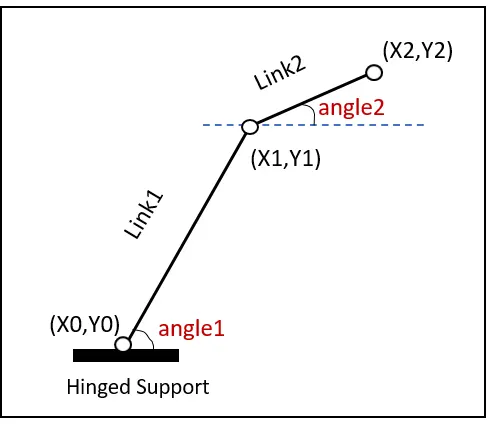
(1)
- Link1 represent l1 similarly Link2 is l2.
- angle1 and angle2 represent respectively theta1 and theta2.
- All joints are pin joints.
- Hinged suport is base for the links to perform tasks.
Inputs:
- First consider length of link1 and link2 respectively 1.2 and 0.7.
- For simulation of robotic arm it is necessary to assume theta1 and theta2 in varying nature for the creation of animation. So we have created a row vector from 0-90(degree) with 20 evenly spaced points between them.
- Base coordinates which is assumed at origin(0,0).
- Calculates end point of link1 as
x1=l1*cosd(A1) and y1=l1*sind(A1) (d used with cos and sin for taking value in degree)
- Similarly for link2 as
x2=x1+l2*cosd(A2) and y2=y1+l2*sind(A2)
Program:
clear all;
close all;
clc;
l1=1.2;                                    %length of link1
l2=0.7;                                    %length of link2

%creation of new vector from 0 to 90
theta1=linspace(0,90,20);
theta2=linspace(0,90,20);
ct=1;
for i=1:length(theta1)
    A1=theta1(i);                          %storing value of theta1 in another variable
    for j=1:length(theta2)
        A2=theta2(j);                      %storing value of theta1 in another variable

        %fixing base of link1 at origin
        x0=0;
        y0=0;

        % finding coordinates of link1
        x1=l1*cosd(A1);
        y1=l1*sind(A1);
        %finding coordinates of link2
        x2=x1+l2*cosd(A2);
        y2=y1+l2*sind(A2);

        %plot lines with help of coordinates
        plot([x0 x1],[y0 y1],[x1 x2],[y1 y2],'linewidth',3)
        axis([-0.25,2.0,0,2.0])                              %axis length
        pause(0.06)                                          %iteration time gap
        M(ct)=getframe(gcf);                                 %capturing frames for make animation
        ct=ct+1;
    end
end
%inserting frames in animation for make movie
movie(M)
videofile = VideoWriter('forward_kinmatics_robotic_arm.avi','Uncompressed AVI');
open(videofile)
writeVideo(videofile,M)
close(videofile)
Errors and Remedies:
- Error in variable recognition.
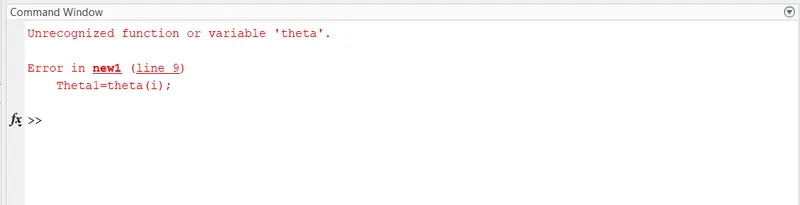
- It is remove by writing right name of variable.
Output:
- Final output is:
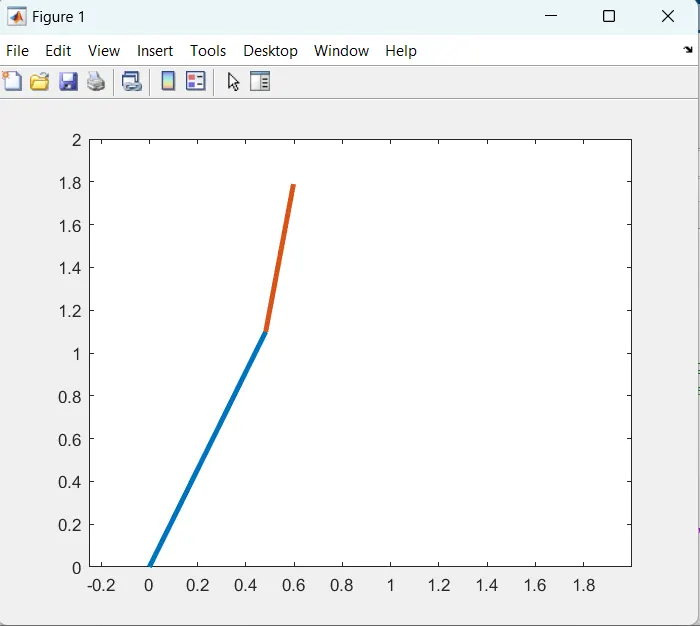
- Final animation of the simulation of 2R robotic arm is:
Link: https://youtu.be/jkdaMPG9_Ks
Reference:
- Image(1) is obtained from google image.