Week 3.2 - 2R Robotic Arm Challenge
AIM:
To create an animation of a 2R Robotic Arm.
DESCRIPTION:
A 2 R Robotic Arm is a device that performs a certain operation base on the manipulator attached at its end. The operation is performed by the program introduced.
To create a valid program, the programmer need to have basic knowledge about the kinematics of the links.
Gorverning Equation:
x1= l1*cosd(θ1)
y1=l1*sind(θ1)
x2=x1+l2*cosd(θ2)
y2=y1+l2*sind(θ2)
where,
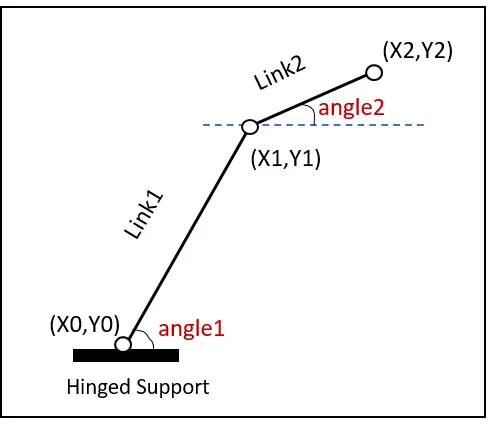
x0,y0 : initial coordinates, origin is taken
x1,y1 : end coordinates of link 1
x2,y2 : end coordinates of link 2
L1 : length of link 1
L2 : length of link 2
Angle1(θ1):angle b/w hinged support & link 1.(wrt to x-axis)
Angle2(θ2): angle b/w link 1 & link 2.(wrt x-axis)
objective
- To understand the kinematics of a 2R Robotic Arm.
- To write a program to crate an animation of Robotic Arm.
- To create a motion picture or animation using the program's plots.
Theory:
-
In this project, we are going to deal with the linkage known as the Forward Kinematics of a 2R Robotic arm in our project, and we're using the basic robotic arms to accomplish that (where 2R means 2-rotating Link i.e 2 is a number of links and R is rotation). Link-1 is aligned at (X0, Y0) and makes an angle1, while Link-2 is hinged at the end of Link-1 and makes an angle2 with respect to Datum. These two links are used as a representation of a robotic arm.
CODE EXPLANATION:
- Using linspace command the angles `theta`θ1 and θ2 are defined with 20 values ranging from 0 t0 90.
- Also the length of both arms and the base coordinates are taken as input
- The initial values of counter(ct) is taken as 1 and a for loop is created inside another for loop.
- Inside the loop for each values of angles the final coordinates of link 1 and link 2 are calculated.
- Now, 400 frames are created and each frame is stored in an array M(ct) which uses the getframe(gcf) command to store the current frames and ct is incremented in the inner loop foer each execution of the loop.
- The command movie is used to join each frame and a video file is create.
- The file is opened and closed using the open and close commands respectively.
- The writeVideo command is used to write the frames from M to videofile.
CREATING A MOVIE
Creating a movie type M(ct) = getframe(gcf) below the pause(0.04) and at extreme end command type movie (m).
Counters are useful programming tools, they are used to keep track of how many times a command has been executed.ct represent every frame.
getfram : this command represent to getting the current figure in the gcf window.
Code:
close all
clc
clear
ct = 1;
% theta1 = angle between the x-axis and first link %
% theta2 = angle between the x-axis and second link %
theta1 = linspace(0,90,20);
theta2 = linspace(0,90,20);

for i = 1:length(theta1)
    THETA1 = theta1(i);
    for j = 1:length(theta2)
        THETA2 = theta2(j);
        % Initial coordinates%
        x0 = 0;
        y0 = 0;
% length of robotic arms of first and second link %
l1 = 1.5;
l2 = 0.9;

 x1 = l1*cosd(THETA1);
  y1 = l1*sind(THETA1);
  x2 = x1 + l2*cosd(THETA2);
  y2 = y1 + l2*sind(THETA2);

 % plotting%

 plot([x0,x1],[y0,y1],[x1,x2],[y1,y2],'linewidth',4)
hold off
  axis([-0.1 2 -0 2])
  pause(0.0004)
 % storing each frame into array%
  M(ct) = getframe(gcf);
    ct = ct+1;

    end
end
% joining each frame and making a movie%
movie(M);
%creating a video file%
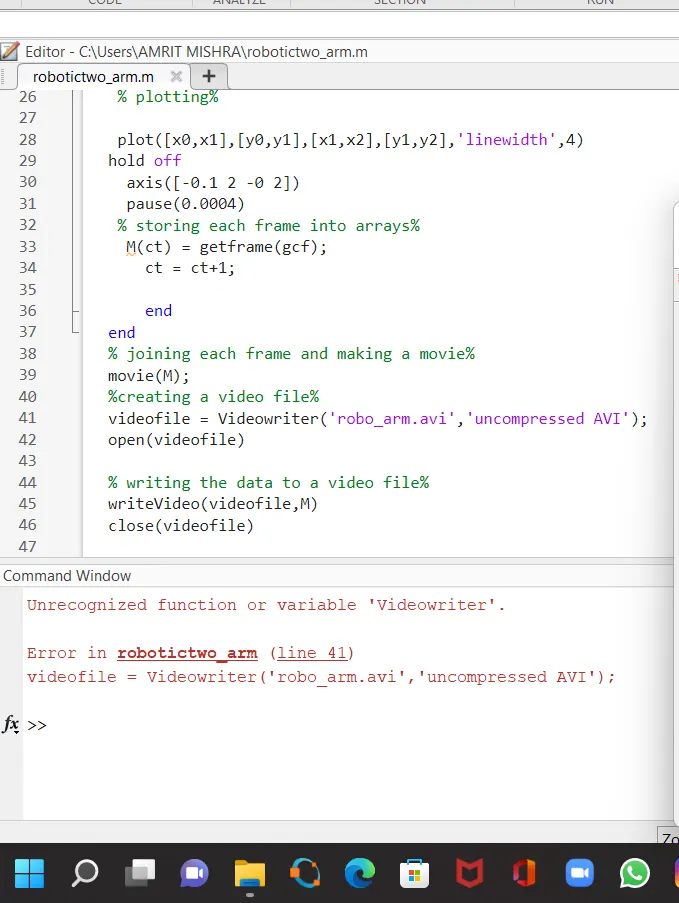
videofile = VideoWriter('robo_arm.avi','uncompressed AVI')
open(videofile)

% writing the data to a video file%
writeVideo(videofile,M)
close(videofile)
ERROR FACED:
While creating the vedio file for animation texted small letter 'w' instead of capital letter 'W' mistakely for the term "VedioWriter".
Conclusion:
- Hence, the 2R robotic arm is simulated by using Matlab programming, and the movie from the plots obtained from the program is also created.
- The below link is given for the program output movie for a 2R robotic arm.