Week 3.2 - 2R Robotic Arm Challenge
Aim:
The aim of the challenge is to write a program in Matlab to simulate the forward kinematics of a 2R Robotic Arm.
Objective:
The main objective of the challenge is to create an animation file of the plot. To create a sytax explanation for major commands used for the program. Explaining the code using the pseudocode and flowchart. Code with line by line explanantion in the form of comments and snapshot the code outputs.
Theory:
A robotic arm is a specific kind of mechanical arm that can be controlled and performs tasks that are comparable to those of a human arm. The arm might be a standalone device or it could be a component of a more sophisticated robot. Such a manipulator has joints that allow for either translational (linear) displacement or rotational motion, similar to an articulated robot. A kinematic chain may be thought of as being formed by the manipulator's linkages. The end effector, which is similar to the human hand, is the terminal of the manipulator's kinematic chain.
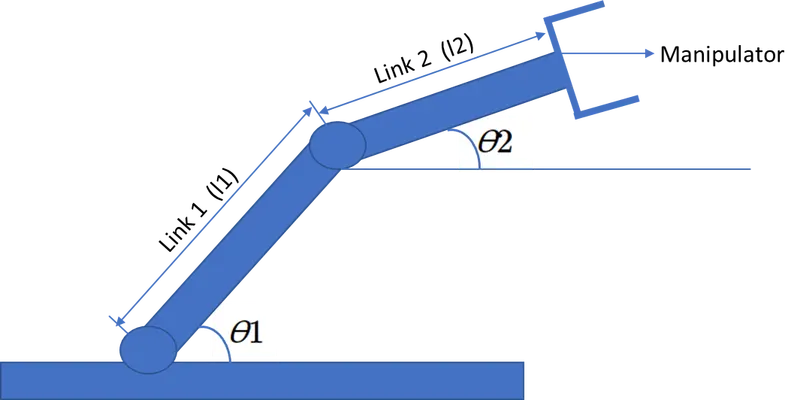
- Let the ϴ1 is the angle formed by the link l1 and horizontal base.
- Let the ϴ2 is the angle formed by the link l2 and horizontal base.
- Let l1 and l2 be the link 1 and link 2 of the robotic arm.
- The starting and ending coordinate of the link 1 is (x0,y0) = (0,0) and (x1,y1) = ((l1cosϴ),( l1 sinϴ))
- The starting and ending coordinate of the link 2 is (x1,y1) = (x1+l2⋅cos(θ2)) and (x2,y2) = (y1+L2⋅sin(θ2).
Program:
% Program for 2R Robotic Arm Challenge
clear all
close all
clc

%Inputs
 l1=1;
 l2=0.5;
 theta1=linspace(0,90,12);
 theta2=linspace(0,90,12);
 ct=1;

for i=1:length(theta1)
THETA1=theta1(i);

 for j=1:length(theta2)
 THETA2=theta2(j);

 x0=0;
 y0=0;

 x1=l1*cosd(THETA1);
 y1=l1*sind(THETA1);

 x2=x1+l2*cosd(THETA2);
 y2=y1+l2*sind(THETA2);

 %Plotting
 plot([x0,x1],[y0,y1] , [x1,x2],[y1,y2],'Linewidth',2)
 axis([-0.1 2 0 1.5])
 pause(0.01)
 M(ct)=getframe(gcf);
 ct=ct+1;
 end

end

movie(M)
Videofile=VideoWriter('Robotic_arm.avi','Uncompressed AVI');
open(Videofile)
writeVideo(Videofile,M)
close(Videofile)
Explanantion:
Step 1: Calculating the position of link 1.
Step 2: The starting point of the link 1 is (0,0) and the end point of link 2 is l1cosϴ and l1 sinϴ.
Step 3: Then calculating the position of link 2
Step 4: The starting point of the link 2 is (x1+L2⋅cos(θ2)) and the ending point of the link 2 is (y1+L2⋅sin(θ2))
Step 5: After finding the position of link 1 and link 2, start the MATLAB program
Step 5: Firstly, clear the workspace by clear all command, close all figure using close all command and clc for clear command.
Step 6: Then initializing the inputs to the program.
Step 7: l1 and l2 is 1.5 and 1 respectively.
Step 8: The theta 1 and theta 2 is provided using linspace command to check how the manipulator changes with respect to theta 1 and 2.
Step 9: Using nested for loop to provide the respective i and j values for the arm to change.
Step 10: Then the code to change the arm is given inside the second for loop to iterate the process.
Step 11: Using movie commandis to combine all the figures saved in the M file to make an animation/movie
Step 12: At end saving the movie in .avi format.