Week 3.2 - 2R Robotic Arm Challenge
Aim: To simulate the forward kinematics of a 2R Robotic Arm using MATLAB tool.
Theory:
Robotic Arm:
Robotic Arm is made up of mechanical linkages, which is programable to work in the required manner. The links are joined in such a way that to create rotational and translatory motion. The behaviour of the robot changes accordingly resulting in a very flexible task achieving. Robotic Arm consists of shoulder, elbow and wrist like human arm.
Applications:
- Robots are used in different fields such as industrial, military, space exploration, and medical applications.
- Robots are also used in dangerous places and situations where humans can’t do where extreme temperatures or contaminated environments exist.
- Robotic arms are generally used in welding, sanitisation, painting, construction, package industries etc.
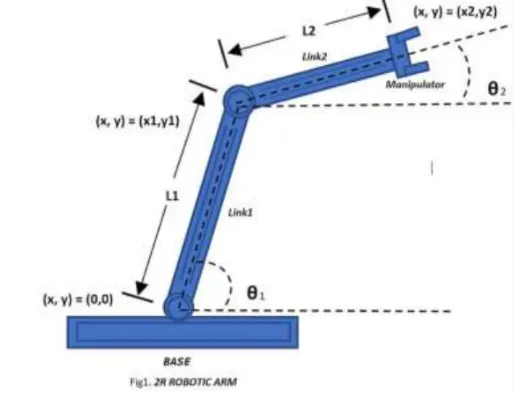
Steps Used:
L1=Length of link 1
L2=Length of link 2
Step1:
- Calculate the starting points and ending ponits for link1
Start point=(x0,y0)=(0,0)
End point=(x1,y1)=(L1cos(theta1),L1sin(theta1))
Step2:
- Calculating the start point and End point for link 2
Start point=(x1,y1)=(L1cos(theta1),L1sin(theta1))
End point=(x2,y2)=(L2cos(theta2),L2sin(theta2))
Step3:Calculating the solution using plotting
[x0,y0],[x1,y1],[x2,y2]
Step4:creating the animation profile
Code:
% Clear existing variables, close figures, and clear command window
clear all
close all
clc

% Define arm parameters
l1=1;% length of the first link
l2=0.5% length of the second link
% Define joint angles (theta1 and theta2)
theta1=linspace(0,90,20);
theta2=linspace(0,90,20);
% Initialize a counter for frames
ct=1;
% Loop through theta1 and theta2 values
for i =1:length(theta1);
    Theta1=theta1(i);
    for j=1:length(theta2);
        Theta2=theta2(j);
        % Compute joint positions using forward kinematics
        x0=0;
        y0=0;

        x1=l1*cosd(Theta1);
        y1=l1*sind(Theta1);

        x2=x1+l2*cosd(Theta2);
        y2=y1+l2*sind(Theta2);
        % Plotting the robot arm
        plot([x0 x1],[y0 y1],[x1 x2],[y1 y2],'linewidth',3);
        axis([-1 2 0 1.5]);
        pause(0.03);
         % Store the current frame for creating a video
        M(ct)=getframe(gcf);
        ct=ct+1;
    end
end
% Create and save a video file
movie(M);
videofile=VideoWriter('forward_kinematic_avi.avi','Uncompressed AVI');
open(videofile)
writeVideo(videofile,M)
close(videofile)
Explanation:
- Clear all: clears all variables from the workspace.
- Close all: Closes all open figures.
- Clc:Clear the command window.
- 'l1' and 'l2' are the lengths of the two links of the robotic arm.
- linspace(0,90,20): Generates 20 equally spaced values between 0 and 90 for both 'theta1' and 'theta2'.
- 'ct' is a counter variable initialized to 1, used for keeping track of frames in the animation.
- Nested loops iterate over all combinations of 'theta1' and 'theta2'.
- Computes the cartesian coordinates of the joints based on the forward kinematics equations.
- Plots the robotic arm for the current joint angles, with a pause to create an animation effect.
- Captures the current frame and stores it the array 'M' for creating the animation.
- Displays the animation using the 'movie' function and saves it as an uncompressed AVI file named 'forward_kinematic_avi.avi'.
Errors:
- In the code 'sind' and 'cosd' to write because in MATLAB to considering the default considering radius we converted into degrees we using the sind anc Cosd.
>> cos(90)

ans =

   -0.4481

>> cosd(90)

ans =

     0
- In this code insted of write the 'VideoWriter' i can weite the 'videowriter' to create video file.
Output:
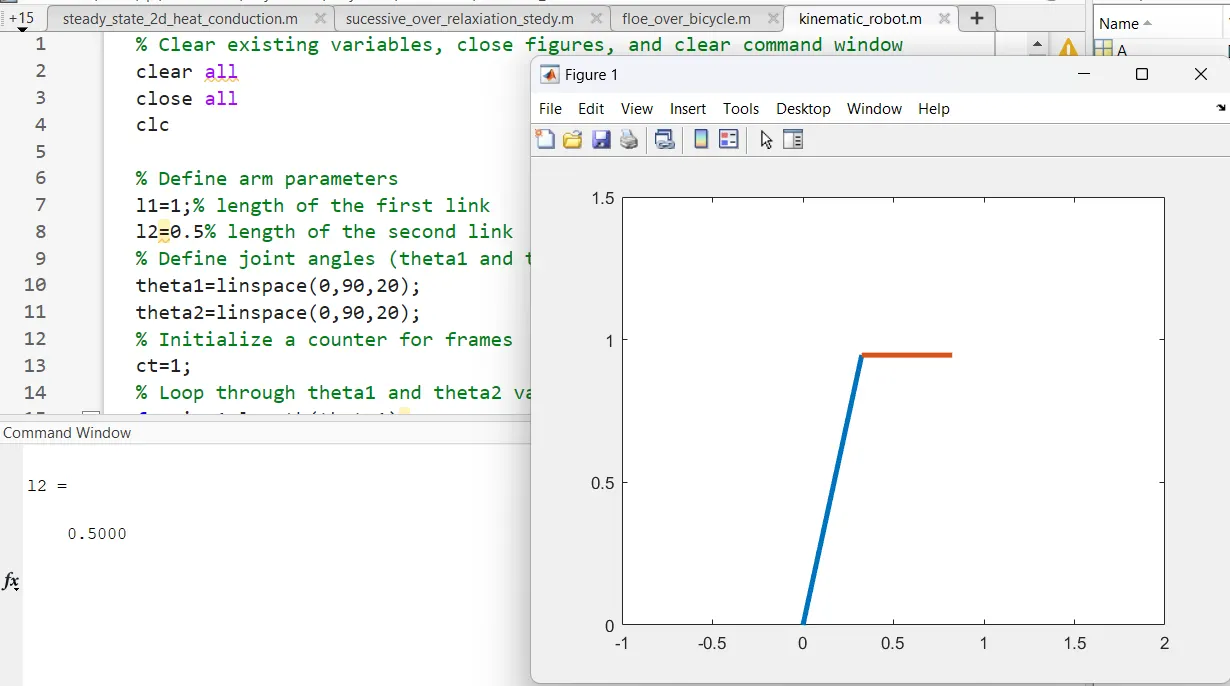
Videolink:
https://drive.google.com/file/d/1hFiR2cqiEoS797iawNmtdDTYisxU12o3/view?usp=sharing