Week 3.2 - 2R Robotic Arm Challenge
Aim :-Write a program in Matlab to simulate the forward kinematics of a 2R Robotic Arm, as shown in the video. Create an animation file of the plot.
OBJECTIVES:- TO COMPLETE ALL TASK GIVEN ABOVE
PROGRAM:- CODING IN MATLAB
clear
close
clc
l1=4;
l2=2;
theta1=linspace(0,90,10);
theta2=linspace(0,90,10);
ct=1;
for i=1:length(theta1)
    THETA1=theta1(i);
    for j=1:length(theta2)
        THETA2=theta2(j);
        x0=0;
        y0=0;
        x1=l1*cosd(THETA1);
        y1=l1*sind(THETA1);
        x2=x1+l2*cosd(THETA2);
        y2=y1+l2*sind(THETA2);
        plot([x0 x1],[y0 y1],[x1 x2],[y1 y2],LineWidth=3)
        axis([0 7 0 7])
        pause(0.03)
        M(ct)=getframe(gcf);
        ct=ct+1;
    end
end
movie(M)
v=VideoWriter('animation.avi');
open(v)
writeVideo(v,M)
close(v)
RESULT
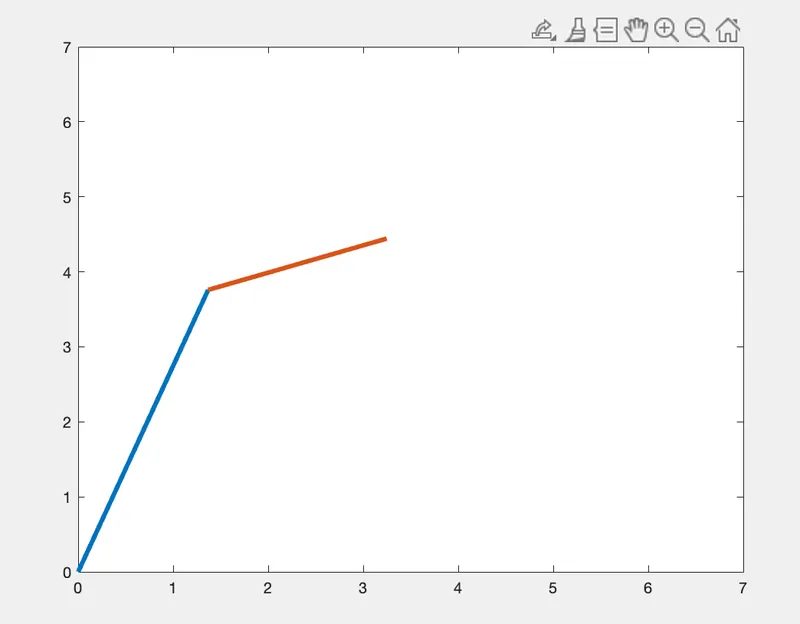
COMMANDS USED
- CLOSES ALL :- closes all figures whose handles are visible.
- CLEAR ALL: - clear removes all variables from the current workspace, releasing them from system memory
- CLC :- clc clears all the text from the Command Window, resulting in a clear screen.
- FOR LOOP:- For loop control statements, you can repeatedly execute a block of code.
- LINSPACE:- Define the length of the vector and the function calculates the interval to fit the length.
- FOR LOOP :- For loop control statements, you can repeatedly execute a block of code.
- getframe:-it is captures the current axes as it appears on the screen as a movie frame.
Fis a structure containing the image data. getframe captures the axes at the same size that it appears on the screen. It does not capture tick labels or other content outside the axes outline. - Videowriter:-videowriter command helps to create a video file with a title
- writeVideo:-writeVideo command helps to write a video data to the file
- open:-open command helps to create a Videowriter object to write a new Motion JPEG AVI file.
- close:-close command helps to create a Videowriter
object to write a new Motion JPEG AVI file.
CONCLUSION:-THEREFORE WE HAVE CREATED A MATLAB PROGRAM THAT HELPS TO COMPLETE ALL TASK GIVEN ABOVE
The drive link to watch the animation
https://drive.google.com/file/d/15oLcBDjvepAeI1Yp1mTqkdhQnpCNKNRB/view?usp=share_link