Exercise on M-script
Que. 1
AIM: To create a MATLAB program that increments the value of "a" using a while loop.
OBJECTIVES :
- To make use of the while loop.
- To increase the value of "a" until it is less than "n".
PROGRAM :
% MATLAB program to execute While Loop

clear all
close all
clc

% Step 1 : Input Variables
a = 0;
n = 10;

% Step 2 : While Loop
while (a < n)
   fprintf('Value of a = %.0fn',a);
   a = a + 1;
end
COMMANDS USED :
RESULTS :
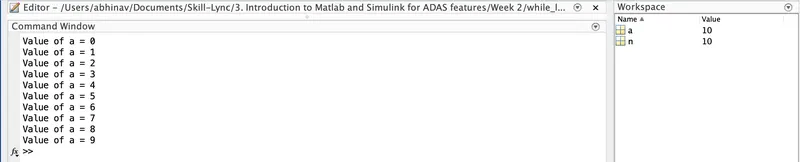
CONCLUSION :
As a result, we created a MATLAB program that uses a while loop to increment the value of "a" until it is smaller than "n".
Que. 2
AIM: To create a MATLAB program that executes multiplication tables operation using for loop.
OBJECTIVES :
- To make use of for loop.
- To perform multiplication table operation.
PROGRAM :
% MATLAB program to execute For Loop

clear all
close all
clc

% Step 1 : Input
a = input('Enter a Number = ');

% Step 2 : For Loop
for (i=1:10);
    fprintf('%d * %d = %dn',a,i,(a*i));
end
COMMANDS USED :
RESULTS :
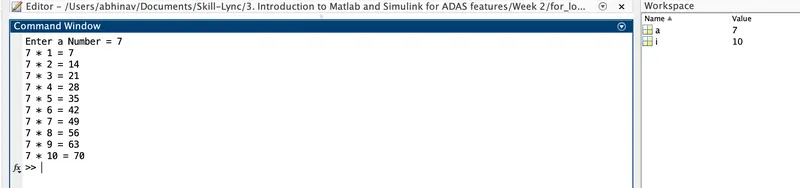
CONCLUSION :
As a result, we created a MATLAB script that executes multiplication tables operation using for loop.
Que. 3
AIM: To create a MATLAB program to check the balance of the customer using string compare & nested if statements.
OBJECTIVES :
- To check the bank balance of the customer.
- To make use of string compare and nested if statements.
PROGRAM :
% MATLAB program to check account details

clear all
close all
clc

% Step 1 : Welcome Page
fprintf('Namasten')
fprintf('Welcome to State Bank Personal Banking Systemnn')

% Step 2 : Data
storedname = 'admin';
storedpass = 'pass';
storedpin  = '1234';

% Step 2 : Program
Username = input('Enter Username = ','s');
% compares Username
if (strcmp(storedname, Username))
    Password = input('nEnter Password = ','s');
    % compares Password
    if (strcmp(storedpass, Password))
        Select = input('nSelect: 1: Personal Details 2: Bank Details 3: Check Balance = ');
        % Case 1 : Personal Details
        if (Select == 1)
        Personal_Details = struct('Name', {{'Abhinav'}}, 'Surname', {{'Mahto'}}, 'DOB', [25])

        % Case 2: Bank Details
        elseif (Select == 2)
        Bank_Details = struct('Bank', {{'State Bank'}}, 'Branch', {{'Mumbai'}}, 'IFSC', {{'SB00034'}})

        % Case 3 : Check Balance
        elseif (Select == 3)
            PIN = input('nEnter 4 Digit PIN = ','s');
            % compares 4 Digit PIN
            if (strcmp(storedpin, PIN))
            Check_Balance = fprintf('nAvailable Balance = ₹21347.01nn');
            else
                fprintf('nInvalid PINnn')
                fprintf('Try Again...Thankyou...!!nn')
            end
        end
    else
    fprintf('nInvalid Passwordnn')
    fprintf('Try Again...Thankyou...!!nn')
    end
else
    fprintf('nInvalid Usernamenn')
    fprintf('Try Again...Thankyou...!!nn')
end
COMMANDS USED :
RESULTS :
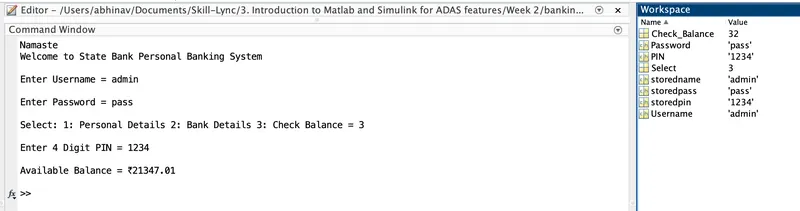
CONCLUSION :
As a result, we created a MATLAB script that helps to check the balance of the customer by entering their Username and Password. This program is completed using string compare and nested if statement.
Que. 4
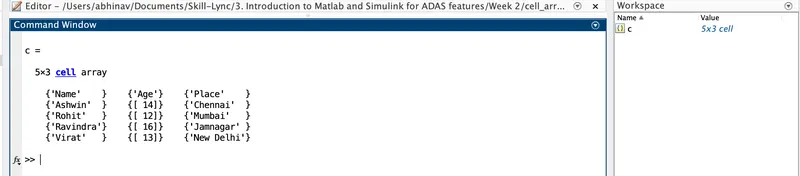
AIM: To create a student database using structure & cell arrays in MATLAB.
OBJECTIVES :
- To create a student database using structure and cell arrays.
PROGRAM :
1. Based on Cell Array
% MATLAB Program to create a Student Database using Cell Array

clear all
close all
clc

% Step 1 : Dimensions of Cell Array
c = cell(3, 5);

% Step 2 : Student Database
c = {'Name','Ashwin', 'Rohit', 'Ravindra', 'Virat';'Age' 14 12 16 13;'Place', 'Chennai', 'Mumbai', 'Jamnagar', 'New Delhi'}'
2. Based on Structure Array
% MATLAB program to create a student database using structure array

clear all
close all
clc

% Step 1 : Structure
database = struct('Name', {{'Ashwin','Rohit'}},'Age', [23,22],'Degree', {{'B.Tech', 'B.Tech'}},'Branch',{{'Mechincal', 'Civil'}})
COMMANDS USED :
RESULTS :
1. Based on Cell Array
2. Based on Structure Array
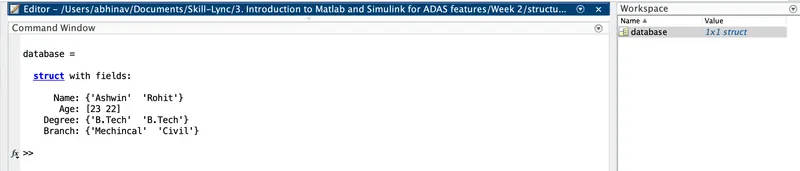
CONCLUSION :
As a result, we created a MATLAB script that helps to create a student database using structure and cell arrays.
Que. 5
AIM: To create a first-order differential equation for the Mass-Spring-Damper system.
OBJECTIVES :
- To create a MATLAB program for the Mass-Spring-Damper system.
- To define m, b & k as global variables.
- To create a function " fy " which is a first-order differential equation.
FUNCTION :
function dx = fy(t,x)
global m
global b
global k

% Mass Constant
m = 300;
% Damper Constant
b = 200;
% Spring Constant
k = 4000;

% First Order Differential Equations
dx(1) = x(2);
dx(2) = (-k*x(1)-b*x(2))/m;

% Row to Column Vector
dx = dx';
end
PROGRAM :
% MATLAB program to create Mass Spring Damper System

clear all
close all
clc

% Step 1 : Simulation start and end time
t = [0 15];

% Initial Displacement and Velocity
initial_value = [0 0];

% Step 2 : Function
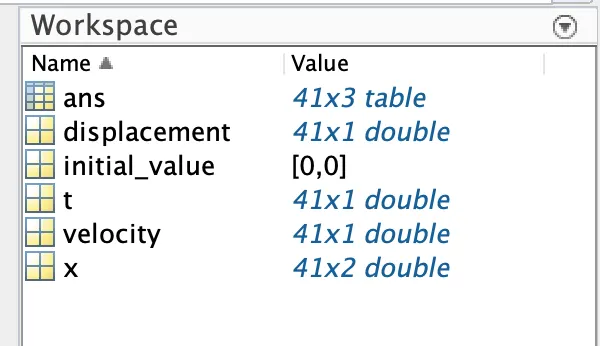
[t x] = ode45('fy', t, initial_value);

% Step 3 : Storing Values in Tabular form
displacement = x(:,1);
velocity = x(:,2);
table(t, displacement, velocity)

% Step 4 : Plot
figure(1)
plot(t,x(:,1),t,x(:,2))
xlabel('Time (s)')
ylabel('Displacement & Velocity')
grid on
COMMANDS USED :
RESULTS :
ans =

  41×3 table

      t       displacement    velocity
    ______    ____________    ________

         0         0             0
     0.375         0             0
      0.75         0             0
     1.125         0             0
       1.5         0             0
     1.875         0             0
      2.25         0             0
     2.625         0             0
         3         0             0
     3.375         0             0
      3.75         0             0
     4.125         0             0
       4.5         0             0
     4.875         0             0
      5.25         0             0
     5.625         0             0
         6         0             0
     6.375         0             0
      6.75         0             0
     7.125         0             0
       7.5         0             0
     7.875         0             0
      8.25         0             0
     8.625         0             0
         9         0             0
     9.375         0             0
      9.75         0             0
    10.125         0             0
      10.5         0             0
    10.875         0             0
     11.25         0             0
    11.625         0             0
        12         0             0
    12.375         0             0
     12.75         0             0
    13.125         0             0
      13.5         0             0
    13.875         0             0
     14.25         0             0
    14.625         0             0
        15         0             0

>> 
CONCLUSION :
As a result, we created a MATLAB script along with a function that helps to find the values of m, b & k as global variables using the first-order differential equation for the Mass-Spring-Damper system.
Que. 6
AIM: To create a simple function that finds the biggest among three numbers using the if loop.
OBJECTIVES :
- To calculate the biggest among the three given numbers.
- To make use of the if loop inside the function to evaluate the numbers.
FUNCTION :
function [max] = mymax(a, b, c)

% This function calculates the maximum among the three numbers given as input
max =  a;
if(b > max)
   max = b;
end
if(c > max)
   max = c;
end
PROGRAM :
% MATLAB program to find the biggest among three numbers using IF Loop

clear all
close all
clc

% Step 1 : Program
fprintf('To find the biggest among three numbersnn')

% Step 2 : Input Variables
a = input('Enter the value of a = ');
b = input('Enter the value of b = ');
c = input('Enter the value of c = ');

% Step 3 : Function
[max] = mymax(a, b, c);

% Step 4 : Maximum Value
fprintf('nnThe Biggest among the three Numbers is %dnn',max)
COMMANDS USED :
RESULTS :

CONCLUSION :
As a result, we created a MATLAB script along with a function that helps to find the biggest among the three numbers using if Loop.
Que. 7
AIM: To create a MATLAB program that identifies all the blocks used in the Simulink model.
OBJECTIVES :
- To identify all the blocks used in the model and write them into a new excel sheet.
- To identify the total number of gain blocks used in the model.
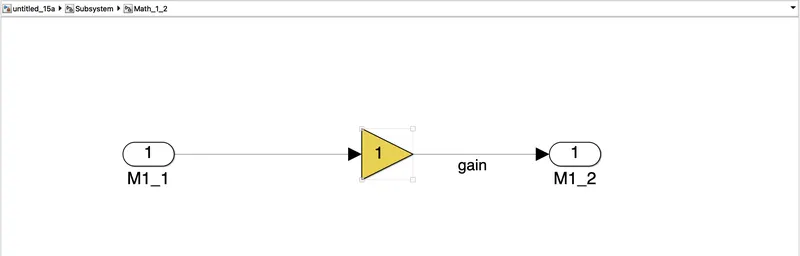
- Also, write a line of code to change its background colour to yellow & save the output model.
PROGRAM :
% MATLAB Program for accessing Simulink blocks

clear all
close all
clc

% Step 1 : Simulink Model
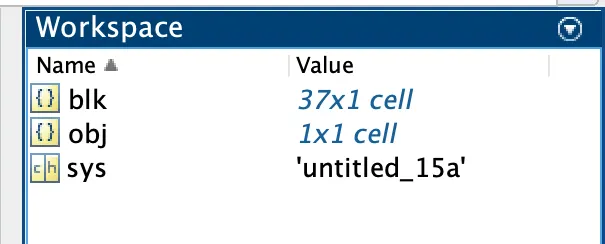
sys = ('untitled_15a');

% Step 2 : Load Simulink File
open_system(sys);
load_system(sys);

% Step 3 : Identifying all Simulink Blocks
blk = find_system(sys);

% Step 4 : Gain Blocks
obj = find_system(sys, 'BlockType', 'Gain');
set_param('untitled_15a/Subsystem/Math_1_2/Gain','BackgroundColor', 'yellow');

% Step 5 : Save File
save_system('untitled_15a')

% Step 6 : Excel File
xlswrite('BlockList.xls',blk)
COMMANDS USED :
RESULTS :
CONCLUSION :
As a result, we created a MATLAB script that identifies all the blocks used in the Simulink model and writes them into a new excel sheet. It also identifies the total number of gain blocks used in the model and changes its background colour to yellow.