Week 2 Challenge
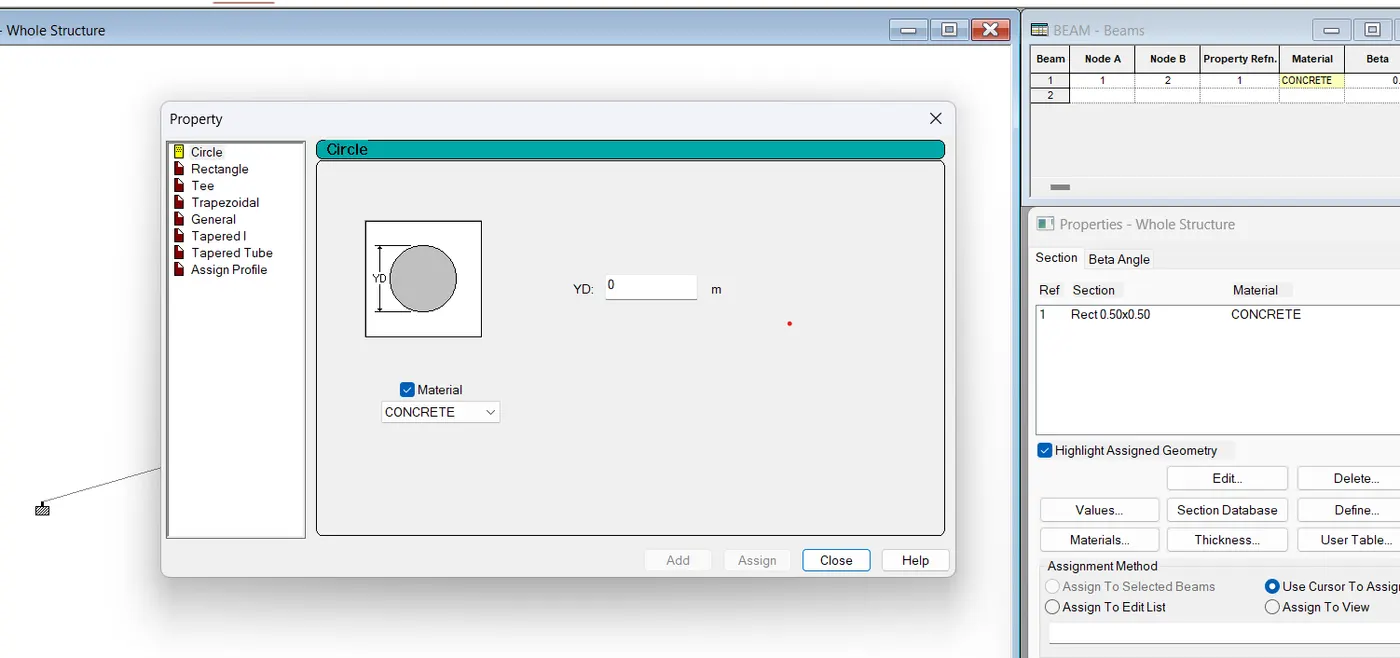
1. How will you assign Circular section to column?
- Go to properties in that select define properties select circle and give the radius for the member and assign the defined circle to the member created
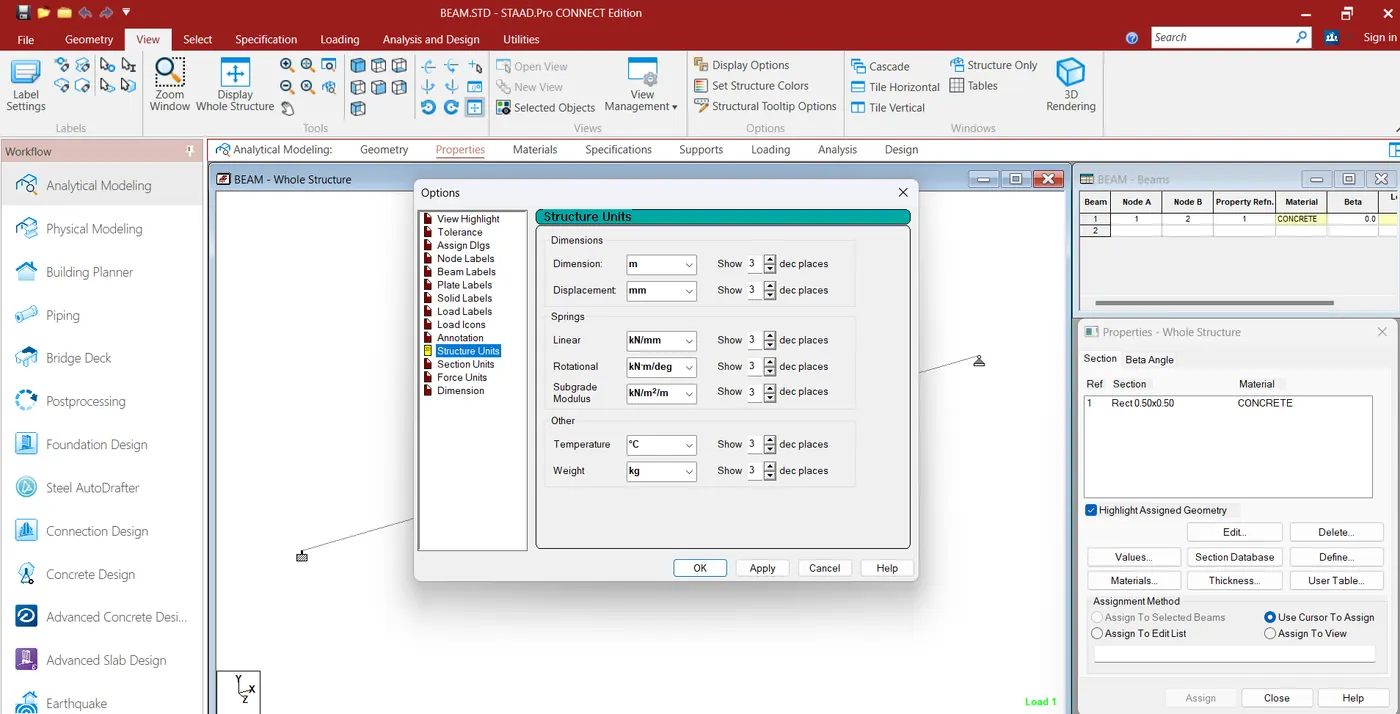
2. How will you assign Unit system to a .std model file?
- Open staad pro file
- go to view table in the ribbon
- select display option and select structure units
- then assign the units
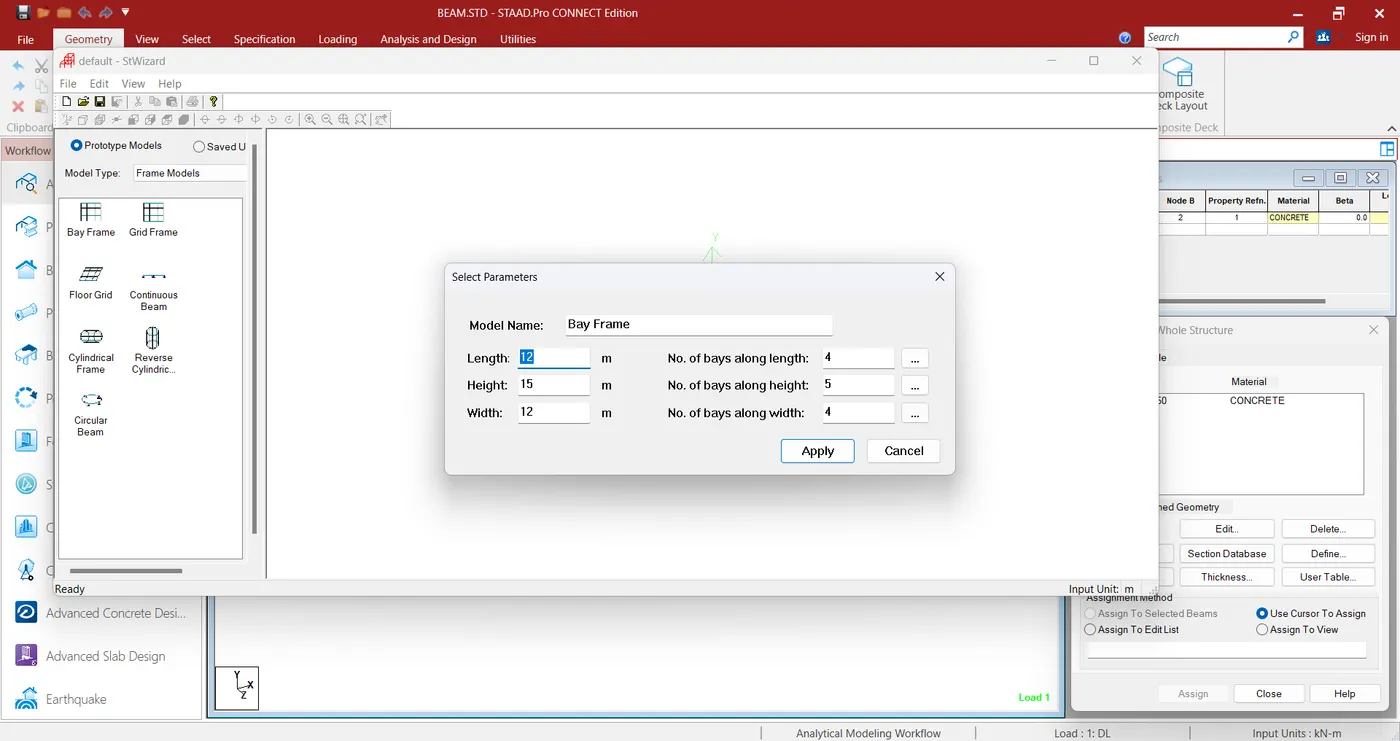
3. What are the parameters to be specified while using “Bay Frame” option?
- Height
- width
- lenght
- no of bays along length
- no of bays along height
- no of bays along width
4. Name few codal standards incorporated in STAAD Pro software.
- IS CODE
- ACI
- and EURO CODE
5. How will you specify the design compressive strength for a RCC section?
- Select the material as concrete
- add code
- define the parameter fc value
1. State the “Input” steps involved in RCC design.
- Geometry
- properties
- materials specification
- support
- loading and load combination
- analysis
- design

2. Explain the difference between Fixed and Enforced support condition in STAADPro.
- Fixed Support Condition:
- In a fixed support condition, the translation and rotation of the structure are completely restrained at the support node.
- It means that the structure cannot move or rotate at the fixed support. All degrees of freedom (translations and rotations) are constrained.
- Enforced Support Condition:
- In an enforced support condition, you specify the degree of freedom (translation or rotation) that is fixed or partially fixed at the support node.
- Unlike the fixed support, enforced support allows you to selectively control the constraints on translations and rotations independently. For example, you can enforce a roller support in one direction while allowing movement in the other direction.
1. Explain the steps involved in analysis of a model using STAAD Pro sequentially.
- Define Units and Preferences
- Define Geometry
- Define Supports
- Define Materials
- Define Sections
- Define Loads
- Define Load Combinations
- Perform Analysis
- Review Analysis Results
- Design Members
- Review and Revise
2. Explain the two ways in which a structural framework/model can be created in STAAD Pro software.
Two ways of creating Structural frame work:
1. node by node method
2. Sturctural wizard method
In the node by node method we need to create a node in the x.y. and z axies then by using the beam then connect them.
In the second method we have to give the input data for height,width and length of the structure
and also give the input data of no of bays along the each direction
3. Elaborate the different support conditions in STAAD Pro.
Fixed Support:
A fixed support completely restrains all translational and rotational degrees of freedom at the specified node. This means that the structure cannot move or rotate at the fixed support.
Pinned Support:
A pinned support allows free rotation at the specified node but restrains translational movement. It is represented by allowing rotational degrees of freedom while constraining translational degrees of freedom.
Roller Support:
A roller support allows translational movement along one specified direction while restraining movement in the other directions. Rotational degrees of freedom are typically unrestrained.
Spring Support:
A spring support allows for translational and rotational stiffness to be applied at a specified node. This simulates the behavior of a structural element with flexibility.
Expansion Joint:
An expansion joint allows for thermal expansion or contraction at a specified node. It can be used to model the behavior of joints that permit limited movement under temperature variations.
Fixed but Release:
This support condition is similar to a fixed support, but specific rotational degrees of freedom can be released. It allows for a partial restraint condition.
Partial Fixity:
Partial fixity allows you to specify a percentage of fixity for each translational and rotational degree of freedom at a support node. This provides flexibility in modeling partially restrained supports.
4. How will you extract the stress distribution for a staircase slab?
- Create a stair case model
- Assign the material porperties of the model
- Apply the loads on the model
- Define the support condition
- Perform the Analysis
- Review the analysis
- Go to post processing mode
- Extract the stress distribution diagram
5.Explain the different ways to view SFD & BMD in STAAD Pro.
- Post processing mode
- Member graphics
- Interactive View
- Print reports
- Deflection shapes