Week -2
Aim
To Create a simulink model of Doorbell using solenoid blocks and to sense the temperature of a heater using thermistor and also using fan for several conditions.
Objective
- Create a situation where the switch is closed for 2 seconds and then released in the doorbell using solenoid block.
- Observe the physical movement of the plunger in the doorbell using solenoid block.
- Use a thermistor to sense the temperature of a heater for temperature 20 °C from 0 to 10 seconds, 27 °C from 10 to 30 seconds and 23 °C from 30 to 50 seconds.
- Turn ON the heater if the temperature is above 25 °C. If it is below 25 °C then the fan should be in OFF condition.
1. Making of doorbell
Main Blocks Used
1. Pulse Genrator
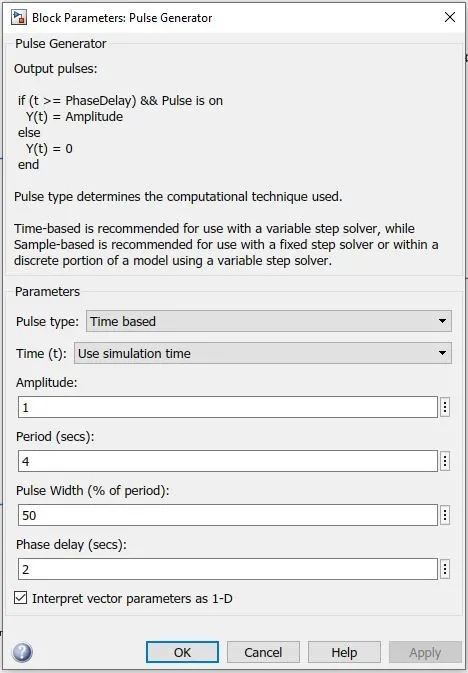
Time-based is recommended for use with a variable step solver, while Sample-based is recommended for use with a fixed step solver or within a discrete portion of a model using a variable step solver.
2. Solenoid
A solenoid is a coil of insulated or enameled wire wound on a rod-shaped form made of solid iron, solid steel, or powdered iron. Devices of this kind can be used as electromagnets, as inductors in electronic circuits, and as miniature wireless receiving antennas. In a solenoid, the core material is ferromagnetic, meaning that it concentrates magnetic lines of flux. This increases the inductance of the coil far beyond the inductance obtainable with an air-core coil of the same dimensions and the same number of turns. When current flows in the coil, most of the resulting magnetic flux exists within the core material. Some flux appears outside the coil near the ends of the core; a small amount of flux also appears outside the coil and off to the side. A solenoid chime is wound on a cylindrical, hollow, plastic or phenolic form with a movable, solid iron or steel core. The core can travel in and out of the coil along its axis. The coil is oriented vertically; the core normally rests somewhat below the coil center. When a current pulse is applied to the coil, the magnetic field pulls the core forcefully upward. Inertia carries the core above the center of the coil.
Model
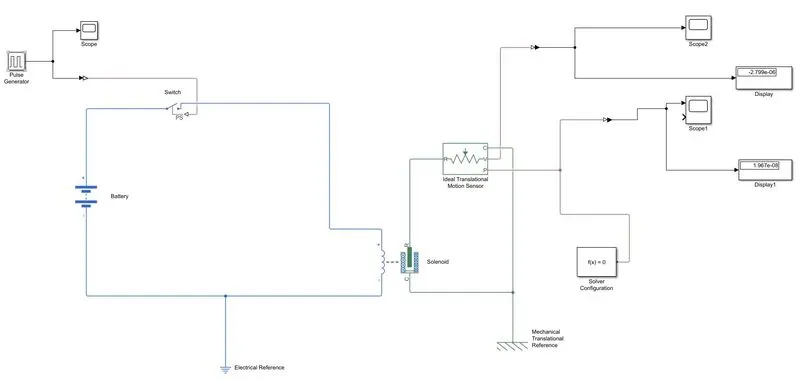
Explannation
- Open the matlab software and click simulink in the taskbar or type simulink in the command window and press enter.
- The simulink window will open, then click blank model in that window.
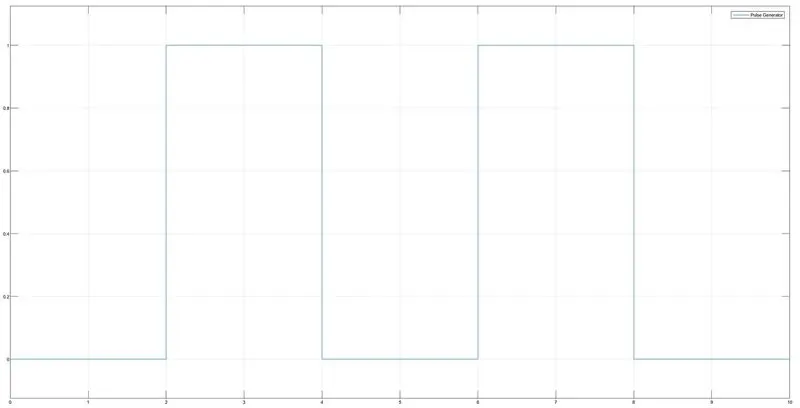
- First Use the pulse generator for generating the input pulse for each every two second to ring the bell for total10 seconds Which was connected to switch block.
- The Simulink-PS convertor used to convert the pulse signal to real time environment.
- In accordance to the signal the switch control the current to the solenoid which was connected to it.
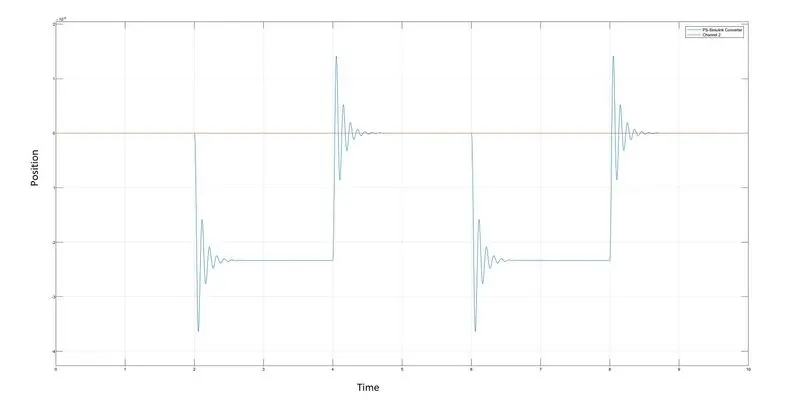
- The motion produced in the solenoid is sensed using ideal translation motion sensor and converted by using PS-Simulink block to get the motion of plunger.
- The Scope block is connected to the sensor for getting the output plot.
- The physical network of sensor is connected with the solver configuration for getting the simulation.
Input Pulse genetator plot
Output position plot
Pulse generator
2. Use a thermistor to sense the temperature of a heater & turn on or turn off the fan as per below conditions:
Main Block
Thermistor
A thermistor is a resistance thermometer, or a resistor whose resistance is dependent on temperature. The term is a combination of “thermal” and “resistor”. It is made of metallic oxides, pressed into a bead, disk, or cylindrical shape and then encapsulated with an impermeable material such as epoxy or glass.
There are two types of thermistors: Negative Temperature Coefficient (NTC) and Positive Temperature Coefficient (PTC). With an NTC thermistor, when the temperature increases, resistance decreases. Conversely, when temperature decreases, resistance increases. This type of thermistor is used the most. A PTC thermistor works a little differently. When temperature increases, the resistance increases, and when temperature decreases, resistance decreases. This type of thermistor is generally used as a fuse.
Simulink model
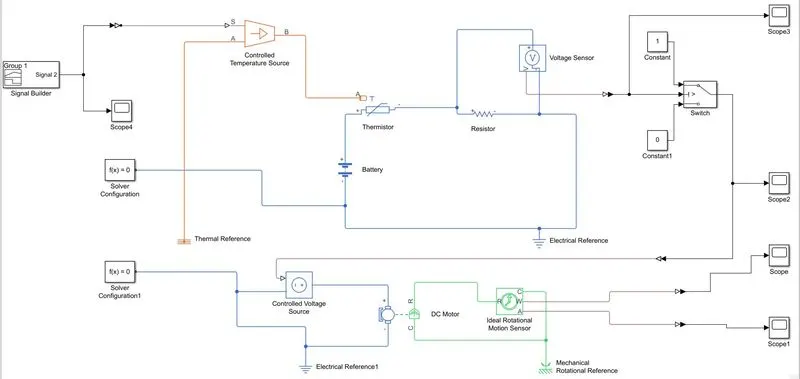
Explannation
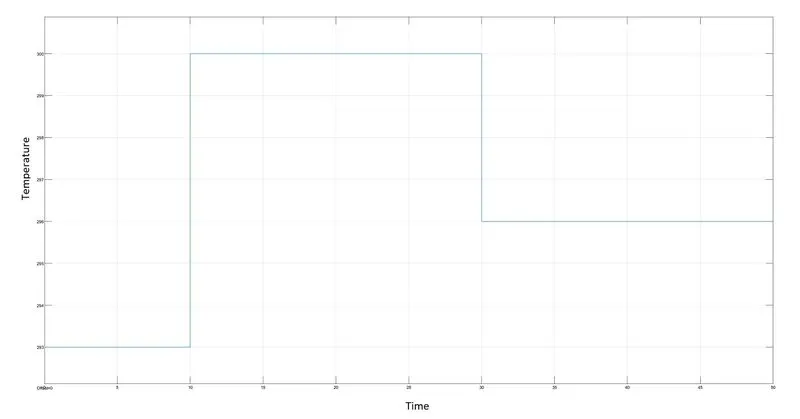
- The Signal Builder block allows you to create interchangeable groups of piecewise linear signal sources and use them in a model. You can quickly switch the signal groups into and out of a model to facilitate testing. In the Signal Builder window, create signals and define the output waveforms.
- The values of temperature were given in the signal builder with respect to their time interval.
-
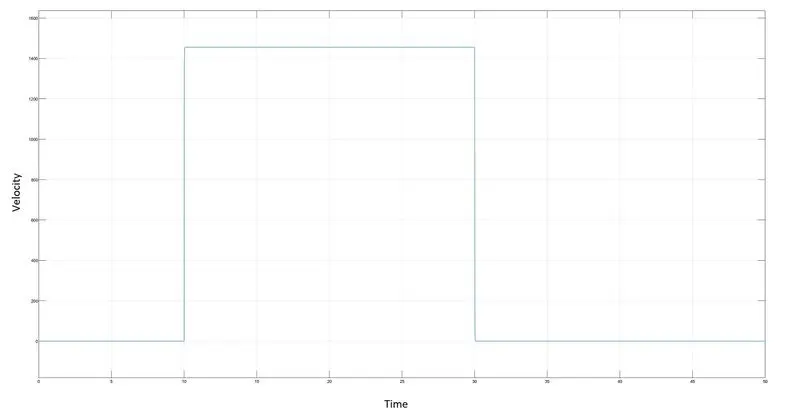
Temperature source: 20 °C from 0 to 10 seconds, 27 °C from 10 to 30 seconds, 23 °C from 30 to 50 seconds. Fan conditions: ON if the temperature above 25 °C, OFF otherwise.
- The controlled temperature source helps to identify input temperatures which are opted to thermister.
- The thermistor helps to resist change of temperature value according to its input data.
- The voltage sensor block represents an ideal voltage sensor, that is, a device that converts voltage measured between any electrical connections into a physical signal proportional to the voltage.
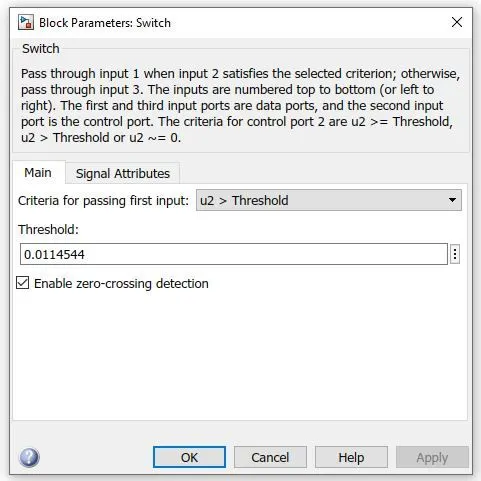
- The voltage sensor is connected to switch to provide the threshold value.
- The DC motor is connected for the purpose of fan.
-
The ideal rotational motion sensor block represents an ideal mechanical rotational motion sensor, that is, a device that converts an across variable measured between two mechanical rotational nodes into a control signal proportional to angular velocity or angle. The sensor is ideal since it does not account for inertia, friction, delays, energy consumption, and so on.
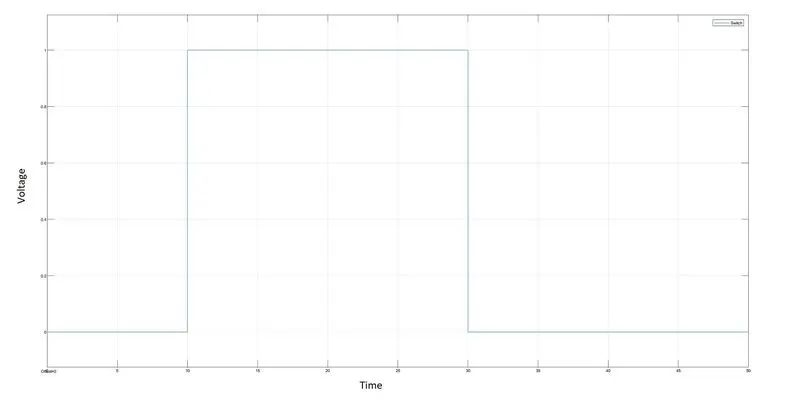
- The switch block helps to turn ON or OFF the fan regarding the threshold values.
- The ideal rotational motion sensor helps to obtain the velocity and angular displacement plots for the DC motor.
Signal Builder
Threshold value
Switch output plot
Output Velocity Vs Time
Output Angular dispalcement Vs Time
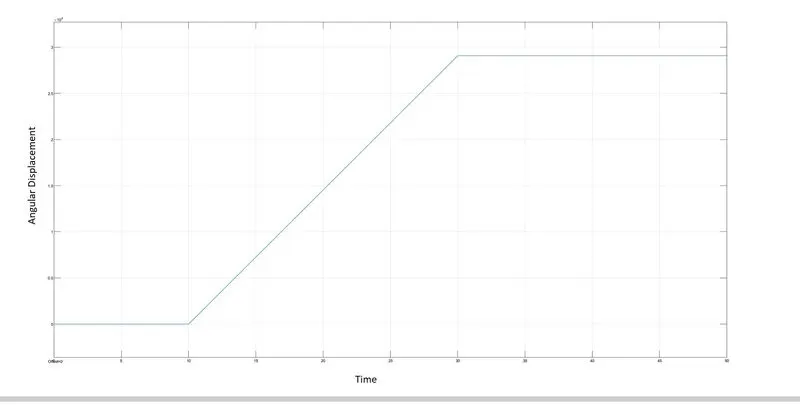
From the above graph we can conclude that the DC motor/Fan was turned ON when the temperature exceeds 25 °C.
Conclusion
- The situation where the switch is closed for 2 seconds and then released in the doorbell using solenoid block is created successfully.
- The Physical moment of plunger is plotted.
- The simulink model for Use a thermistor to sense the temperature of a heater is created successfully and the fan is used when the temperature of heater exceeds 25 °C is also plotted successfully.