Week -2
Objective
To develop a physical Simulink model of a Doorbell using a solenoid block and another Simulink model of a thermistor to sense the temperature of a heater and then run and analyze the result.
Introduction
1) Doorbell using solenoid block
A doorbell uses the electromagnetic force produced by a solenoid to force an iron rod (called the plunger) to hit against aluminum sheets placed at both sides of the solenoid. This in turn produces the ding-dong sound.
The DC and AC solenoids are different. The doorbell uses an AC solenoid. When current flows through the coil of an AC solenoid, a magnetic field is produced. This magnetic field produces a magnetic force and pulls the plunger in its direction. Now since the current which is flowing is AC in nature hence the magnetic force produced also reverses its direction with the frequency of AC which is 50Hz or 60Hz. As a result, the plunger moves to and fro i.e. either towards the front plate or towards the back plate. When it hits the front plate it produces the ding sound and when it hits the back plate it produces the dong sound.
Condition-1: When the switch is closed the electromagnet receives electrical power from the battery and pulls the metal arm to hit the bell producing sound.
Condition-2: The switch is closed for 2 seconds and then released and observe the physical movement of the plunger.
Develop a physical model of a solenoid doorbell using Simulink
- Study and understand the working principle of a doorbell and how its components
- Open Matlab and enter into Simulink and create a new model
- Added the required blocks from the library browser, such as display, pulse generator, scope, Simulink PS converter, Solver Configuration, Electrical Reference, etc
- Commonly used blocks can be added to the physical model by using commonly used under the Simscape from the library browser or by double clicking on the blank screen and searching for the appropriate block
- Display block: After running the physical model the output will display on this block
- Scope block: signal output can be generated
- PS-Simulink converter: Converts Simulink signals to the respective physical signal.
- Solver Configuration: The Solver Configuration block specifies the solver parameters that the model needs before beginning with simulation and this is mandatory for all simscape designs.
- Electrical Reference: electrical reference blocks will provide the required initial conditions to the connected electrical block for the solver.
- Mechanical Translation reference: It will provide the required initial mechanical translation conditions to the connected block.
- Switch: It will close the circuit and supply the power from the battery to the rest of the system whenever the system demands it.
- Battery: Power source used to run the system
- Resistor: It will maintain a constant supply to the system
- Solenoid block: When the switch is closed It will generate electromagnetic force and pushes the rod
- Ideal Translation motion sensor: Identify the translation motion from the block and generate output
- Connect each block to obtain the desired output and review it before running
- Once the physical model is ready to run the operation initially simscape will check for the errors and validate the connection then perform the operation
- We can adjust the time period of running the operation based on the complexity of the physical block
- After running the model, the result will be generated on the display block signal output from the scope block
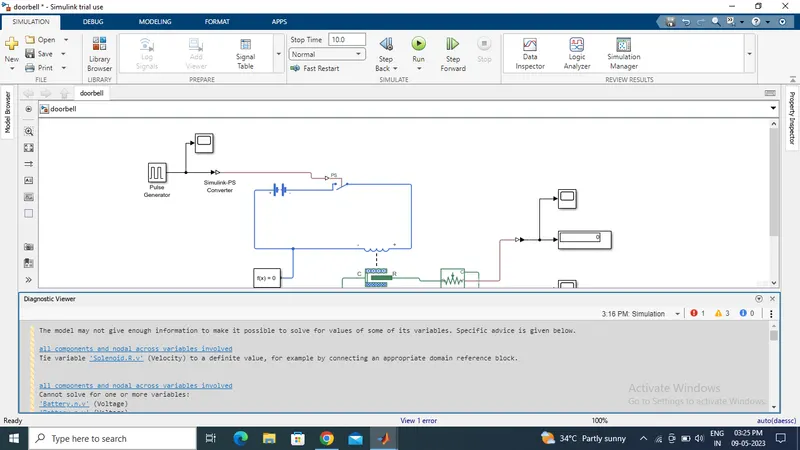
Diagnostic viewer showing an error during the first run due to no electrical and mechanical reference
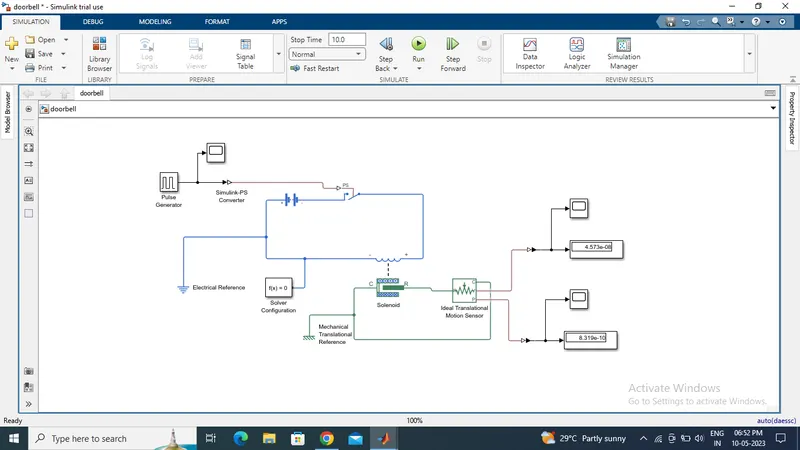
Developed and generated the output from the physical model of the Doorbell using a solenoid block
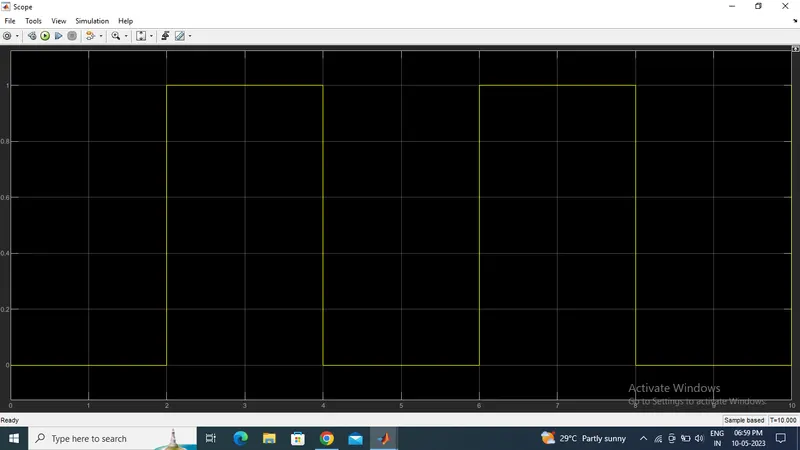
Input signal given to the model
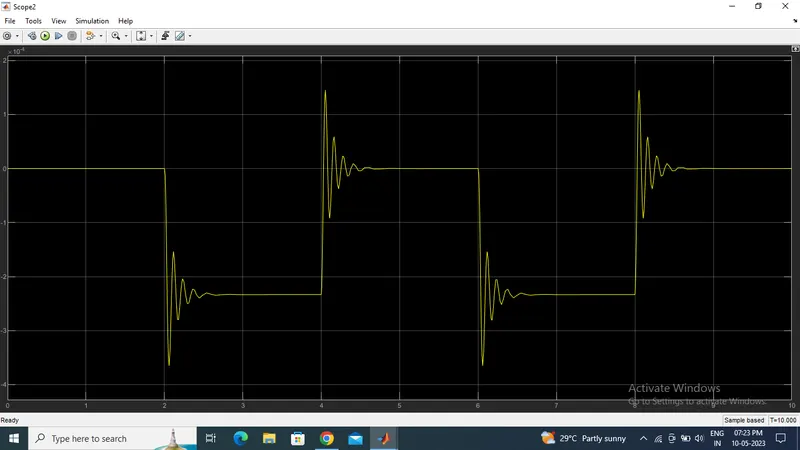
Position of the plunger on every 2 seconds
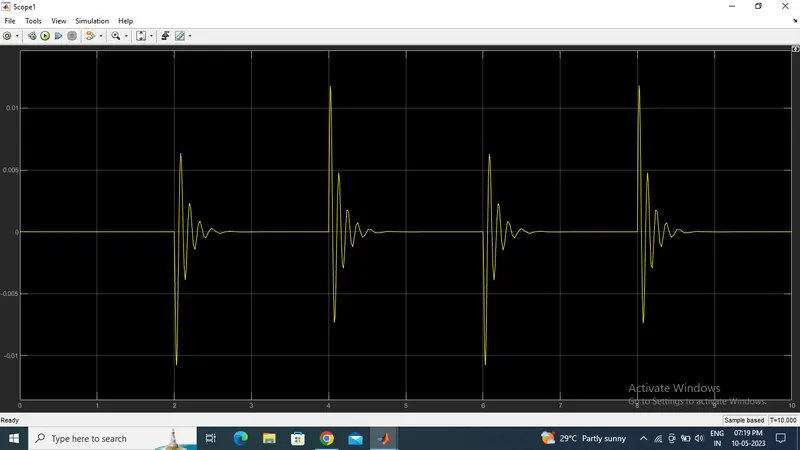
The velocity of the plunger on every 2 seconds
The desired output is obtained for the solenoid doorbell and that defines when we closed the switch for two seconds the electrical signal will transfer to the solenoid and pushes the plunger toward the metal and produce the sounds and when the switch is opened the plunger returns to the original position and hits the metal body at there and produces one more sound thus two sounds were produced on every 2 seconds.
2) Thermistor use to sense the temperature of a heater while turning on or turning off the fan as per the given condition
Thermistors are a type of semiconductor having greater resistance than conducting materials, but lower resistance than insulating materials. The term 'thermistor' is derived from the term THERMally sensitive ResISTOR and these devices are a very accurate and cost-effective option for temperature measurement. A thermistor’s temperature and resistance are highly dependent upon the materials from which it is composed.
A thermistor does not actually “read” anything, instead the resistance of a thermistor changes with temperature. The main use of a thermistor is to measure the temperature of a device. In a temperature-controlled system, the thermistor is a small but important piece of a larger system. A temperature controller monitors the temperature of the thermistor. It then tells a heater or cooler when to turn on or off to maintain the temperature of the sensor.
The location of the thermistor in the system affects both the stability and the accuracy of the control system. For best stability, the thermistor needs to be placed as close to the thermoelectric or resistive heater as possible. For best accuracy, the thermistor needs to be located close to the device requiring temperature control. Ideally, the thermistor is embedded in the device, but it can also be attached using thermally conductive paste or glue. Even if a device is embedded, air gaps should be eliminated using thermal paste or glue.
Some of the most common uses of thermistors are in digital thermometers, in cars to measure oil and coolant temperatures, and in household appliances such as ovens and refrigerators, but they are also found in almost any application that requires heating or cooling protection circuits for safe operation. For more sophisticated applications, such as laser stabilization detectors, optical blocks, and charge-coupled devices, the thermistor is built in.
Develop a physical model of the Thermistor to sense the temperature of a heater using Simulink
- By using the thermistor to sense the temperature of a heater & turn on or turn off the fan as per the below conditions:
Temperature Source:
20 °C from 0 to 10 seconds,
27 °C from 10 to 30 seconds,
23 °C from 30 to 50 seconds
Fan conditions: ON if the temperature is above 25 °C else OFF
- Convert all the temperature input signals to their respective kelvin values as all the thermal blocks will be in kelvin by default.
- Increase signal builder axes limit to 50sec
- Study and understand the working principle of a Thermistor and how it is applied to a physical model
- Open Matlab and enter into Simulink and create a new model
- Add the required blocks from the library browser, such as display, scope, Simulink PS converter, Solver Configuration, Controlled temperature source, Thermistor, Electrical Reference, Voltage sensor, etc
- Thermistor: Thermistor block which shows us the NTC thermistor relation between temperature and resistance
- Battery: A battery is a storage device that provides the required voltage based on the parameter given. We can use DC voltage source blocks too.
- Resistor: Resistor which provides the opposing nature of current in a circuit
- Voltage sensor: This is used to measure the voltage or potential difference across any electrical component and it should connect in parallel only.
- Switch: This block is used from the library Simulink / Signal Routing where it has three inputs namely Port1, Port2, and Port3. Port2 is a control input where the signal given to port2 is satisfied with the condition and threshold of the switch block then it passes Port1 as output and if it is not satisfied then it will pass Port3 as output.
- Controlled Voltage Source: (CVS) This block is an ideal voltage source that gives a constant output based on the load requirement connected to it.
- DC Motor: DC motor is an electromechanical block that takes an electrical input and provides Mechanical rotational output.
- Ideal Rotational Motion Sensor: (IRMS) This block is a motion sensor that senses the rotational output from the mechanical rotational blocks.
- Display block: After running the physical model the output will display on this block
- Scope block: signal output can be generated
- PS-Simulink converter: Converts Simulink signals to the respective physical signal.
- Solver Configuration: The Solver Configuration block specifies the solver parameters that the model needs before beginning with simulation and this is mandatory for all simscape designs.
- Electrical Reference: electrical reference blocks will provide the required initial conditions to the connected electrical block for the solver.
- Connect the blocks to obtain the desired output and review it before running
- Once the physical model is ready to run the operation initially simscape will check for the errors and validate the connection then perform the operation
- We can adjust the time period of running the operation based on the complexity of the physical block
- After running the model, the result will be generated on the display block signal output from the scope block
- By using the above-listed blocks and generating the output signal to run a dc motor
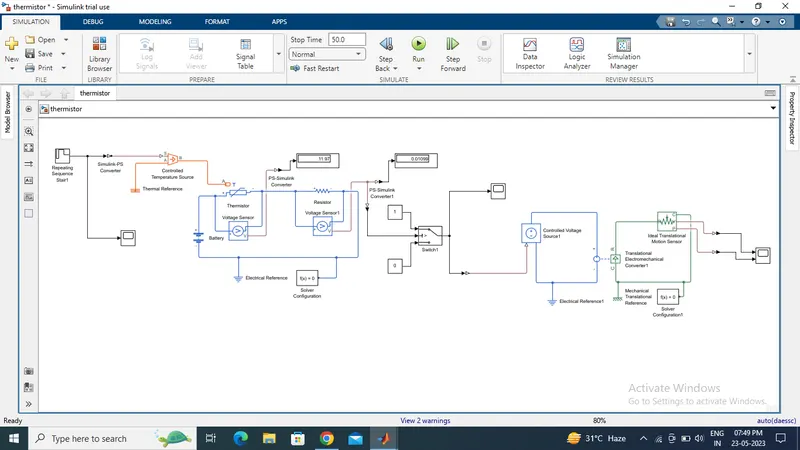
Developed the physical model for the thermistor system and generated the output
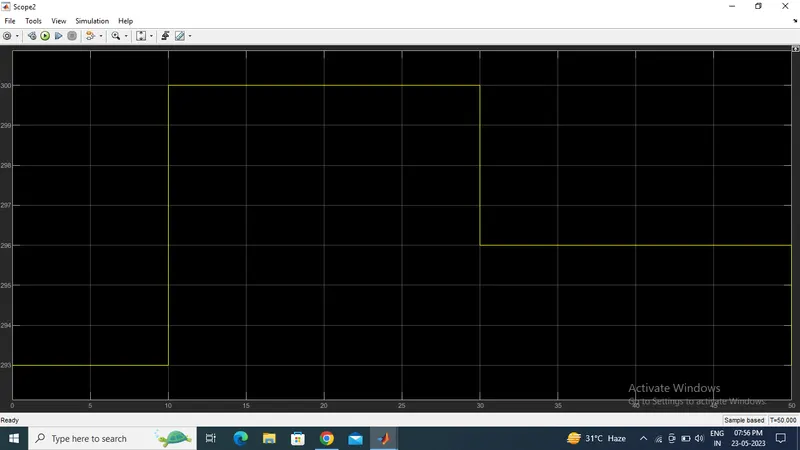
The input temperature range given and run for 50 seconds shows the generated input signal of the system
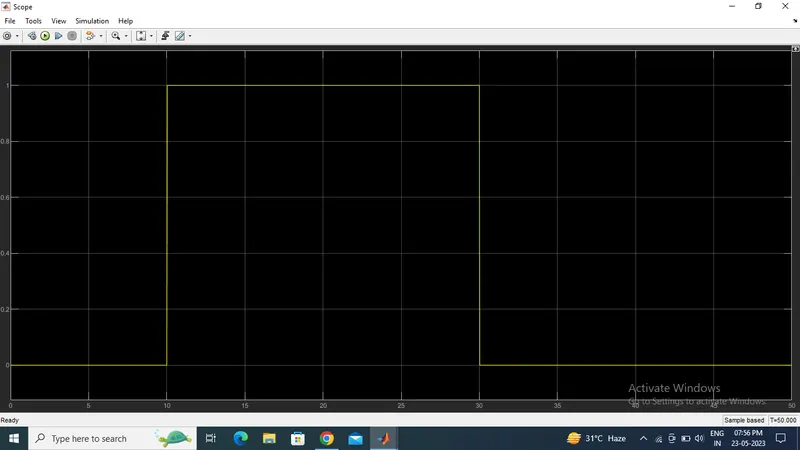
The plot generated after passing through the switch block here the input signal is checked and validated for the given temperature range condition and the signal passes to the output DC motor if the temperature is above 25 degree Celsius
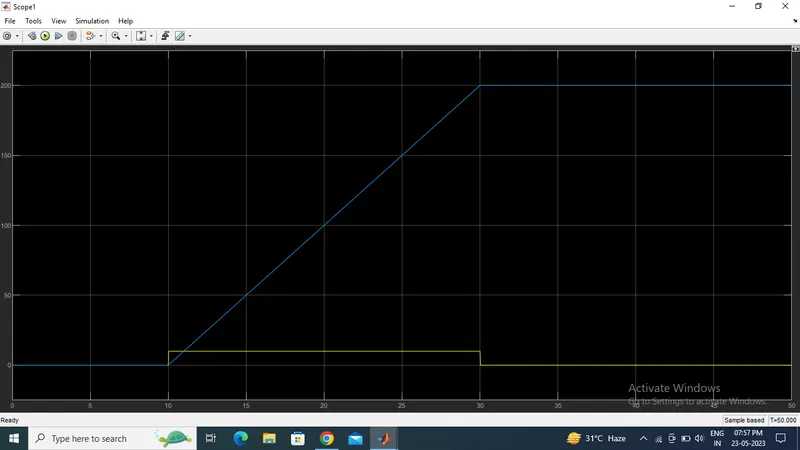
Velocity and displacement of the output DC motor
Conclusion
The physical models for the doorbell and thermistor were developed and executed in Simulink and thereby understand how to develop, run and analyze a real-world physical model in Simulink and how it plays a major role in Industries to minimize errors, time savings, and give more efficient products.