Week 2- 2R Robotic Arm Challenge
Forward kinematics of a 2R Robotic arm
The aim of this program is to simulate the forward kinematics of a 2R (two rotating link) robotic arm using matlab and create an animation file of the plot.
Kinematics of a robotic arm is the relationships between the positions, velocities and accelerations of the links of a manipulator.The forward kinematics is when the kinematical data are known for the joint coordinates. Before process with the program we have to understand the basic kinematics of the links & work space of the robot.Normally a 2R arm robot will have two linkages & a manipulator which works according to the instruction given by the system.Here we have to find out the working area of the robot & initiate the axis, angle of arm accordingly.
- To find the position of link-1
Coordinates of starting point of first link, l1=(0,0)
Coordinates of end point of first link, l1=(l1 cos(theta1), l1 sin(theta1))
- To find position of link-2
Coordinates of starting point of second link (l2)= coordinates of end point of first link (l1), because the end point of first link is connected to the starting point of second link hence both are same.
Coordinates of end point of second link, l2=(l1+l2 cos(theta1), l1+l2 sin(theta1))
Let us assume the coordinates are (x0,y0),(x1,y1) & (x2,y2)
where, x2=x1+l2 cos(theta2)
y2=y1+ l2 sin(theta2)
Give the standard values to the links & theta and use the above formulas and create a program accordingly.
1) The below program is the basic program for creating a general plot.
% Forward kinematics of a 2R robotics arm
clear all
close all
clc
% inputs
% length of robotic arm (m)
l1=1;
l2=0.5;
% angle of arm with respect to corresponding links
theta1=45;
theta2=30;
% coordinates
x0=0;
y0=0;
x1=l1*cosd(theta1);
y1=l1*sind(theta1);
x2=x1+l2*cosd(theta2);
y2=y1+l2*sind(theta2);
% plotting
line([x0 x1], [y0 y1], 'linewidth',3,'color','b');
line([x1 x2], [y1 y2], 'linewidth',3,'color','r');
xlabel('X axis');
ylabel('Y axis');
title("Forward kinematics of a robotic arm 2R");- In the program we have mentioned sind(theta) & cosd(theta) instead of sin(theta) and cos(theta) because these are assigned in radian in a matlab program.
- For plotting three axis of robotic arm we are using 'line' command in this program.
- linewidth command is used for giving thickness to line in the plot.
- color command will give the assigned color to the links.
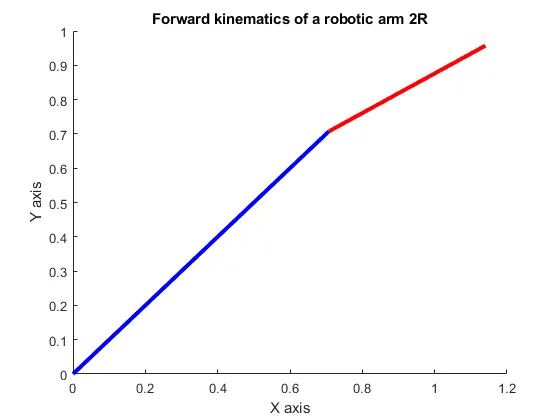
- This is the basic plot of a 2R Robotic arm in this we can't get various position of robotic arm & the animation.
- The blue color represents the first link and red color represents the second link.
- For getting different movements of robotic arm we have to change the value of theta each time manually which is not practical.To solve this we have to create a separate program by using for loop which gives animation of the plot & also create a movie of it.
2) A program to animating the plot & to create the movie of forward kinematics of a 2R robotic arm.
% Forward kinematics of a robotic arm 2R animation
clear all
close all
clc
% inputs
% length of the arms
l1=1;
l2=0.5;
theta1=linspace(0,90,4);
theta2=linspace(0,90,4);
ct=1;
for i=1:length(theta1)
    THETA1=theta1(i);
    for j=1:length(theta2)
        THETA2=theta2(j);
        % coordinates
        x0=0;
        y0=0;
        x1=l1*cosd(THETA1);
        y1=l1*sind(THETA1);
        x2=x1+l2*cosd(THETA2);
        y2=y1+l2*sind(THETA2);
        figure(ct);
        % plotting
        plot([x0 x1], [y0 y1], [x1 x2],[y1 y2],'linewidth',3);
        axis([-0.1 1.5 0 1.5]);
        pause(0.3);
        M(ct)=getframe(gcf);
        ct=ct+1;

    end
end
movie(M);
videofile=VideoWriter('forward_kinematics_robotic_arm_2r.avi','Uncompressed AVI');
open(videofile);
writeVideo(videofile,M);
close(videofile)- For animating the plot we have to give multiple values of theta for identifying the position of the links with respect to the theta values.
- 'linewidth' command can be used for giving the multiple values of theta.
- 'for' loop should be used here as this is a repeated set of actions that is each time it will execute the set of commands inside the for loop.
- Variables like 'i' or 'j' in a for loop is a loop counter it determines how many times the for loop is going to be executed.
- 'Plot' command will give us each and every plots according to the input values.
- 'ct' command represents each and every frame.
- Pause command is used for pausing all other commands before it get executed.
- For creating a movie we have to use 'movie' command and calling it with the variable assigned.
- 'VideoWriter' command is used for writing the video we can assign the name and also have to provide the format and mentioned it is going to be a uncompressed file.
- open,write and close commands are self explanatory as it says used for opening, writing and closing the video file.This is mainly for giving instruction to the VideoWriter the things we want to execute with that particular movie.
Below plot shows the position of the links with respect to the value of theta of a forward kinematics of robotic arm before animation.
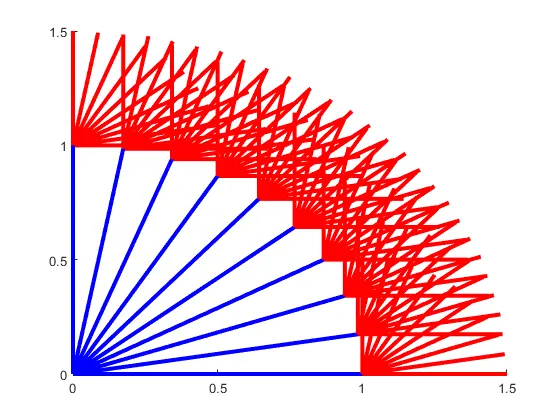
Below the final plot of forward kinematics of a 2R robotic arm
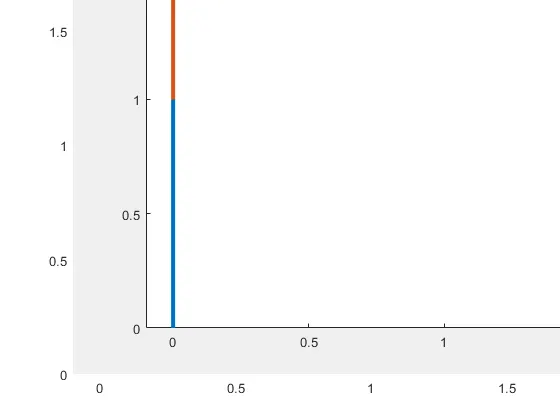
Below the youtube link for movie of a forward kinematics of a 2R robotic arm.
We will get the movie and plots of forward kinematics of a 2R robotic arm.From the movie we can easily understand the various movement of the robotic arm with respect to it angle and axis thus we will get the work space of the robotic arm.