Week -2
- Make a Simulink model of Doorbell using solenoid block with the following details:
In the above arrangement, when the switch is closed the electromagnet receives electrical power from the battery and pulls the metal arm to hit the bell producing sound.
Create a situation where the switch is closed for 2 seconds and then released. Observe the physical movement of the plunger.
Assume remaining parameters.
-
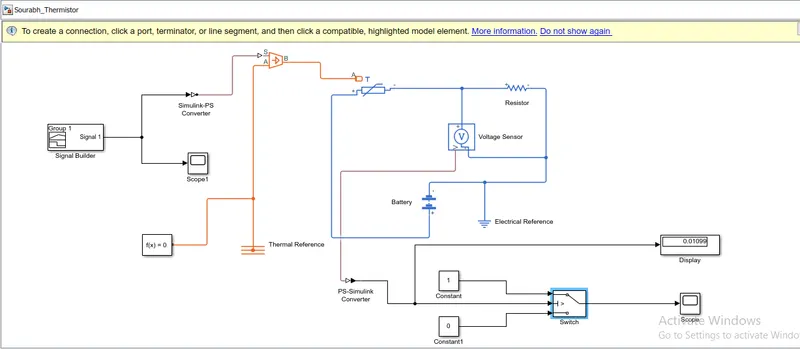
Use a thermistor to sense the temperature of a heater & turn on or turn off the fan as per the below conditions:
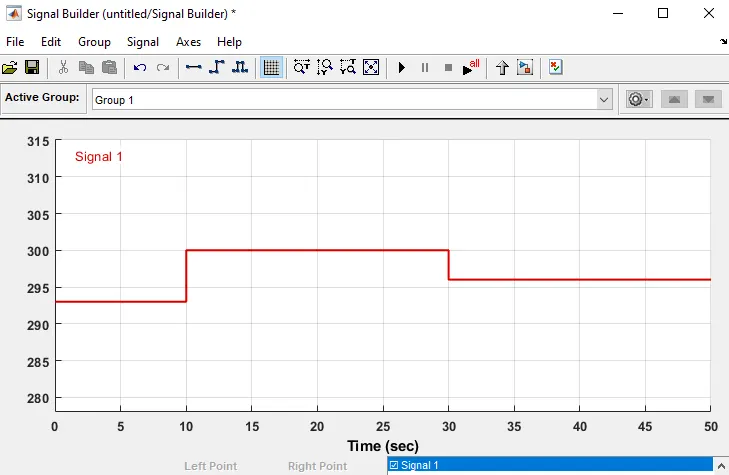
Temperature source: 20 °C from 0 to 10 seconds, 27 °C from 10 to 30 seconds, 23 °C from 30 to 50 seconds
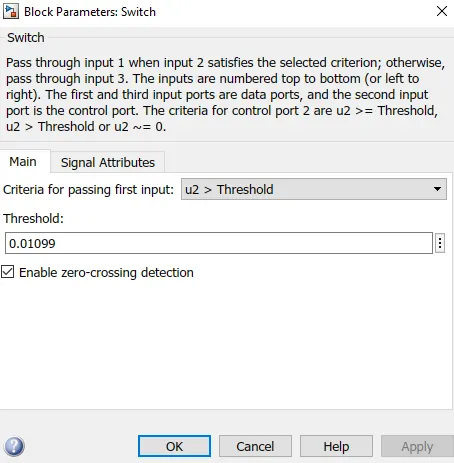
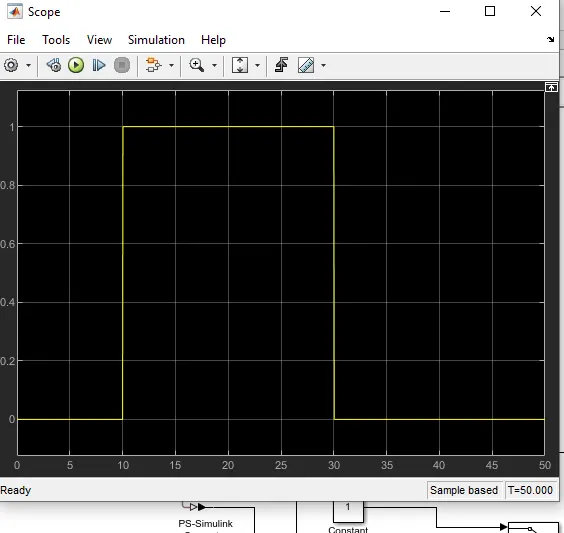
Fan conditions: ON if the temperature above 25 °C, OFF otherwise
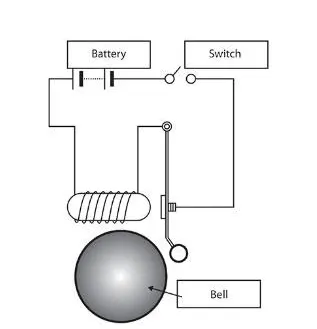
Solution:
- Here first we are going to study the Simulink model of the doorbell using a solenoid block. We need to access the Simulink with the block parameters to run the simulation. First, we need to get to understand the theory behind the Doorbell mechanism.
- When you press a doorbell button, you complete an electrical circuit that allows household electricity to flow through the doorbell's internal electromagnet. The magnetic field generated by the electromagnet is then used to power a mechanism that creates the doorbell sound.
- Doorbells are low- voltage devices. This means they require relatively little energy to operate. An important part of a doorbell mechanism is the transformer. The transformer converts regular 120-volt household current to the lower voltage (usually somewhere between 6-16 volts) required by the doorbell.
- A simple chime doorbell uses the magnetic field created by the electromagnet to move a magnetic piston to strike two tone bars. This makes that “ding dong" sound you've probably heard many times.
- The simplest type of doorbell is the buzzer. In a buzzer doorbell, the electromagnet operates a self- interrupting circuit. When the button is pressed, the circuit closes and the electromagnet moves a contact arm. When the contact arm moves, it interrupts the circuit and the electromagnet stops. When it stops, the contact arms fall back into position, completing the circuit and starting the process over again.
- This cycle repeats quickly over and over again as long as the button of the doorbell is held down. The sound of the contact arm hitting the electromagnet multiple times every second creates the buzzing noise you hear as the doorbell.
Simscape and Simulink Blocks we will be using:
- PS-Simulink and Simulink-PS converter
- Scopes
- Displays
- Pulse generator
- electrical and mechanical references
- solenoid
- Battery
- switch
- ideal Transalation motion sensor
- solver configuration
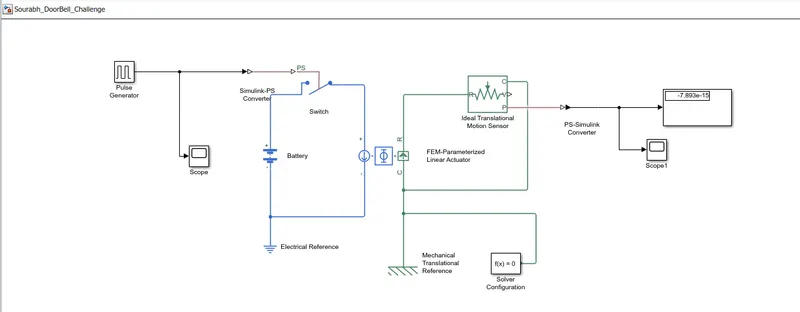
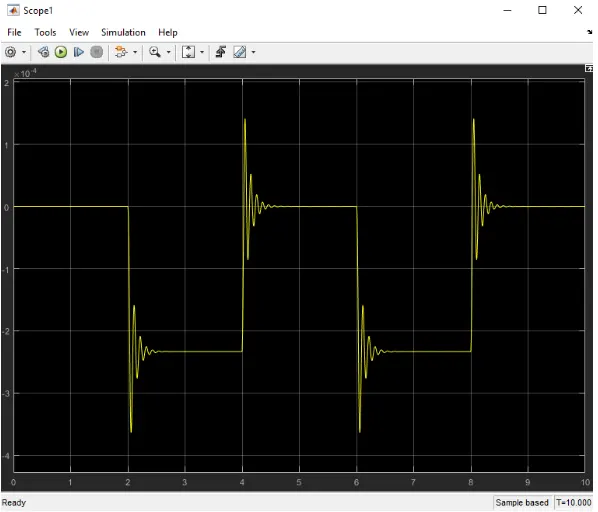
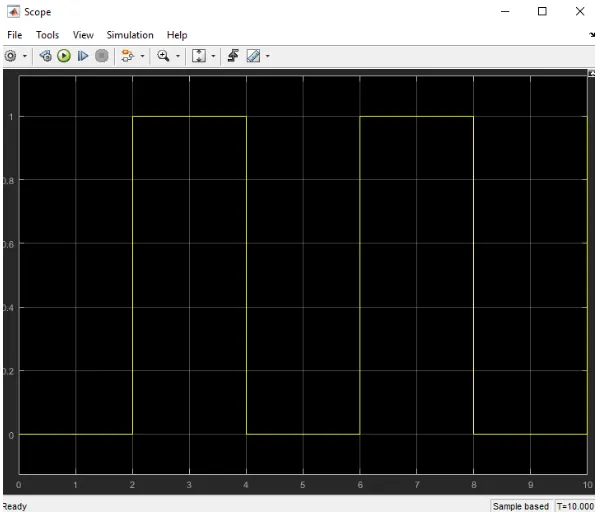
2. Use a thermistor to sense the temperature of a heater & turn on or turn off the fan as per the below conditions:
we are going to use the same procedure as above to simulate a thermistor to sense the temperature of a heater.
Thermistor: thermal resistor is defined as a type of resistor whose electrical resistance varies with changes in temperature. Although all resistor's resistance will fluctuate slightly with temperature, a thermistor is particularly sensitive to temperature changes. Thermistors act as a passive component in a circuit. They are an accurate, cheap, and robust way to measure temperature. While thermistors do not work well in extremely hot or cold temperatures, they are the sensor of choice for many different applications. Following is the Simulink block assembly for Thermistor based heater. And with condition follows here as :
1. 0-10 sec temperature 293
2. 10-30 secs temperature 300
3. 30-50 secs temperature 296
and you can see these details in plot basis in signal builder block where the input is inserted with these signals.