Week -2
AIM :
1. To make a Simulink Model of Door Bell using solenoid block .
2. To make a Simulink Model Using a thermistor to sense the temperature of a heater & turn on or turn off the fan.
SOLENOID :
- A solenoid is a type of electromagnet , the purpose of which is to generate a controlled magnetic field through a coil wound into a tightly packed helix .
- The coil can be arranged to produce a uniform magnetic field in a volume of space when an electric current is passed through it . The term solenoid was coined in 1823 by André - Marie Ampère to designate a helical coil .
- In engineering , the term may also refer to a variety of transducer devices that convert energy into linear motion . The term is also often used to refer to a solenoid valve , an integrated device containing an electromechanical solenoid which actuates either a pneumatic or hydraulic valve , or a solenoid switch , which is a specific type of relay that internally uses an electromechanical solenoid to operate an electrical switch for example , an automobile starter solenoid or linear solenoid . Solenoid bolts , a type of electromechanical locking mechanism , also exist in electromagnetic technology , a solenoid is an actuator assembly with a sliding ferromagnetic plunger inside the coil Without power , the plunger extends for part of its length outside the coil , applying power pulls the plunger into the coil Electromagnets with fixed cores are not considered solenoids .
THERMISTOR :
- A thermistor is a type of resistor whose resistance is dependent on temperature , more so than in standard resistors. The word is a combination of thermal and resistor .
- Thermistors are widely used as inrush current limiters , temperature sensors ( negative temperature coefficient or NTC type typically ) , self - resetting overcurrent protectors , and self - regulating heating elements ( positive temperature coefficient or PTC type typically ) .
- Thermistors are of two opposite fundamental types :
- With NTC thermistors , resistance decreases as temperature rises . An NTC is commonly used as a temperature sensor , or in series with a circuit as an inrush current limiter .
- With PTC thermistors , resistance increases as temperature rises . PTC thermistors are commonly installed in series with a circuit , and used to protect against overcurrent conditions , as resettable fuses .
- Thermistors are generally produced using powdered metal oxides . With vastly improved formulas and techniques over the past 20 years , NTC thermistors can now achieve accuracies over wide temperature ranges such as 0.1 ° C or 20.2 ° C from 0°C to 70°C with excellent long - term stability . NTC thermistor elements come in many styles such as axial - leaded glass - encapsulated ( DO - 35 , DO - 34 and DO - 41 diodes ) , glass - coated chips , epoxy - coated with bare or Insulated lead wire and surface - mount , as well as rods and discs . The typical operating temperature range of a thermistor is -55°C to +150°C , though some glass - body thermistors have a maximal operating temperature of +300°C.
Governing Diagrams:
For Solenoid-
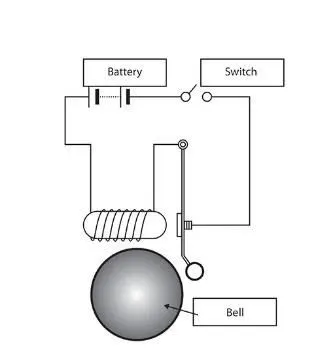
Basic components used to generate a simple doorbell circuit are:
1.Battery
2.Switch
3.Solenoid
4.A bell with plunger
For Thermistor:
Basic components used to generate a simple cooling fan circuit are:
1.Battery
2.Thermistor
3.Fan
4.Transistor
5.Resistor
OBJECTIVES :
- FOR DOOR BELL :
Create a situation where the switch is closed for 2 seconds and then released . Observe the physical movement of the plunger.
- FOR FAN:
Temperature source should be 20 ° C from 0 to 10 seconds , 27 ° C from 10 to 30 seconds , 23 ° C from 30 to 50 seconds . Fan conditions should be ON if the temperature above 25 ° C , OFF otherwise .
SIMULINK MODEL :
- DOOR BELL-
https://drive.google.com/file/d/11IzmLNR4nNXolK0xewkdXMe-Uz-KM6dz/view?usp=sharing
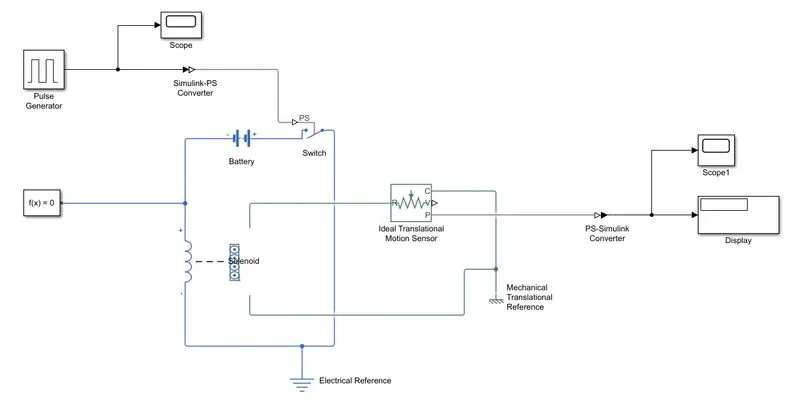
Explanation:
- From the above governing circuit of a door bell , we know that we need a switch , solenoid , battery and a plunger .
- So, in order to get all these components into a Simulink model we have to taken blocks that perform same action what the above devices perform.
- Now first a ' Solenoid Block is taken to represent a solenoid in the model , then to represent the battery we have taken Battery Block from the library browser .
- Then this ' Solenoid Block ' and ' Battery Block ' are connected to each other via positive and negative terminals .
- A ' Switch Block ' is placed in between Solenoid Block ' and ' Battery Block and it is connected with both the blocks .
- Now for the Switch to operate we need to provide a physical signal through PS port in the Switch Block .The provided physical signal should be greater than the threshold of the switch ,for switch being closed or else it will open
- Now this whole battery , switch and solenoid path is connected to an Electrical Reference Block which represents earthing of the circuit . This Electrical Reference Block should be connected with negative part of the Battery Block.
- Then in the Solenoid Block , R and C are two variables which represent plunger and fixed point respectively .
- Now this R is connected to a R of Ideal Translation Motion Sensor Bock ,which senses the position of the plunger in the Solenoid Block and gives the output .
- Now in Ideal Translation Motion Sensor Bock the outputs are given as ' V ' and ' P ' which represent the velocity and position of the plunger .Since we are only interested in knowing the change in position of the plunger , so we need only results from P output .
- Now C in the ideal Translation Motion Sensor Bock is a mechanical translation conserving port , which means that the mechanical process starts from R and ends at C and again it starts at R and the cycle goes on .
- So C in the Ideal Translation Motion Sensor Bock is connected to a Mechanical Translation Reference which represents a fixed point where it is rigidly clamped in real time .
- Similarly C of Solenoid Block is also connected to the same Mechanical Translation Reference as fixed point for the solenoid
- Since we position of the plunger as output from Ideal Translation Motion Sensor Bock we have connected port P to a PS - Simulink Converter where the physical values from port P are converted into Simulink value , and then this PS - Simulink Converter is connected to Scope Block which will generate a graph for change in position of plunger from port P of Ideal Translation Motion Sensor Bock
- Now to provide a physical signal for operating the switch , we have used a Pulse Generator Block , which generates a continuous square pulse.
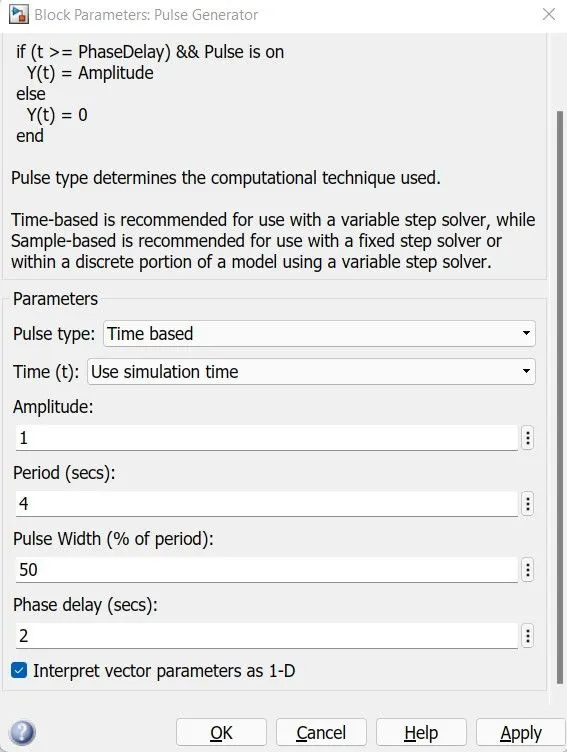
- From the above Figure we can observe that we have taken we have given period value as ' 4 ' , pulse width as 50 ' , phase delay as ' 2 ' and amplitude by default is ' 1 ' we have not changed it . This means that initially the pulse will be zero , since we have given phase delay of 2 so till 2 sec the pulse will be zero and at 2 secs the pulse will start from zero to 1 since we have given amplitude as 1 and then now the pulse width will half of period , so for the next two seconds the pulse will be at amplitude 1 only , then it will again come down to zero at 4th second and then it will at zero for next 2 secs thus completing the period of 4 seconds .
- From starting to ending of the pulse it will take 4 secs of time period in which only for 2 secs the amplitude will be one and for rest of time it will be zero . So ,after these 4 secs period again the pulse will be generated and thus cycle continues .
- To this Pulse Generator Block a Scope Block is connected to see how the pulse is generated .
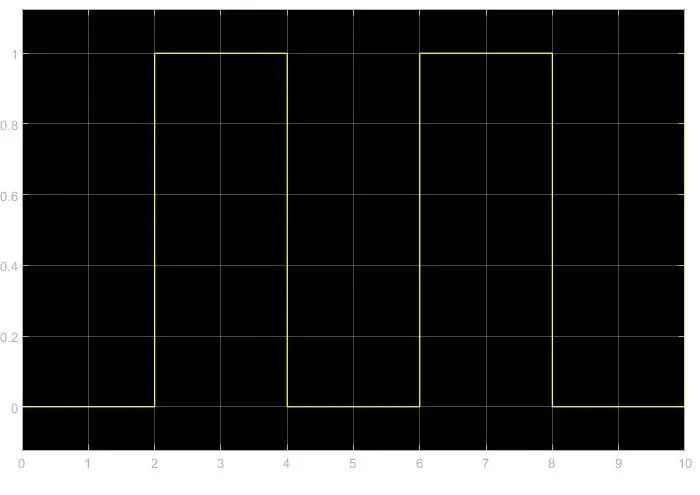
- The above figure is obtained by running the Simulink model and double clicking on the Scope block . This figure shows , how the pulse is generated and in this figure the X - axis represents the time and Y - axis represents the amplitude . As mentioned in the last point , the pulse has started after 2 seconds , then for next two seconds it has amplitude of ' 1 ' and then next two seconds the pulse is again zero .The pulse is starting from 2 seconds and ending at 6 seconds which nothing but a time period of two seconds .
- Thus ,this represents that when amplitude is one ,the switch will be closed and when it is zero the switch will open . Since our objective is only to see the change position of plunger when switch s closed for 2 secs so the we have the amplitude as 1 for 2 secs in the pulse generator by making the pulse width half of the period in the inputs for Pulse Generator Block .
- Since the pulse that is coming from Pulse Generator Block is a Simulink value , so to convert this value into a physical value we have used Simulink - PS Converter Block, since switch only takes physical value as inputs .
- As mentioned above the port P of Ideal Translation Motion Sensor Bock is connected to another Scope Block and a Solver Configuration Block is also connected to this path which generates equations and solves the whole model internally to give the results of the whole Simulink model as output .
- Now the run the model and double click on the Scope Black which is connected to Ideal Translation Motion Sensor Bock to get the results .
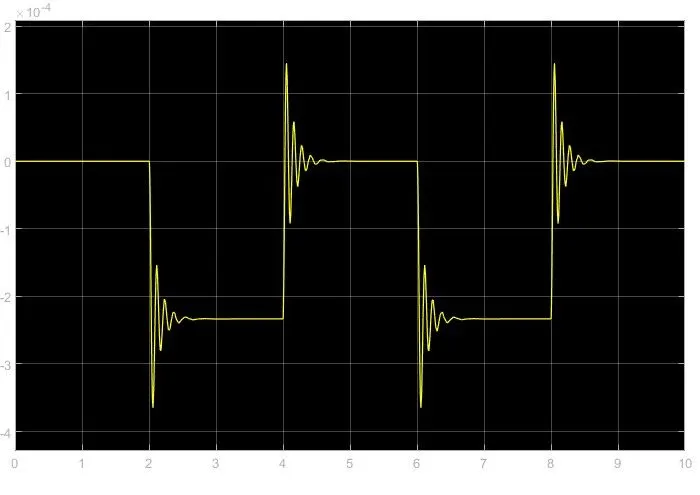
- We will get above graph as the result when we double click on the Scope block . Here x - axis represents the time in seconds and y - axis represents position of plunger in mm
- From the above figure we can observe that the initial position of the plunger is at ' 5 ' , as from the pulse generator block , a pulse generated at 2 , so in the position of the plunger is also changing at time 2 seconds and time till which the pulse amplitude is ' 1 ' till that time the plunger is also at same position after the change from initial position .
- Again , as the amplitude of the pulse becomes zero , the plunger returns to its initial position back again and as the pulse cycle goes on , plunger also changes its position and comes back to its initial position .
- We can also observe that when there is a change in position of the plunger , there are some waves forms at the start changes in position . This is due to recoil of the spring , each time when the plunger is moving . So to reduce this , in the Solenoid Block ' we can reduce the spring constant value and increase the damping coefficient . This will reduce the waves that are being formed and we will get a smooth graph .
- FOR FAN OPERATIONS USING THERMISTORS:
https://drive.google.com/file/d/1eOO66ETCExCatEWlMagJLnG7oQeTTg2V/view?usp=sharing
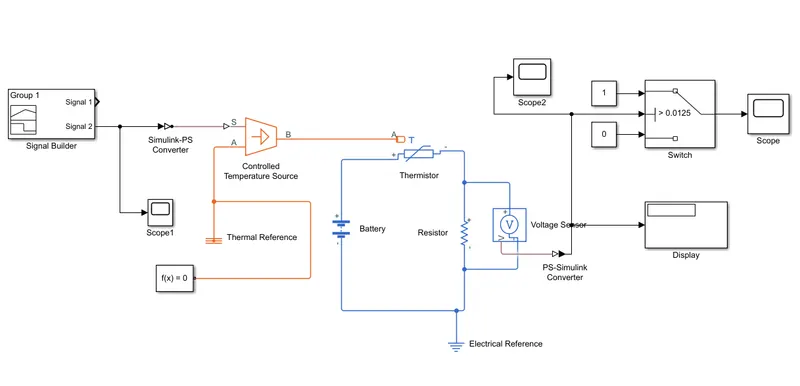
Explanation Model and Output:
The above model shows the thermistor is used to sense the temperature and switch is used to start and stop the fan
1. Firstly , we add thermistor (NTC) block . The port (T) is connected with a controlled temperature source block . The block one port is connected to thermal reference and another port is connected to converter .
2. The temperature difference is set by the physical signal port (S) which is connected to signal builder block with help of Simulink - PS converter .This converter is used because we require physical signal for temperature source input . Our input signal given to signal builder is Simulink signal .
3. In signal builder we created an input signal for system .As per given condition as follow
0-10 sec - temperature is 293.15k (20°C)
10-30 sec - temperature is 300.15k (27°C)
30-50 sec - temperature is 296.15k (23°C)
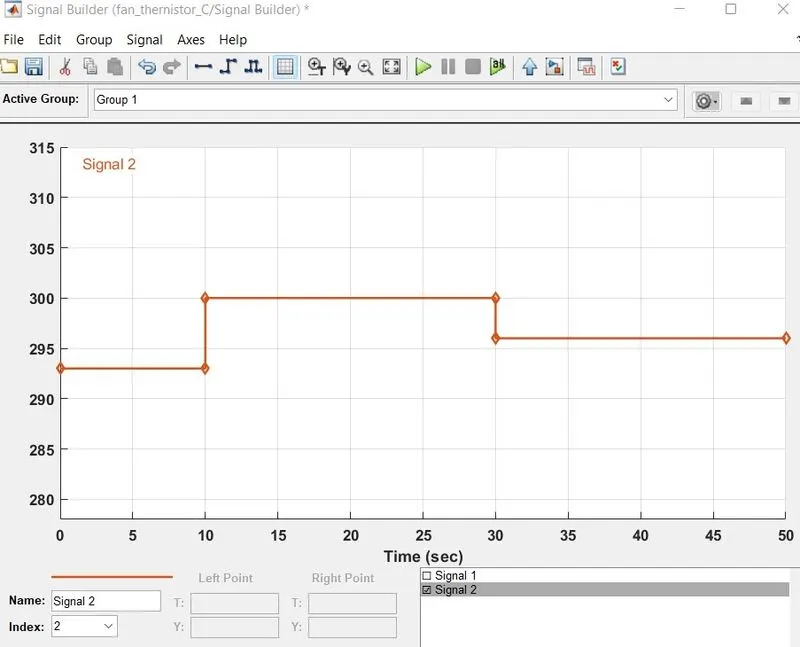
4. Here the temperature is converted to kelvin because the signal converter didn't have the option of degree Celsius . Otherwise , there is another option , Apply Affine Conversion , also gave input signal unit is kelvin . Also selected solver requires input derivatives , you can either provide them explicitly through additional signal ports , or turn on input filtering to calculate time derivatives .
5. The battery and voltage sensor are connected in series and resistor is connected in parallel to voltage sensor . The solver configuration is also used to specify the solver parameter . The electric reference is also used to ground the electric system 6. The voltage sensor is connected to switch to control the fan with the help of PS - Simulink converter to convert signal in Simulink input . After that we use scope to decide threshold value of switch . Also , we connected the display to the last simulation value so we can decide our threshold value with the help of PS- Simulink converter .
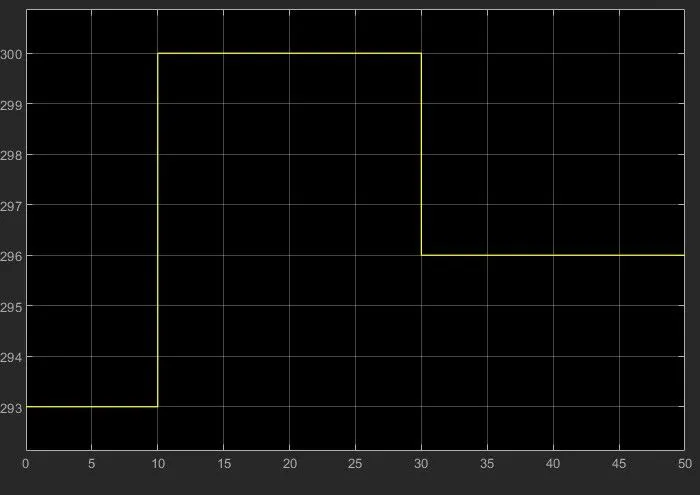
7. In the switch decided threshold value ,If the temperature is above the threshold limit , then it gave " 1 " as output which means fan switch on and if the temperature is below the threshold limit , then I gave " 0 " as output which means fan switch off .
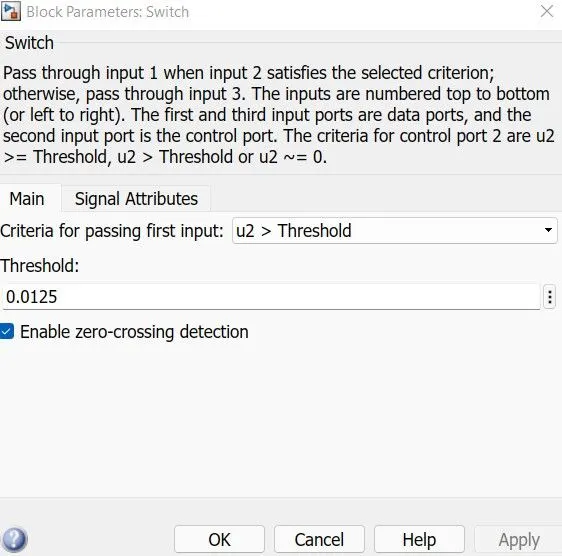
8. At the end of system scope is connected to see output for fan on or off . We run the simulation for 50 sec because we take time limit in signal builder as 50 sec . So , we can get the following output ,
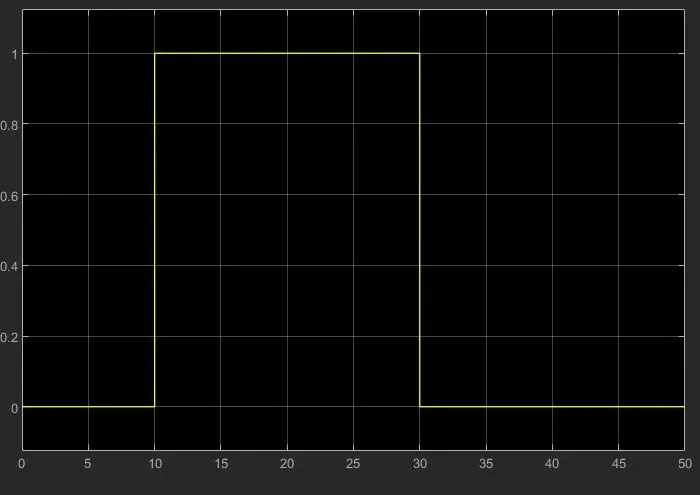
in above graph we can saw form 0-10 sec signal is " 0 " because in this time the temperature was 20 ° C which is below 25 ° C mean fan is switch off . After that from 10-30 sec signal is " 1 " because in this time the temperature was 27 ° C which is above 25 ° C means fan is switch on . At the end from 30-50 sec signal is " 0 " because in this time the temperature was 23 ° C which is below 25 ° C mean fans was switch off .
Conclusion : -
We can conclude that from the above output results of our Simulink model for solenoid operated heaters give correct output and satisfy with all input conditions .