Week 2- 2R Robotic Arm Challenge
AIM:
To write a program to simulate the forward kinematics of a 2R Robotic Arm in Matlab.
OBJECTIVE :
- To solve and simulate the forward kinematics of a 2R Robotic Arm and understand the movement of manipulator.
- To create the animation of working of a 2R Robotic Arm.
THEORY:
A robotic arm is a robot manipulator, usually programmable, with similar functions to a human arm. The links of such a manipulator are connected by joints allowing either rotational motion (such as in an articulated robot) or translational (linear) displacement. The links of the manipulator can be considered to form a kinematic chain. The use of industrial robots is increasing in areas such as food, consumer goods, wood, plastics and electronics, but is still mostly concentrated in the automotive industry.
In this project, we consider a 2R robotic arm. A 2R robotic arm represents a robotic arm with two rotations. i.e. it has two links which rotate or work over a two-dimensional plane with each of links having a single degree of freedom.
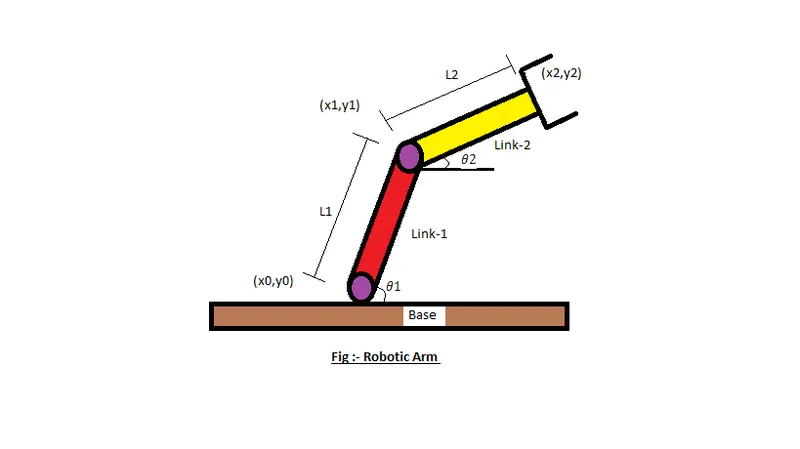
- Let , L1 & L2 be the lengths of the link-1 & link-2 Respectively.
- Let , θ1">θ1be the angle formed by link-1 with horizontal.
- Let , θ2">θ2 be the angle formed by link-2 with horizontal.
- Let , the starting and end co-ordinates of link-1 to be (x0, y0) and (x1, y1)
- Let , the starting and end co-ordinates of link-2 to be (x1, y1) and (x2, y2)
MATLAB CODE:
% Program for 2R Robotic Arm Challenge
clear all
close all
clc

%Inputs
 l1=1;
 l2=0.5;
 theta1=linspace(0,90,12);
 theta2=linspace(0,90,12);
 ct=1;

for i=1:length(theta1)
THETA1=theta1(i);

 for j=1:length(theta2)
 THETA2=theta2(j);

 x0=0;
 y0=0;

 x1=l1*cosd(THETA1);
 y1=l1*sind(THETA1);

 x2=x1+l2*cosd(THETA2);
 y2=y1+l2*sind(THETA2);

 %Plotting
 plot([x0,x1],[y0,y1] , [x1,x2],[y1,y2],'Linewidth',2)
 axis([-0.1 2 0 1.5])
 pause(0.01)
 M(ct)=getframe(gcf);
 ct=ct+1;
 end

end

movie(M)
Videofile=VideoWriter('Robotic_arm.avi','Uncompressed AVI');
open(Videofile)
writeVideo(Videofile,M)
close(Videofile)
Here in the above matlab code Startted with entering a comment and then provided the input variables and provided values for the robotic arms (l1 and l2). Adding values for theta and then by using the for loop we done the program.
No Errors where found while running.
Result (Screenshot):
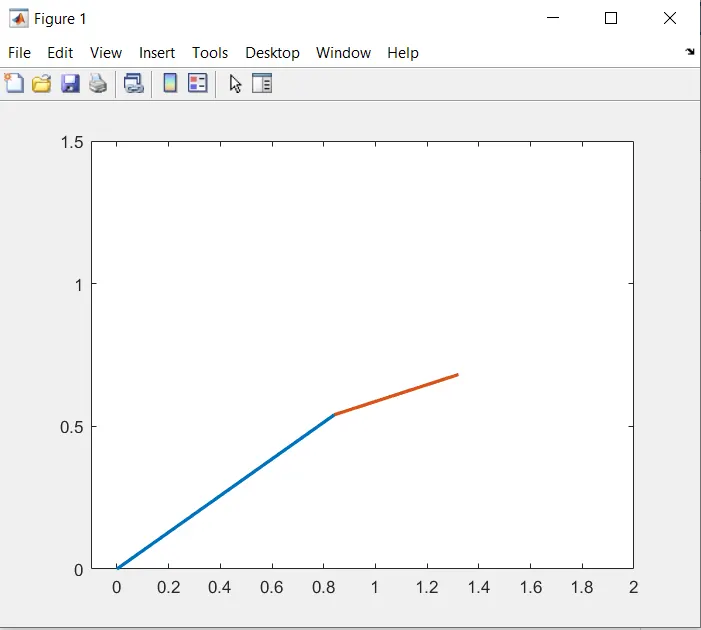 Figure 1 while running the program.
Thus we have simulated 2R robotic arm by using the matlab programming and also created a Movie/Animation from the plots obtained from the program
- Below is the link given for the program output for movie/animation of a 2R robotic arm