Week 2- 2R Robotic Arm Challenge
AIM : To write a program to simulate the forward kinematics of a 2R Robotic Arm in Matlab.
OBJECTIVE :
- To solve and simulate the forward kinematics of a 2R Robotic Arm and understand the movement of manipulator and create an animation of working of a 2R Robotic Arm.
Description :
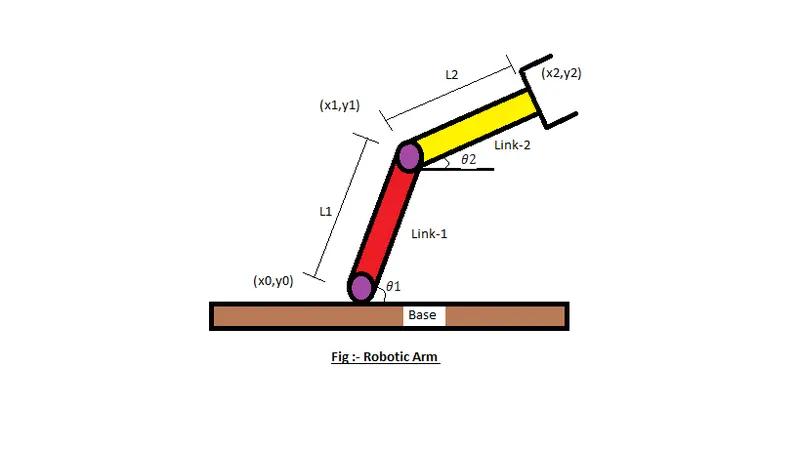
the robotic arm consists of 4 components,
- The Base, which is clamped to the surface and all other links are joined through hinge joint.
- Link 1 (L1) making θ1 with horizontal.
- Link 2 (L2) making θ2 with horizontal.
- The device attached to the manipulator which interacts with its environment to perform tasks
INPUTS :
- For our program we have assumed the length of link 1 and link 2 to 1.75 m and 1.25 m.
- In order to simulate the robotic arm it is necessary to vary `theta1`and `theta2` to obtain a desired animation and it cannot be possible if we manually enter the respective data everytime. So we have created a row vector from0°-90° with 10 evenly spaced points between them.
- The coordinates of base is assumed to be at origin (0,0)
- The coordinates of end points of link 1 (L1) can be found by using trignometry as,
x1=l_a_1.cos(`theta1`)
y1=l_a_1.sin(`theta1`)
- Similarly, the coordinates of end point of link 2 (L2) can also be found from trignometry as,
x2=x1+l_a_2⋅cos(`theta2`)
y2=y1+l_a_2⋅sin(`theta2`)
- Mention the errors faced while programming.
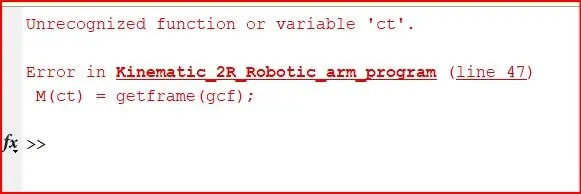
- Steps taken to overcome those errors.
ct value not mentioned and defined so therefore ct=1; given to solve the above error
MATLAB CODE :
% Forward Kinematics of a 2R Robotic arm manipulator and simulate it

clear all
close all
clc

%Inputs

%Length of the arm link
l_a_1 = 1.75;
l_a_2 = 1.25;

%create a row vector from 0 to 90 with 10 evenly spaced points
Theta1 = linspace(0,90,10);
Theta2 = linspace(0,90,10);

% the values of Theta1 when iterated is stored in T1
% the values of Theta2 when iterated is stored in T2
%for loop

ct=1;

for i= 1:length(Theta1)
    T1 = Theta1(i);
    for j= 1:length(Theta2)
        T2 = Theta2(j);

% Co_ordinates
% base of link1 and link2 is fixed at origin

x0 = 0;
y0 = 0;

% finding final coordinate of link1
x1 = l_a_1*cosd(T1);
y1 = l_a_1*sind(T1);

% finding final coordinate of link2
x2 = x1+l_a_2*cosd(T2);
y2 = y1+l_a_2*sind(T2);

% Plotting line

 plot([x0 x1],[y0 y1],[x1 x2],[y1 y2],'linewidth',3)
 axis([-0.5,3,0,3])
 pause(0.1)

 M(ct) = getframe(gcf);
 ct = ct+1;

 end
 end

% Inserting Frames in the animation to make movie
 movie(M)
 videofile = VideoWriter('Forward_Kinematics_Robotic_arm.avi','Uncompressed AVI');
 open(videofile)
 writeVideo(videofile,M)
 close(videofile)
Matlab code logic explanation:
- The link 1 is attached to the base and the link 2 is connected to link 1
- Origin taken to be (0,0)
- length of the links are given and linespace command used to give spacing pr instances for the link 2.
- For the movement of links which are connected to the base ,Theta values are given in a for loop to plot them
- Variable 'i' and 'j' are assigned for the links to continue in for loop
- For final coordinates of x1,y1,x2,y2 we have given formula as per the theta direction and x0,y0 fixed to the base
- For plotting we use an array consists of points as calculated using the above given conditions and we use linewidth command to visulaize the links separately
- axis is mentioned to move the links within the plot and pause command is used to make a better visual apperance
- M variable is assigned to the frame command
- end of for loop
- But error shows as the ct assigned to 'M' has no initial value
- To solve the error we have to give ct value before the for loop, so ct=1;
- Thereby to save the animation we use commands like movie,videofile,open,writevideo,closevideo,to save the frames created in an animation video.
Result
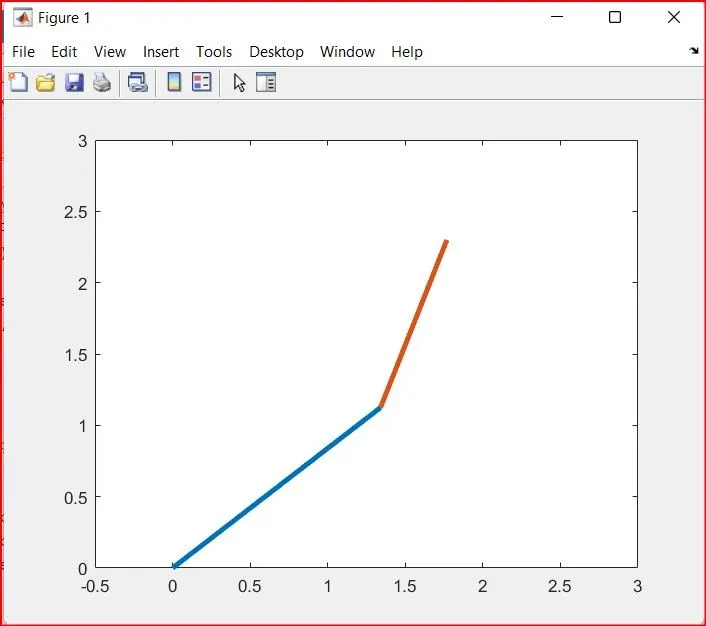
Animation link: https://drive.google.com/file/d/1mMw0ziuygn0qro1GgfuIZFHkpj1xKz9K/view?usp=sharing
https://drive.google.com/file/d/1mMw0ziuygn0qro1GgfuIZFHkpj1xKz9K/view?usp=sharing
Conclusion: A program to simulate the forward kinematics of a 2R Robotic Arm in Matlab is created
Thankyou