Week 2- 2R Robotic Arm Challenge
FORWARD KINEMATIC 2R ROBOTIC ARM
Now a days we see this two armed robots in many of industries for using different purposes like pick&place and welding purposes etc
before starting the programing lets us find out the basic requirements through an image as shown in below
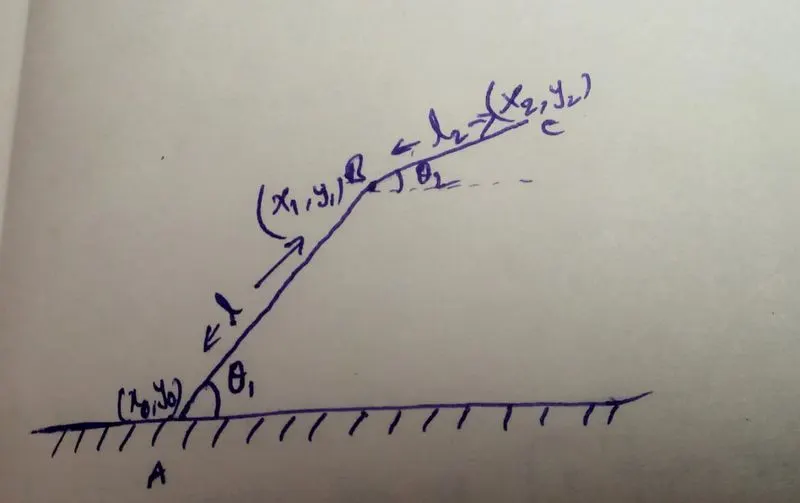
here the A to B is first link with length of l1 and angle oftheta1 and B to C is second link with the length of l2 and angle of theta2
to get the animation of robot we can use matlab to solve this easily for this we need two editor windows
in the first window we write the programm as below
close all
clear all
clc

%inputs

l1=1
l2=0.5

theta1=45
theta2=30

x0=0
y0=0

x1=l1*cosd(theta1);
y1=l1*sind(theta1);

x2=x1+l2*cosd(theta2);
y2=y1+l2*sind(theta2);

%plotting

line([x0 x1],[y0 y1],'linewidth',3,'color','g')
line([x1 x2],[y1 y2],'linewidth',3,'color','b')
it is always good to practice some commands before starting the coding
in the above code we have taken inputs of l1 as 1m and l2 as 0.5m and first angle theta as 45 degrees and second angle theta as 30 degrees ,first coordinate of link one x0,y0 is taken as 0,0 and second cordinate of first link is given asl1*cosd(theta1) and l1*sind(theta1) this is solved easily by using trignometry method
we use sind,cosd instead of using sin,cos because to get the values in degree values if we not use d the values are printed in radians and semicolomns to avoid the printing of values in the command window
we know that starting point of second link and ending point of first link are same,and ending coordinates of second link as x1+l2*cosd(theta2) and y1+l2*sind(theta2)
for plottig this we use line commad and entering the x limits first and t limits alter and linewidth command to get the thick line and colour of green in first link and blue in second link if we run this code we get the output as below
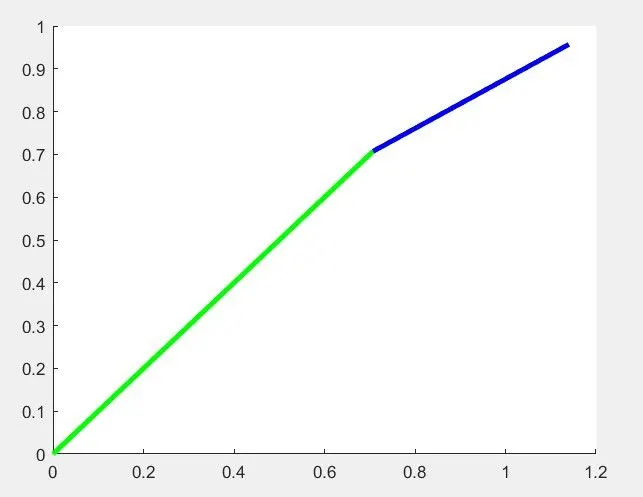
with this we completed the first window the green link was first link and blue link is second link
now to complete the animation completly we take new editor window
and write code as follow
close all
clear all
clc

% inputs

theta1=linspace(0,90,10)
theta2=linspace(0,90,10)
l1=1
l2=0.5
ct=1
%looping
for i=1:length(theta1)
    THETA1=theta1(i)
    for j=1:length(theta2)
        THETA2=theta2(j)
     x0=0
     y0=0

x1=l1*cosd(THETA1);
y1=l1*sind(THETA1);

x2=x1+l2*cosd(THETA2);
y2=y1+l2*sind(THETA2);

plot([x0 x1],[y0 y1],[x1 x2],[y1 y2],'linewidth',3)
axis([-0.1 1.5 0 1.5])
pause(0.03)
M(ct)=getframe(gcf)
ct=ct+1

   end
end
movie(M)
videofile=VideoWriter('forward_kinamatics.avi','uncompressed avi')
open(videofile)
writeVideo (videofile,M)
close(videofile)
EXPLANATION OF SECOND EDITOR WINDOW:
in this we have started with close all,clear all,clc and inputs of theta is changed to take array values by using linspace command
linspace command is to take random values between set of given starting value and end value and number of values in this theta 0 is starting degree value and 90 is the ending degree value and we need to get the 10 number of values ,next we take the same similar values for l1 and l2 ct is the counter of the links
now use the looping cocept because we use the same operation between the given range of values that was exctly what loop cocept is.
for is loop is the function code and i is equal to 1 to length of theta1 and THETA1=theta1(i), here lowercase theta is set of array and uppercase THETA is varible
and take another for loop to theta2 , j is equal to 1 to lenth of theta2 which is similar to the above loop
and now copy the code of first editor window to this second editor window and change the x1,y1,x2 andy2
from
we have changed the theta to THETA which means array to varible
and remove the two line command lines and make all the values i;e x0,y0,x1,y1,x2,y2 coordinates in the same line and change the line command to plot command in plot command we have advantage of using pause command to pause for required sec and we can giv the axis for the figure here i have taken x limits from -0.1 to 1.5 and y limits from 0 to 1.5
M(ct)= getframe (gcf) is to the current figure and ct=ct+1 that means each every time of loop takes place then the counter of the link is also increses now end the both loops and call the function command movie(m) and enter the videofile name the that we are entering here is same as the file name saved in the desktop and enter file name <'forward_kinematics.avi'> and <'uncompressed av'i> open functin to open the videofile and writevideo function to make videofile to movie use the parntheses and closed the videofile .
if we run the above code we get the result as below
result:-
https://drive.google.com/file/d/1rH7le6BOM-w6laZizbuhYW2F3BMAkFqq/view?usp=sharing
with this we have completed the animation videos
errors obtained in this code are :-
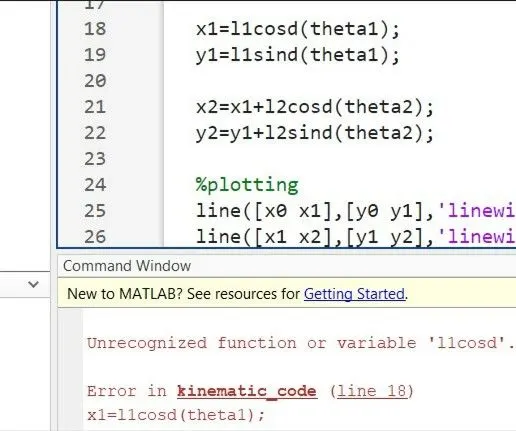
- directly i have written l1cosd(theta1)and l1sind(theta1) here the mistake i have done is without including * multiplication symbol when i run the code it get the error like unrecognized varible the advantage of the matlab is, it shows the what is the is the mistake that we we made and where it was happened is showing by the matlab
the error is as below
- after chaged the l1cosd(theta1) as l1*cosd(theta1) similarly all functins are changed like this we get rectification of the error as below
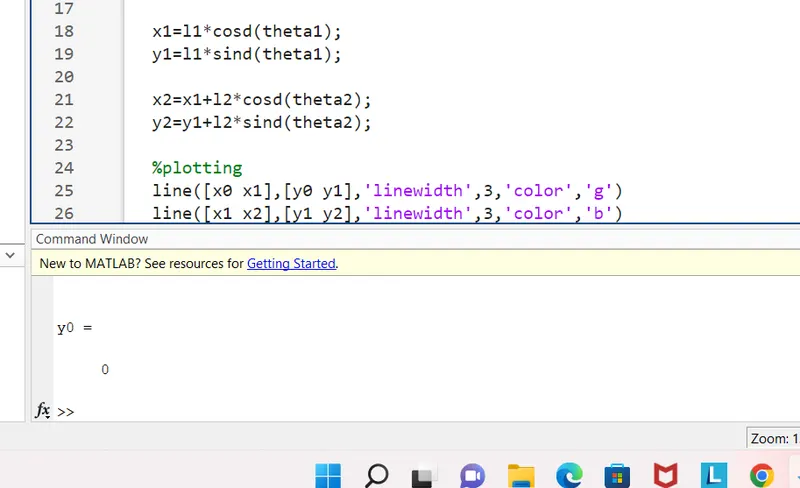
- with this this was rectified and
- another error was
- written videowriter function as videowrite that was the error
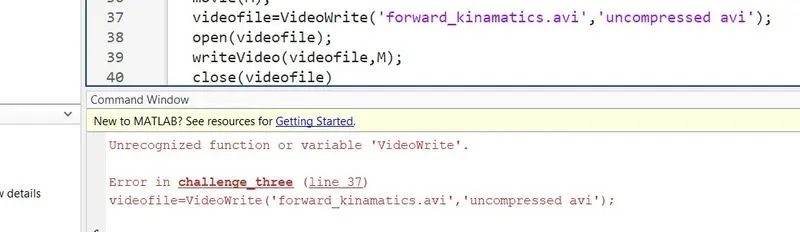
- we can rectify this with the cahnging videowrite to videowriter, this results in
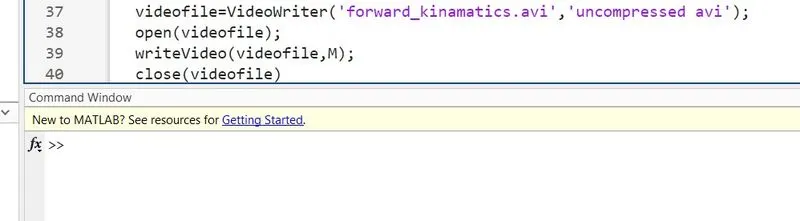
- this was rectified.
conclussion:-
hence we have completed the animating of the 2arm robotic arm.
- thank you!