Week 2- 2R Robotic Arm Challenge
Aim: To program in matlab to simulate the forward kinematics of 2R robotic arm
Explanation: 2R-robotic arm is simple mechanism in robots
Procedure to program in matlab to simulate the forward kinematics of 2R robotic arm:
- Robotic arm consist of two link with some length and and teta
- store the length and teta value as input
- store teta value from 0 degree to 90 degree using linspace command
- Then use 'for loop' then provide range to execute teta value from o degree to 90 degree by putting like this, example i=1:length(teta)
teta1=teta(i)
- then store input of initialize and final values of co-ordinate because to show in graph
- then use plot command to plot the graph
- Then using some command like, pause , m(ct)=get frame(gcf), ct=ct+1 performing the function like m(ct) is save the frame of figure and pass to the movie and ct performing the increements
- After to watch the simulation of the forward kinematics 2R- robotic arm as video use command like, movie, videowriter, open, writevideo, close This command function is shown in below program
Program to simulate forward kinematics of 2R robotic arm:
%input
l1 = 1
l2 = 0.5
theta1 = linspace(0,90,10)
theta2 = linspace(0,90,10)
ct = 1
for i = 1:length(theta1)
THETA1 = theta1(i)
for j = 1:length(theta2)
THETA2 = theta2(j)
%co-ordinates
x0 = 0
y0 = 0
x1 = l1*cosd(THETA1)
y1 = l1*sind(THETA1)
x2 = x1 + l2*cosd(THETA2)
y2 = y1 + l2*sind(THETA2)
%plotting
plot([x0 x1],[y0 y1],[x1 x2],[y1 y2],'linewidth',3)
axis([0 1.5 0 1.5])
pause(0.03)
m(ct) = getframe(gcf)
ct = ct+1
end
end
movie(m)
videofile = VideoWriter('forward_kinematics.avi','Uncompressed AVI')
open(videofile)
writeVideo(videofile,m)
close(videofile)
Below is the program run in the matlab:
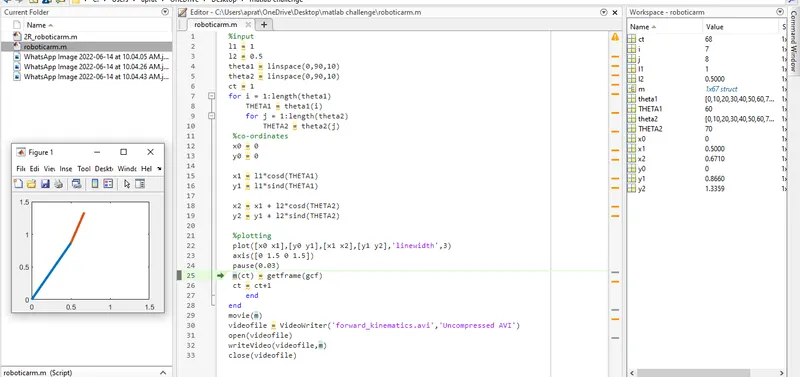
video link of forward kinematics of 2r robotic arm: https://drive.google.com/file/d/1tHXoHZQ3KmfdVxuNbk_-KOMmQxhYJTup/view
Inserting code sample:
%input
l1 = 1
l2 = 0.5
theta1 = linspace(0,90,10)
theta2 = linspace(0,90,10)
ct = 1
for i = 1:length(theta1)
THETA1 = theta1(i)
for j = 1:length(theta2)
THETA2 = theta2(j)
%co-ordinates
x0 = 0
y0 = 0
x1 = l1*cosd(THETA1)
y1 = l1*sind(THETA1)
x2 = x1 + l2*cosd(THETA2)
y2 = y1 + l2*sind(THETA2)
%plotting
plot([x0 x1],[y0 y1],[x1 x2],[y1 y2],'linewidth',3)
axis([0 1.5 0 1.5])
pause(0.03)
m(ct) = getframe(gcf)
ct = ct+1
end
end