Week 2- 2R Robotic Arm Challenge
Aim: To simulate the forward kinematics of a 2R Robotic Arm.
To simulate the forward kinematics of a 2R Robotic Arm the code has been written in the MATLAB, Steps in the construction of the code are as explained below:
- Code has been started with usually required commands to close all the previously open graphs, to clear the workspace and to clear the command window .
- Inputs for the forward kinematics of 2R robotic arm manipulator has been given by defining the length of link1 and link2. The coordinates of the fixed end of link1 has been declared.
- The angle between link 1 and x-axis is defined as theta1 and similarly the angle between link 2 and x-axis is defined as theta2. The array of both theta1 and theta2 have been declared between 0 to 90 degrees with the interval of 5 degrees.
- The frame counter ct has been declared and set to 1 , to save frames for each value of combination of theta1 and theta2.
- First for loop has been used to calculate the moving end coordinates of the link1 which are same as the linked end of the link2. Then second for loop has been used as nested loop in first for loop, to calculate the coordinates of moving end of link2 i.e. tip of the manipulator arm.
- After finding all of the required coordinates the lines have been plotted using plot command, to represent link1 and link2 inside the second for loop only. By this way we will beable to get all the frames of 2R Robotic arm movement in its workspace.
- The frame counter ct has been incremented then both for loops are closed.
- The animation movie has been created using movie, videoWriter and writeVideo commands.
- The code has been executed successfully and saved animation has been uploaded to YouTube platform. The link of the same has been provided below.
- Thus the simulation of forward kinematics of the 2R Robotic arm manipulator has been successfully done.
Code for the simulation of forward kinematics of 2R Robotic Arm is as follows:
%Forward kinematics of 2R Robotic arm manipulator
close all;
clear all;
clc;

%inputs
l1=1;               %length of link 1
l2=0.5;             %length of link 2
theta1 =[0:5:90];   %Array of theta1
theta2 =[0:5:90];   %Array of theta2

% Fixed end Co-ordinates
x0=0;       % X coordinate of origin
y0=0;       % X coordinate of origin
ct=1;       % frame counter declaration & initialisation

for i= 1:length(theta1)            % For loop for theta1

    for j=1:length(theta2)         % For loop for theta2

        x1=l1*cosd(theta1(i));     % X coordinate of moving end of link1 or linked end of link2
        y1=l1*sind(theta1(i));     % Y coordinate of moving end of link1 or linked end of link2

        x2=x1+(l2*cosd(theta2(j))); % X coordinate of moving open end of link2
        y2=y1+(l2*sind(theta2(j))); % Y coordinate of moving open end of link2

        %Plotting
        plot([x0 x1],[y0 y1],[x1 x2],[y1 y2],'linewidth',3); % Lines Plotting for link1 & link2
        axis([-0.1 1.5 -0.1 1.5]);                              % X & Y axis range declaration
        xlabel('X axis');                                    % X axis label
        ylabel('Y axis');                                    % Y axis label
        title ('2R-Robotic Arm Manipulator')                 % Title of the graph
        M(ct)= getframe(gcf);                                % Stiching of the current figure frames
        ct=ct+1;                                             % Frame counter increment
    end

end
movie(M);                                                        % invoking movie command
videofile=VideoWriter("Robotic_arm_2R.avi","Uncompressed AVI");  % declaring video file, type and writer
open(videofile);                                                 % opening videofile
writeVideo(videofile,M);                                         % Writing vodeo file with stiched frames
close(videofile);                                                % closing videofile
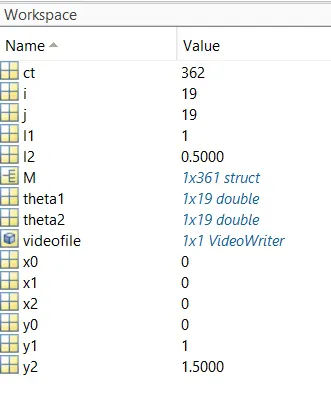
The screenshot of the workspace after successful execution of the code:
Link of the animation video file:
YouTube link :https://youtu.be/MoNeuC3zNfg