The Foward Kinematics of a 2R Robotic Arm
Aim :
To write a program and simulate the forward kinematics of a 2R Robotic arm
Objective :
To create an animation file and simulate the motion of a 2R robotic arm
Theory:
Robotic arms are machines that are programmed to execute specific task or job quickly,efficiently and accurately.
It is a mechanical arm that functions similar to human arm. A typical industrial robot arm includes a series of joints,
articulations and manipulators that work together.
some of the types of robotic arms are:
- Cartesian Robots
- Cylindrical Robots
- SCARA Robots
- Collaborative Robots
In this 2R robotic arm there are 2 links forming a kinematic chain which allows for both rotational and transitional motion.
Input Parameters:
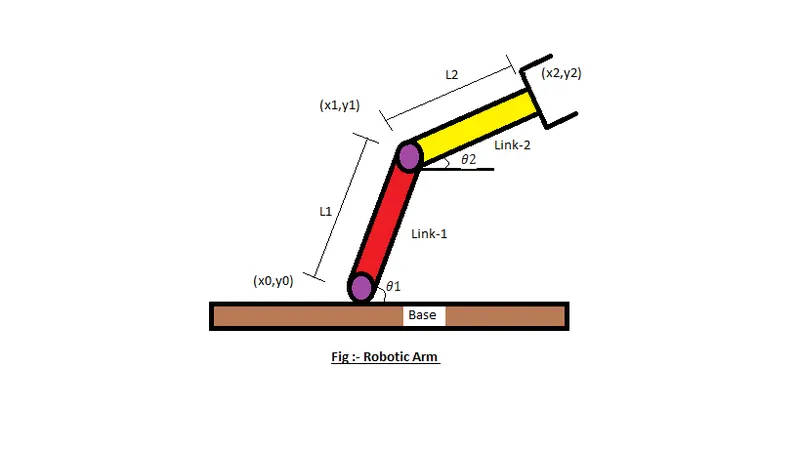
L1=Length of link 1
L2=Length of link 2
Theta1=angle made by the link 1 with x-axis
Theta2=angle made by the link 2 with x-axis
(x0,y0)=starting point of link1
(x1,y1)=ending point of link 1 and starting point of link 2
(x2,y2)=ending point of link 2
Explanation of code :
- Length of link1 is assumed to be 1m
- Length of link2 is assumed to be 0.5m
- Theta1 and Theta2 varies from 0 to 90 degrees in 4 partitions
- The value of counter is set to 1 which is increased by 1 for every iteration of loop
- Double for loops are used for iteration of the robotic arm position
- First for loop is for link1 and second for loop is for link2
- The positions of link1 and link2 are iterated and plotted in a graph
- ImageMagick is used to create the animation in gif file
Code :
Programming language used :- MATLAB
Software used :- MATLAB