Parsing NASA thermodynamic data
Aim :
To perform the file parsing for NASA thermodynamic data.
Objective :
1. To write a function that extracts the 14 coefficients and calculates the enthalpy, entropy, and specific heats for all the species in the data file. Note: (The FIRST 7 coefficients are HIGH-temperature coefficients and the SECOND 7 coefficients are LOW-temperature coefficients).
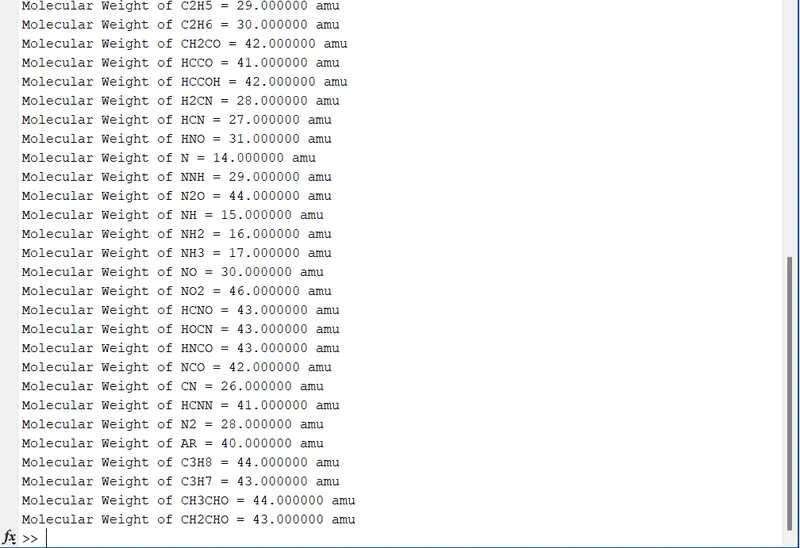
2. To calculate the molecular weight of each species using the mentioned formula and display it in the command window.
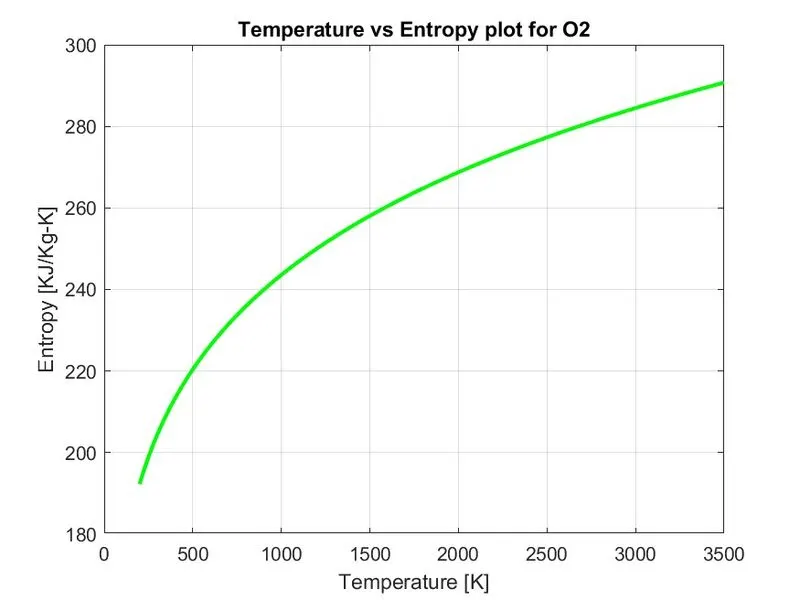
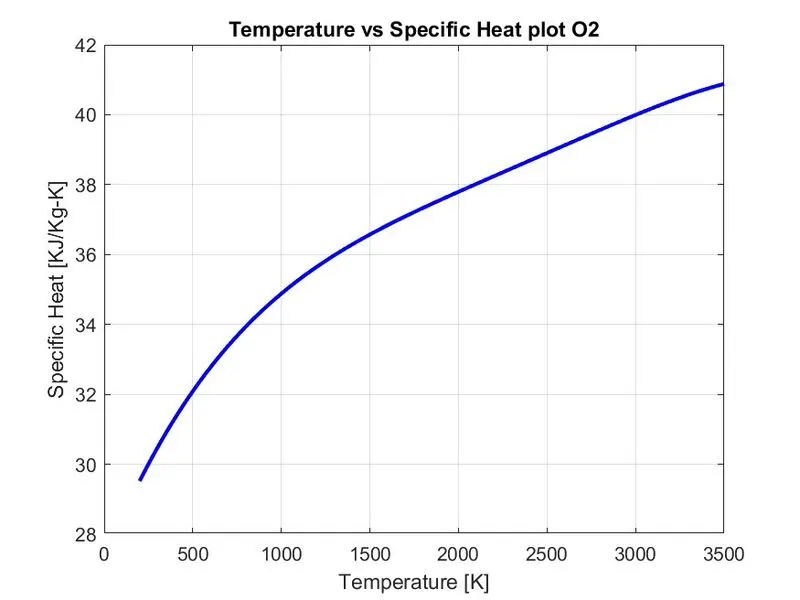
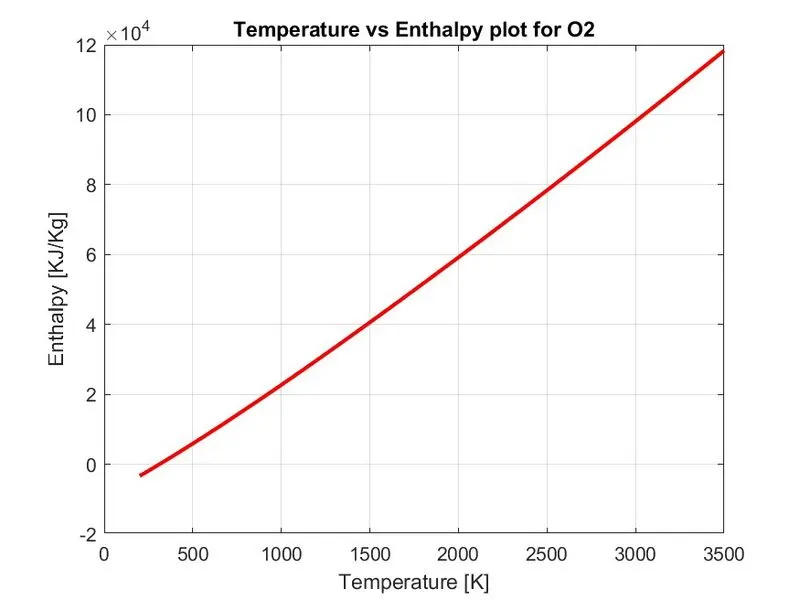
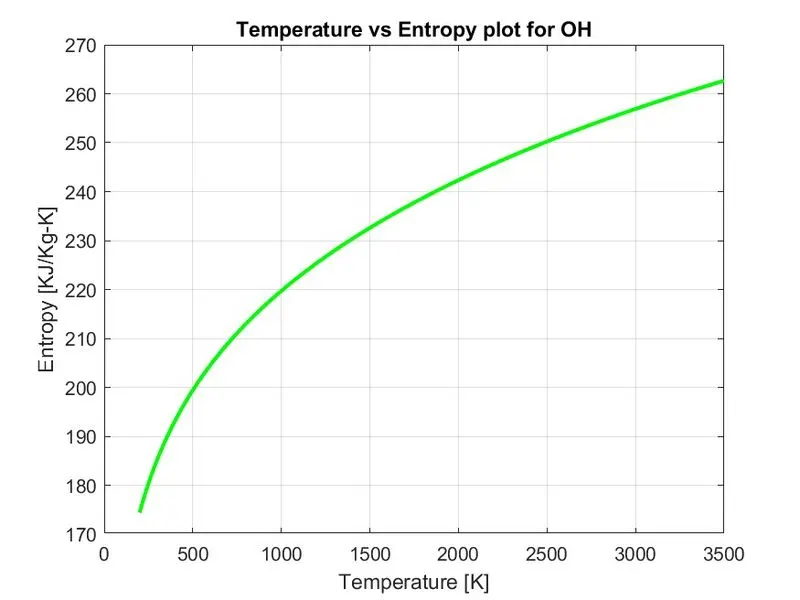
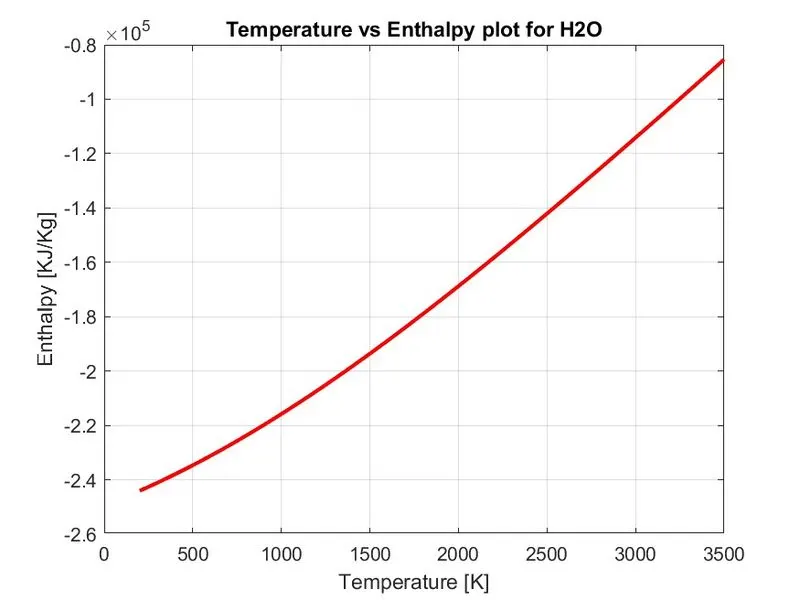
3. To plot Cp,Enthalpy and Entropy for the local temperature range (low temperature : high temperature) specific for each species.
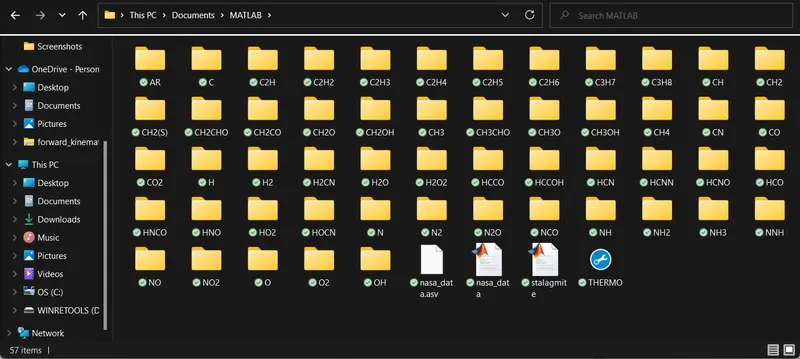
4. To save the plots as images with appropriate names and dump them in separate folders for each species with a suitable name. All these should be generated automatically.
Introduction :
Parse essentially means to ''resolve (a sentence) into its component parts and describe their syntactic roles''. In computing, parsing is 'an act of parsing a string or a text'. [Google Dictionary]File parsing in computer language means to give a meaning to the characters of a text file as per the formal grammar. ''Within computational linguistics the term is used to refer to the formal analysis by a computer of a sentence or other string of words into its constituents, resulting in a parse tree showing their syntactic relation to each other, which may also contain semantic and other information.'' (Wikipedia). A parser is a program that parses the text files.
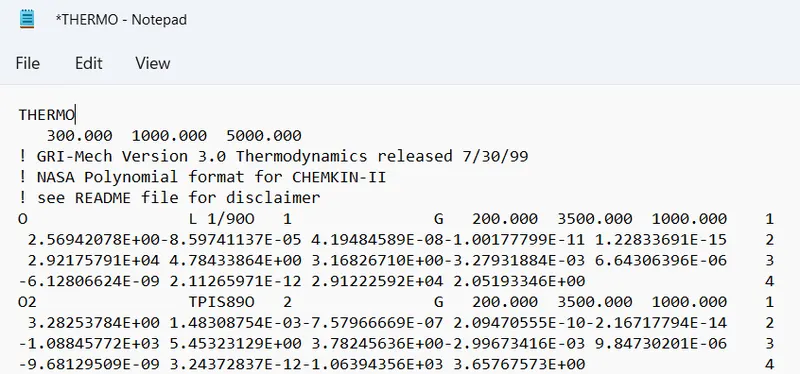
NASA's Thermodynamic Data File :- NASA came up with polynomials that can be used to evaluate thermodynamic properties such as Specific Heat, Enthalpy, and Entropy. They have also documented the coefficients that are required to evaluate these polynomials for 1000+ species. This file is provided in a '.dat' the file format which can be opened using the Notepad for accessing the species-wise properties. "THERMO.net" file is a data file containing 14 coefficients for 53 different species given by NASA. These coefficients are utilized to calculate the specific heat, enthalpy, and entropy for a particular element. Each element has its own range of local temperatures. Below we can see the layout of the THERMO.dat file as opened in the notepad.
Thermodynamic constants :
- Specific heat:
The specific heat is the amount of heat per unit mass required to raise the temperature by one degree Celsius.
- Entropy:
Entropy, the measure of a system's thermal energy per unit temperature that is unavailable for doing useful work. Because work is obtained from ordered molecular motion the amount of entropy is also a measure of the molecular disorder, or randomness, of a system.In short, we can define entropy as a measure of the disorder of the universe, on both macro and microscopic level.
- Enthalpy:
Enthalpy, the sum of the internal energy and the product of the pressure and volume of a thermodynamic system. Enthalpy is an energy-like property or state function-it has the dimensions of energy (and is thus measured in units of joules or ergs), and its value is determined entirely by the temperature, pressure, and composition of the system and not by its history. In symbols, the enthalpy H, equals the sum of the internal energy E, and the product of the pressure P, and volume V, of the system: H=E+ PV.
Molecular weight:
Molecular weight, also called molecular mass, the mass of a molecule of a substance, based on 12 as the atomic weight of carbon-12. It is calculated in practice by summing the atomic weights of the atoms making up the substance's molecular formula.
Governing Equations:
`(Cp)/R=a_1+a_2T+a_3T^2+a_4T^3+a_5T^4`
`H/(RT)=a_1+(a_2T)/2+(a_3T^2)/3+(a_4T^3)/4+(a_5T^4)/5+a_6/T`
`S/R=a_1lnT+a_2T+(a_3T^2)/2+(a_4T^3)/3+(a_5T^4)/4+a_7`
where,
Cp=Specific Heat (J/K kg)
H=Enthalpy (J)
S=Entropy (J/K)
R=Universal gas constant = 8.314 (J/mol.K)
T=Temperature (K)
a1...a7 = coefficients (In the file, first 7 are high temperature and other 7 are low temperature coefficients)
Main Code :
1. The program is commenced with the basic 'clear all', 'close all', 'clc' commands.
2. In order to open the file 'fopen' command is used, 'THERMO.dat' is the file name and 'r' relates to reading a file. This is saved as a variable for further reference.
3. From this step, the process of line reading is started. The 'fgetl' command is used for this purpose. The variable that was saved is now used for reading the line from that .dat file.
4. Line number two consists of the Global Temperature range. For extracting the values, we use the split tactic where we identify a delimiter that acts as a reference point. We initiate this by using the 'strsplit' command. For our case,' ' (literally space mark) is the delimitor where either side of the space hosts the temperature value. Since we can identify on which position the values lie with respect to space, the string values are converted to number characters using 'str2double'.
5. 53 species data given in the file, we initiate a loop that follows the length of the number of species. Taking this step will repeat all the below-mentioned processes 53 times.
6. The first line of the species data is read similarly to Step 3. The line is split similar to that of Step 4. Thus, the name of the species is extracted as the first string.The length of this line is saved as a variable.
7. The Local Temperature range lies before one string at the end of this line. Hence, we use 'str2double' to extract all three temperature values using the code seen above.
8. Further, three more lines have to be read that contain or 14 coefficients. All these have been extracted by the strategy as seen in the program above.
9. In order to find the Molecular Weight of each species, the basic Elements, and their respective Atomic weights have to be fed in the code for evaluation. This is done using the symbols of the elements and saving them in an array. The respective atomic weights are saved accordingly.
10. A 'for' loop is initiated for the length of the Species Name. Another 'for' loop is initiated within for the length of the Element array. Under these loops, a command known as 'strcmpi' used in order to compare the strings that are case sensitive.if the strings agree with the
code, the value returned is true and it is added with the molecular weight of that very element. The technique can be understood by looking at the code itself.
11. The values of respective molecular weights are displayed on the command window.
12. A new 'for loop' is initiated for calculating the thermodynamic properties. Since we have to calculate for lower and higher temperature ranges, we use the 'if=else' loop that keeps the properties discrete for every species. This depends on the mid-range temperature that has been provided in the THERMO.dat file. The formulae are fed accordingly.
13. A new folder is created using the 'mkdir' command so that the automatically created folders for the species are saved in one place. The 'cd' command is used for changing the current directory.
14. Basic plot commands are further given for comparison between all three thermodynamic properties and the temperature range.All plots are saved to the directory using the 'saveas' command.
15. The directory is converted back to the current one and the master loop ic finally ended. The .dat file is also closed.
Results from the above program :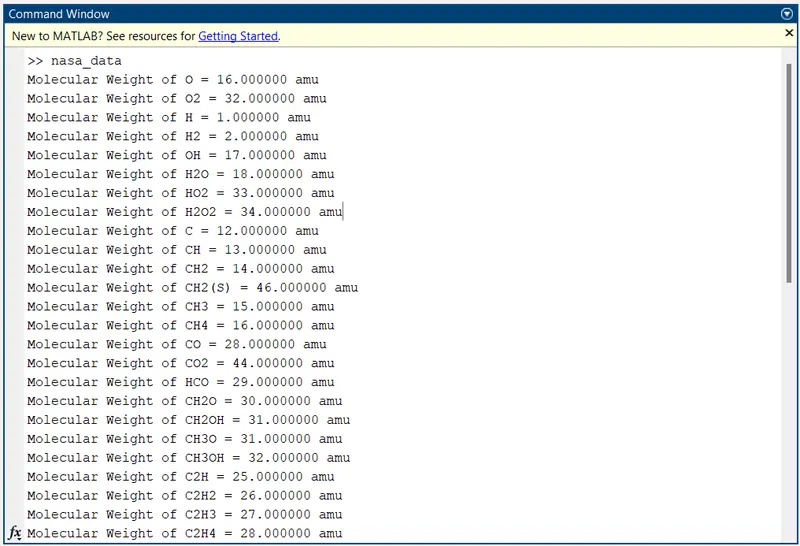
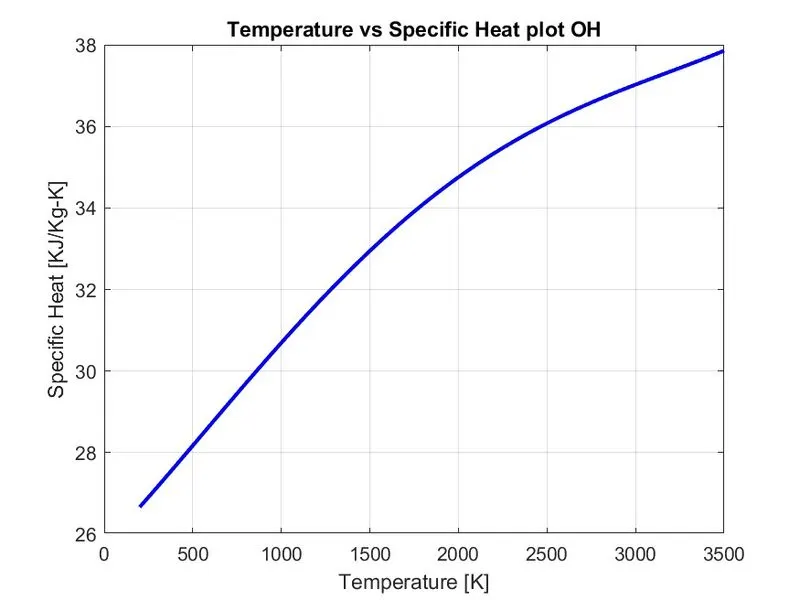
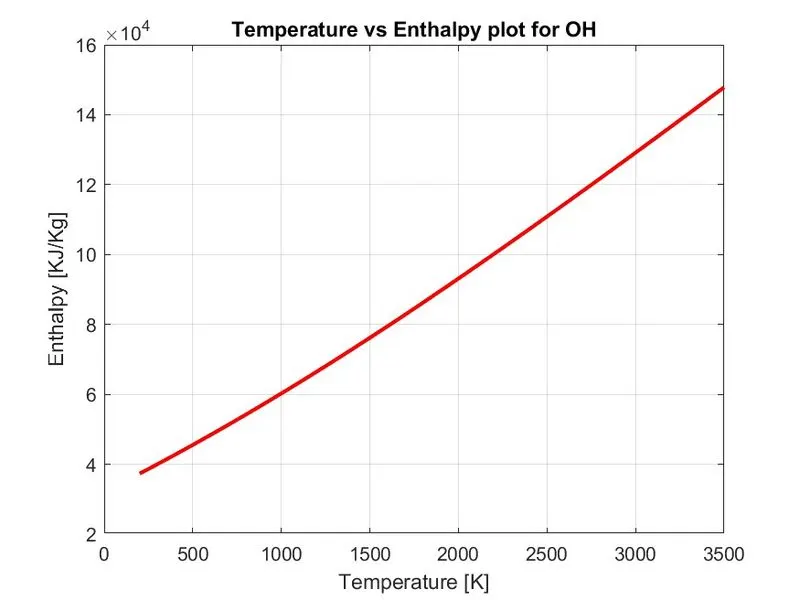
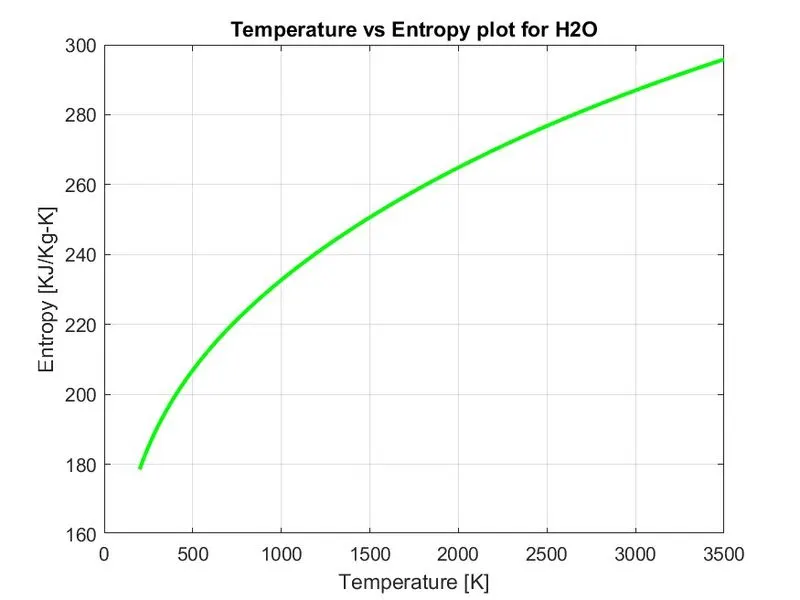
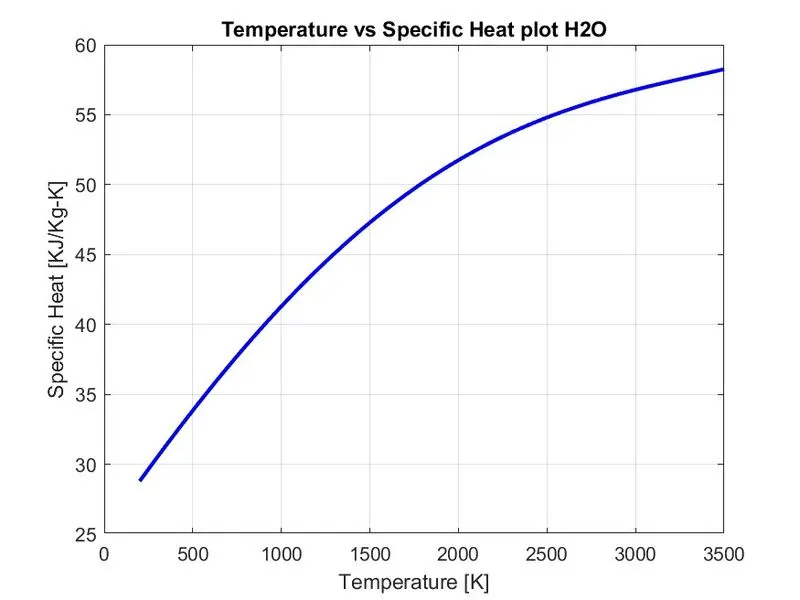
In this project report, the theory and application of the File Parsing were discussed for reading the THERMO.dat file in MATLAB. Therefore, the following are the conclusions that can be made on the basis of the study done on the topic :-
1. The use of File Parsing in this report shows that we can read all kinds of desired data from files that contain them and utilize these data for any analysis that has to be done.
2. We can read data from any line, at any position in the file as long as we use the correct strategy to extract the same.
3. By using File Parsing, we can analyze any data file with good efficiency as well as save valuable time while doing so.
REFERENCES :
• Concepts
1. Parsing- Wikipedia
2. NASA polynomials- UC Berkeley
3. Specific Heat-Britannica
4. Enthalpy-Britannica
5. Entropy - Britannica
•Important MATLAB Commands
1. fopen- MathWorks
2. fgetl- MathWorks
3. strsplit-MathWorks
4. str2double- MathWorks
5. strcmpi-MathWorks
6.mkdir- MathWorks
7. if-elseif-else - MathWorks
8.cd-MathWorks
9. saveas-MathWorks