Week 2- 2R Robotic Arm Challenge
Aim:
To write a program in the Matlab software to simulate the forward kinematics of a 2R Robotic arm and to make an animation video file of the plot.
Diagram:
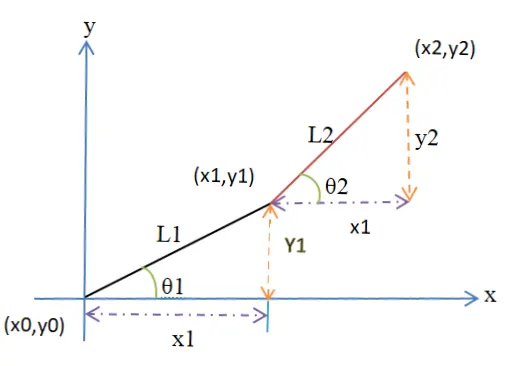
Robotic arm graphical representation are,
Equations:
From the triangles of two arms the equations are derived for finding the coordinates. They are,
x0 = 0
y0 = 0
cos θ =`frac{x1}{l1}`=> x1=l1*cos θ
sin θ = `frac{y1}{l1}` => y1=l1*sin θ
x2 = x1 + l2*cos θ
y2 = y1 + l2*sin θ
Objective:
The objective of the program is to identify the angle of rotation or movement and the degree of freedom of the 2R–robotic arm.
Then to make an animation movie by obtaining the continuous output of plots by varying each degree of links of each arm of the robot.
Theory:-
Robotic arm:
The 2R robotic arm is a kind of mechanical machine in which its looks, functions and performs like bending are almost similar to the human hand, where it is used in most of the industries like manufacturing and production. While its turns, rotations and handlings are managed by the end effector in form of analogous by programmable. The arm links are connected by a joint that allows to makes the movement either in linear motion like tilting in forward and backward or rotation like circular motion.
Forward kinematics:
The forward kinematics of robotic arm are refers to analyse and create a kinematic equations to the robots arm to compute the position of the end effector to identify parameters of joint from specified values.
Manipulator:
The manipulator is a mechanical device which is fixed at the end of the robotic arm to manipulate materials with physical contact only by the robot arm not by the operator because of in inaccessible places.
In this program we consider the 2R robotic arm that has two links rotate or move with various degree of freedom where the robot is fixed at its base regarding to its dimension.
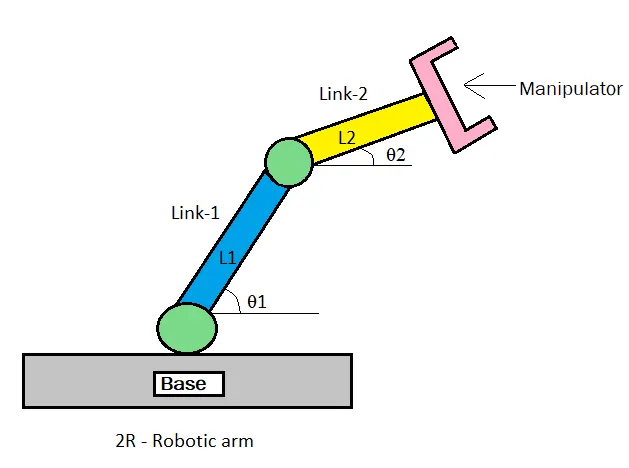
where,
- Let L1 & L2 be the length of link-1 and link-2 of the robotic arm respectively,
- Let θ1 & θ2 be the angle of link-1 and link-2 formed from the horizontal axes of each links,
- Let (x0 y0) and (x1 y1) are the starting and ending co-ordinates of link-1,
- And let (x1 y1) and (x2 y2) are the starting and ending co-ordinates of linl-2.
Procedure:-
Code explanation:
- Open the Editor window in the Matlab software by click New icon in tool bar or press Ctrl+N.
- Provide the values for the length of links l1 & l2 as constant inputs.
- Then enter the values for theta 1 and theta2 using the linspace command of angle from 0 to 90 degrees to obtain 10 values.
- The linspace command will generate a evenly spaced points between 0 to 90 degrees of 10 values.
- Then enter counter as ct=1 which will start to count the figure from 1 to go on.
- Now start with for command for making the loop for the length of theta.
- Again start another for loop command for at each plot of link-1 the link-2 varies with its angle.
- It can be called by providing the i and j as variables for theta 1 and theta 2.
- Then call the THETA as variables for getting the increment of i & j of angle of thata.
- Then provide the co-ordinates for x0,y0 and provide the equation for x1,y1 and x2,y2 are derived.
- Then plotting all the co-ordinates with linewidth and provide the axis.
- By using the pause command to run the various pictures of output.
- Then store the counter pictures as movie in getframe command to gather current frames.
- And provide the increment to the counter to get continuous increment of figures.
- Then end the both of the for loop.
- To using the movie and the videofile command to make all the figured output as animation.
- Then save the animation in .m extenssion and run the command.
Matlab code for robotic arm:
%To simulate the forward kinematics of a 2R Robotic arm:

%Inputs
l1 = 1.2;
l2 = 0.7;

theta1 = linspace(0,90,10);
theta2 = linspace(0,90,10);

ct=1;
for i=1:length(theta1)
    THETA1= theta1(i);
    for j=1:length(theta2)
        THETA2=theta2(j);

        %co-ordinates:
        x0 = 0;
        y0 = 0;

        x1=l1*cosd(THETA1);
        y1=l1*sind(THETA1);

        x2=x1+l2*cosd(THETA2);
        y2=x2+l2*sind(THETA2);

        %plotting
        plot([x0, x1],[y0, y1],[x1, x2],[y1, y2],'linewidth',3)
        axis ([-0.1 2 0 2])
        pause(0.03)
        M(ct)= getframe (gcf);
        ct=ct+1;
    end
end
movie(M)
videofile = VideoWriter('forward kinematics.avi','uncompressed AVI');
open(videofile)
writeVideo(videofile,M)
close(videofile)
Error thrown in command window:
The error were found is unknown command option while entering the values for axis by missing the round bracket.
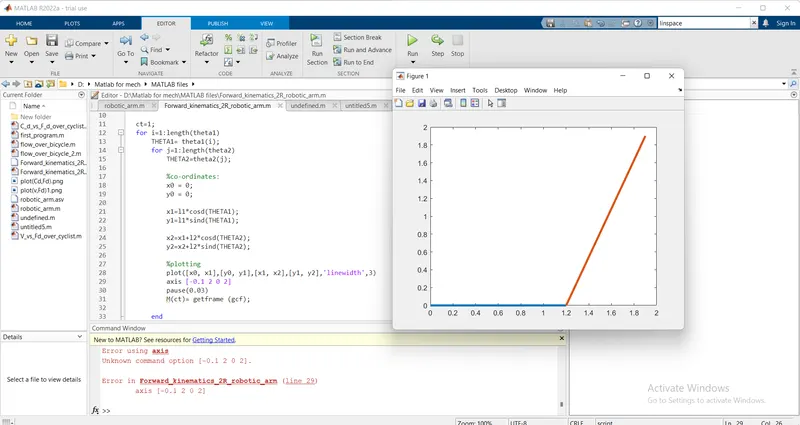
To solve the error:
To overcome the error is by providing the round bracket to the axis the error get resolved.
Result:
Thus the result is obtained by making simulation for the forward kinematics of a 2R Robotic arm by using Matlab program and also the animation movie is created from the obtained output of plots.
the link is given below for the output program of the movie animation.