Week 2- 2R Robotic Arm Challenge
AIM: To simulate the forward kinematics of a 2R Robotic Arm using MATLAB.
INTRODUCTION:
- Forward kinematics refers to the use of the kinematic equations of a robot to compute the position of the end-effector from specified values for the joint parameters.
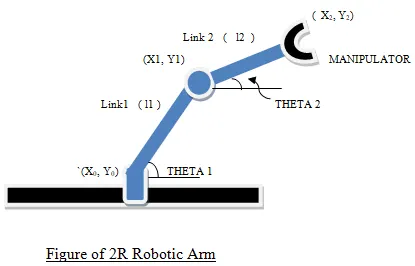
- As shown in figure here are the inputs that will be used in writing the matlab program
(x0 y0) = starting point of link1 / base
(x1 y1) = ending point of link1/ starting point of link2.
(x2 y2) = ending point of link2/ starting point of simulator.
L1 = Length of link1
L2 = Length of link 2
theta1 = Angle made by link 1 with the base along x-axis
theta2 = Angle made by link 2 with LINK1 along x-axis
- Following values are assigned while writing the code
Co- ordinates of (x0 y0) = (0,0)
L1 = 1 metre
L2 = 0.5 metre
- Co-ordinates of (x1 y1) and (x2 y2) can be computed by using simple mathematics and resolving the links with respect to the angles.
- x1 = L1*cos(THETA1)
y1 = L1*sin(THETA1) - x2 = x1+l2*cosd(THETA2);
y2 = y1+l2*sind(THETA2);
CODE
clear all
close all
clc

% Program for simulating forward kinematics of 2R robotic arm challenge
% using MATLAB
%INPUTS
l1 =1;      %length of link 1 in meters
l2 =0.5;    %length of link 2 in meters
%theta1 is the angle made by link 1 with  origin/starting point along x
%axis
theta1 = linspace(0,90,10);  %taking value for theta 1 starting from 0 to 90 degress in the intervals of 10
%theta2 is the angle made by link 2 with end point of link 1 along x axis
theta2 = linspace(0,90,10);

 ct = 1;  %counter with starting value as 1

 for i= 1: length(theta1) %length of theta(1) is 10, for loop from i= 1 to 10
THETA1 = theta1(i);
for j = 1:length (theta2)
THETA2 = theta2(j);

%co-ordinates of starting point/origin
x0 = 0;
y0=0;


%co-ordinates of link1 end point/ link2 start point
x1 = l1*cosd(THETA1);
 y1 = l1*sind(THETA1);

%co-ordinates of link2 end point/ manipulator start point
x2 = x1+l2*cosd(THETA2);
y2 = y1+l2*sind(THETA2);

%plotting
%plotting x co-ordinates and y co-ordinates

plot([x0 x1], [y0 y1], [x1 x2], [y1 y2], 'linewidth',3)

%assigning limits for x-axis and y-axis
axis([-0.1 1.5 0 1.5])

%to pause the animation for small intervals to see the animation properly
 pause (0.03)

 %Collecting all the frame to create a movie
 M (ct) = getframe(gcf);
 ct =ct+1; %increasing counter value in intervals of 1
end
 end

 %creating movie
 movie (M)

 %saving ,ovie in .AVI FORMAT
 videofile =VideoWriter ('robotic_arm.avi', 'uncompressed AVI');
 open(videofile)

 %Writing the videofile
 writeVideo(videofile, M)
 close (videofile)
CODE EXPLANATION:
- It is recommended to start the code by following these 3 commands
-
close all = closes all previous figures and plots.
clear all = clears data stored in workspace.
clc = clears all data in command window.
- Always include comments in your code for better understanding, comments can be added by using % command
- Assign the input values for L1 and L2
- As theta1 and theta2 angles can vary so we use linspace command for printing theta1 and theta2 values from (0,90) in intervals of 10.
- As theta2 value depends on theta1 i.e for each value of theta1 there can be different values of theta2, hence we use 2 for loops to compute theta2 values for variation in theta1 values and vice versa
- Assigning intial values for (x0 yo) co-ordinates
- Plotting the co-ordinates and assigning limits for x-axis and y-axis.
- To get clear and smooth animation use pause command to pause the frames at small intervals.
- All frames are captured in single variable M and for every increment in counter frames get captured.
- Movie command is used to create a movie/animation by combining all frames
ANIMATION:
The animation can be seen using this link
https://drive.google.com/file/d/15MeQ9VDthU0M0rfZ-pPG2HzUd6DEFQEG/view?usp=sharing
Errors faced
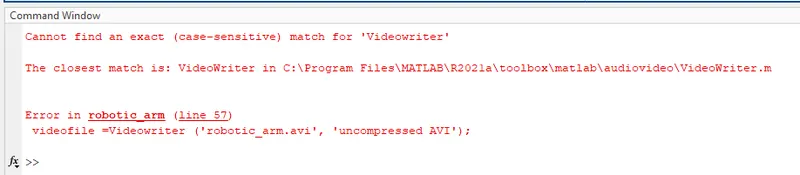
- Instead of VideoWriter, case sensitive Videowriter was typed. This error was corrected
CONCLUSION:
Simulation of 2r robotic arm is observed
REFERENCES
https://en.wikipedia.org/wiki/Forward_kinematics
https://www.souplovecentral.top/products.aspx?cname=2r+robotic+arm&cid=26