Week 2- 2R Robotic Arm Challenge
1. Aim:
To write a program to simulate the motion of the 2R Robotic arm.
2. Governing equations:
Forward kinematics refers to process of obtaining position and velocity of end effector, for the given known joint angles and angular velocities.
The trignometric equations used are:
- `Sin(theta) = (opposite) / (hypoten use)`
- `Cos(theta) = (adjesent)/(hypoten use)`
Note:
- The length is in meters.
- The angle is in degrees.
3. Objective of the project:
- Write to program in MATLAB to simulate the motion of the 2R robotic arm.
- Capture all the plots as frames and convert the frame array into the video file in .avi format.
- Save the motion in a video format.
4. Body of the content:
- Software used - MATLAB
- Language of the software - C/C++
-
% Forward kinematics of 2R Robotic arm using 'for loop' clear all % clearing all the garbage values and closing all the program/figures close all clc % Inputs L1 = 1; % length of first arm (meters) L2 = 0.5; % length of second arm (meters) % Defining the angular range theta1 = linspace(0,90, 10); % Angle range for the first arm in degrees theta2 = linspace(0,90, 50); % Angle range for the second arm in degrees ct = 1; % To keep track of the frames for i = 1:length(theta1) % Looping for the length if theta1 array THETA1 = theta1(i) % Assigning the values for j = 1:length(theta2) % Looping for the length if theta2 array THETA2 = theta2(j) % Assigning the values % Base co-ordinates X0 = 0; Y0 = 0; % End of link 1 & start of link 2 X1 = L1*cosd(THETA1); Y1 = L1*sind(THETA1); % End of link 2 X2 = X1 + L2*cosd(THETA2); % using cosd because our angle is in degrees Y2 = Y1 + L2*sind(THETA2); % using sind because our angle is in degrees % PLOTTING plot([X0 X1],[Y0 Y1],[X1 X2],[Y1 Y2],'linewidth',3) axis([-1 2 0 2]) % Definig the axis length pause(0.0001) % Pausing the frame for 0.1 sec M(ct) = getframe(gcf); % Getting the current firure and saving it in an array 'M' ct = ct+1; end end movie(M) videofile = VideoWriter('forward_kinematics_forloop', 'Uncompressed AVI') % Defining a video file open(videofile) % Opening the video file writeVideo(videofile,M) % Writing to video file with frames from M close(videofile) % Closing the video file - First all the previous programs and variable assigned are cleared.
- Then input are defined here the length of the first and second arm is defined.
- Then angular range is defined using linspace command.
- Then using the 'for loop' to run for the length of theta1 times.
- Again using a 'for loop' to run for the length of theta2 times.
- The position of base of the first arm is defined.
- The position of the second end of the first arm is calculated by using the trignometric formulae.
- The second end of the first arm becomes the first end of second arm.
- Then the position of the second end of second arm is calculated.
- Then this data is plotted using the plot command and axis are defined for steady frame.
- Every figure of the plot is caputured in a frame and an arrray is defined to store it named 'M'.
- Then by using videowriter command the video is created named as 'forward_kinematics_forloop.avi'
- First step is to open the file with file id.
- Then frame array is written.
- Close the function.
4. Results and output:
- The executed progrm:
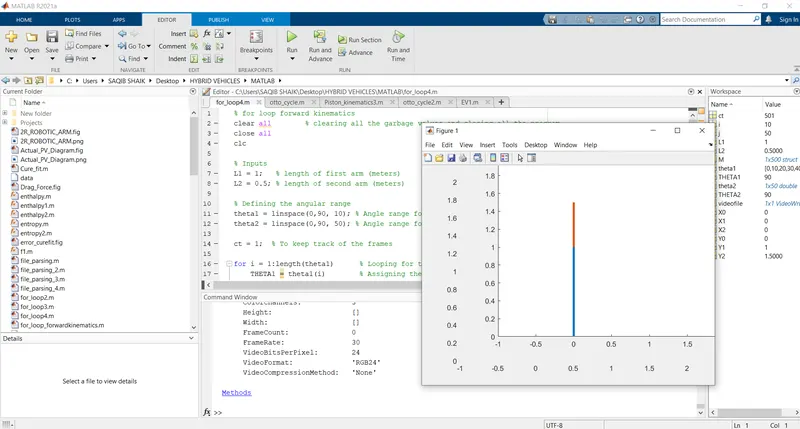
- The graphs plots array is the output containg the positon of both the arms. (single frame example)
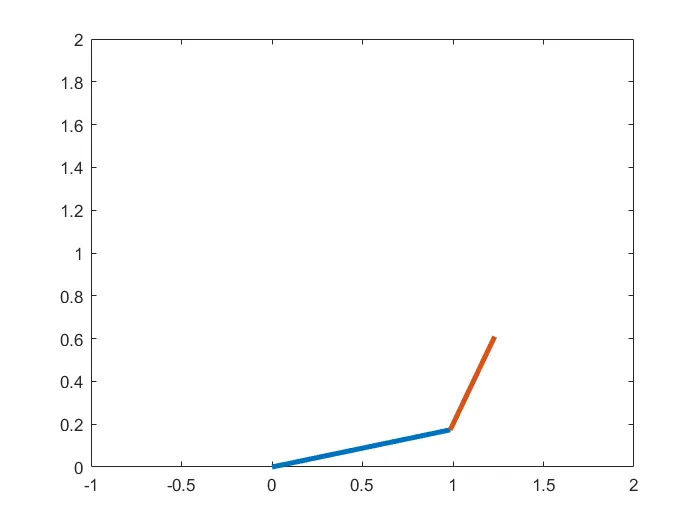
- The output is converted from frames array to video file named 'forward_kinematics_forloop' :
5. Conclusion:
- Successfully executed the program to simulate the motion of 2R Robotic arm.
- The output is stored in the form of a video named 'forward_kinematics_forloop.avi'.
6. References:
- 2 - Kinematics and Dynamics by Marko B.Popovic, Matthew P.Bowers, Worcester Polytechnic Institute, Worcester, MA, United States - https://doi.org/10.1016/B978-0-12-812939-5.00002-1