Week 2- 2R Robotic Arm Challenge
code:1
Forward kinematics of 2R robotic arm:
initially, the origin is taken as the reference point of the two arms. The origin is given as x,y.
The angle between the two arms with reference to the X-axis is taken as theta.
Now, the length of the two arms is given as L1 and L2.
Using L1, L2 and theta1 and theta2 we calculate x1,x2,y1,y2.
After getting the values of x1,x2,y1 and y2, the points are plotted on the graph using the line command.
The code for the above explanation is as follows;
%forward kinematics of 2R robotic arm

%inputs
%axis
x = 0;
y = 0;
%angle of two arms with respect to X-axis
theta1 = 60;
theta2 = 30;

%length of the arms
L1 = 4;
L2 = 2;

%calculating x1,y1 coordinates
x1 = L1*cosd(theta1);
y1 = L1*sind(theta2);
%calculating x2,y2 coordinates
x2 = x1 + L2*cosd(theta1);
y2 = y1 + L2*sind(theta2);

%plotting
line([x x1],[y y1],'linewidth',3,'color','r');
line([x1 x2],[y1 y2],'linewidth',3,'color','b');
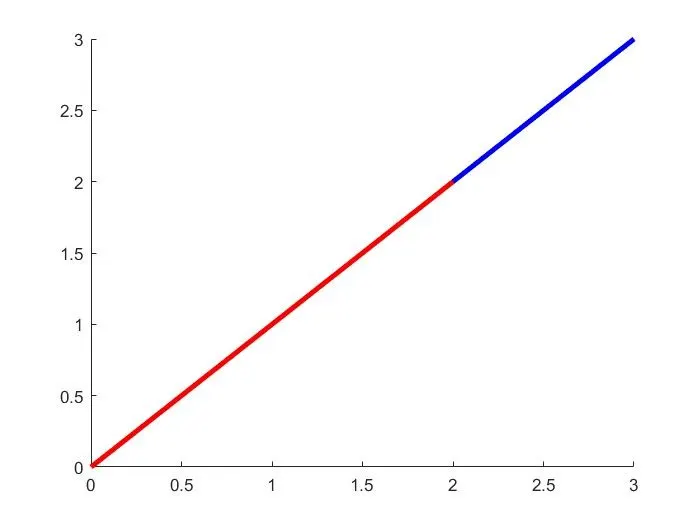
The figure of the plot:
code: 2
using for loop to forward kinematics of 2R robotic arm
The code is as follows:
%forward kinematics of 2R robotic arm using for loop

%inputs

%origin
x = 0;
y = 0;

%length of the arms
l1 = 4;
l2 = 2;

%angle between arm and X-axis
theta1 = linspace(0,90,8);
theta2 = linspace(0,90,8);

%using for loop
ct = 1;
for i = 1:length(theta1)
    THETA1 = theta1(i);
    for j = 1:length(theta2)
        THETA2 = theta2(j);

        %calculating x1,x2 and y1,y2
        x1 = l1*cosd(THETA1);
        y1 = l1*sind(THETA1);

        x2 = x1 + l2*cosd(THETA2);
        y2 = y1 + l2*sind(THETA2);

        %output

        %plotting
        plot([x x1],[y y1],[x1 x2],[y1 y2],'linewidth',3);
        axis([-2 5 0 6]);
        pause(0.1);

        %getting  movie frame
        M(ct) = getframe(gcf);
        ct = ct+1;
    end
end
%creating a movie
movie(M)
%creating video file
videofile = VideoWriter('for_loop_for_robotic_arm.avi','Uncompressed AVI');
open(videofile);
writeVideo(videofile,M);
close(videofile);
explanation:
firstly, the inputs are the origin (x,y) and the length of the arms are L1 and L2. The angle between the arms and the X-axis is taken as theta1 and theta2. The values of theta1 and theta2 ranging from 0 to 90 degrees. Using the Linspace command we get 8 values for both theta1 and theta2 between 0-90.
Now, using the for loop to perform the calculation for each theta1 and theta2 value.
for theta1'i' is used as the loop counter and 'j' is used as the loop counter for theta2.
THETA1 and THETA2 are taken as the new variables for each theta1 and theta2 values from 0 to 90 degrees.
calculating the new coordinates x1 and y1 using L1 and THETA1, and x2,y2 using L2 and THETA2.
The output is the new coordinates x1,y1 and x2,y2.
Now, these new coordinates are plotted using the plot command.
To visualise the movements of the two arms we create the plot as a movie using the movie and getframe command.
Creating a video file using videowriter command.
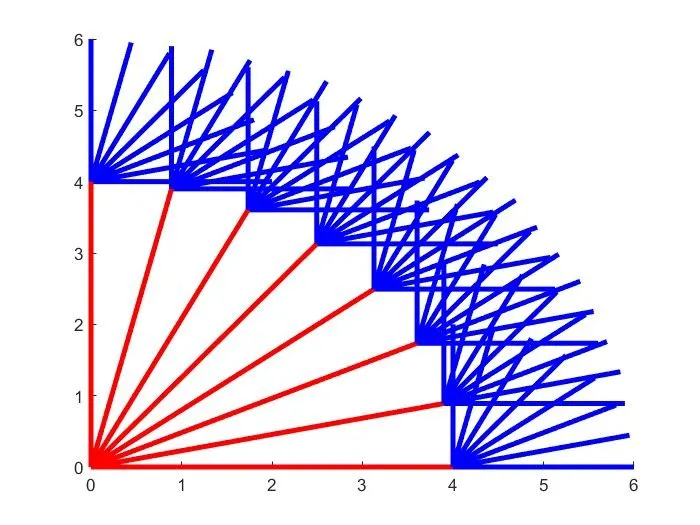
In the plot for each theta1 value, there are 8 different theta1 values. the plot is as follows:
Youtube link for the animation: