Week 2- 2R Robotic Arm Challenge
Aim: To write a program to simulate the forward kinematics of a 2R robotic arm.
- Create an animation file of the plot.
Governing Equations
There are few equations used to calculate the coordinates of the links of the robotic arm, which are as following
Where,
x1= x-axis co-ordinate on which first link end and second link start.
x2= x-axis co-ordinate on which second link end.
Y2= y-axis co-ordinate on which first link end and second link start.
y2= y-axis co-ordinate on which second link end.
l1 =length of the first link.
l1=length of the second link
TH1= angle between x-axis and link1.
TH2= angle between x-axis and link2.
Objective
To learn about the forward kinematics and to simulate and make animation file using the MATLAB programming.
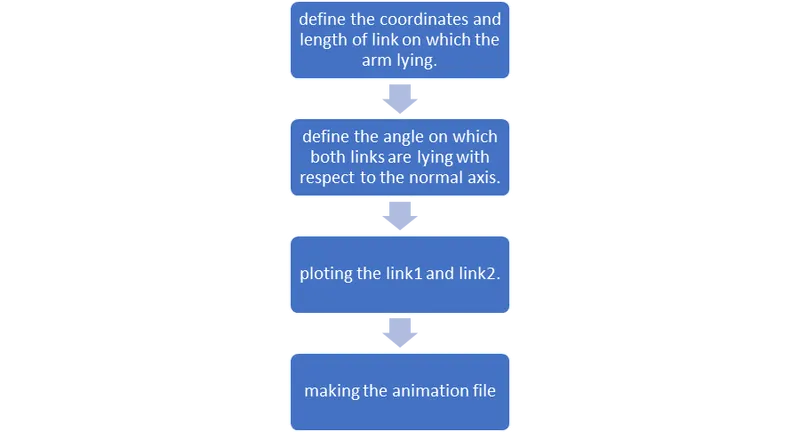
FLOW CHART: -
MATLAB Program for forward kinematics of 2R robotic arm:
clear all
close all
clc

%Inputs
l1 = 1.2
l2 = 0.8

% Input angles
a1 = linspace(0,90,10);
a2 = linspace(0,90,10);

ct = 1

% Different angles used for different coordinates
for i = 1:length(a1)
    TH1 = a1(i);
    for j = 1:length(a2)
        TH2 = a2(j);

%Coordinates
        x0=0
        y0=0

        x1 = l1*cosd(TH1)
        y1 = l1*sind(TH1)


        x2 = x1 + l2*cosd(TH2)
        y2 = y1 + l2*sind(TH2)
% Plotting
      plot([x0 x1],[y0 y1],[x1 x2],[y1 y2],'linewidth',3)
      axis([-0.5 2 0 2])
      pause(0.5)
      M(ct) = getframe(gcf);
      ct = ct+1;
    end

end
%Movie making
movie(M)
videofile = VideoWriter('2R_robotic_arm.avi','Uncompressed AVI');
open(videofile)
writeVideo(videofile,M)
close(videofile)
The above program starts with inputs as l1, l2 which are the lengths of the links and a1, a2 are the angle of the links to the normal axis for which 10 different angles are chose for both the links. After that figure counter is given by “ct” is putted as 1. After that the for loop is executed for the link1 and link2 for the different angle of the links with the x-axis.
In the first for loop the angle are putted for the link1 and an another for loop is defined in which the angles are putted for the link2. After that the values of angle are executed in the coordinate equations by which the coordinates points of start and end of link1 and link2 are calculated. After the coordinate values the coordinates are plotted with the help of the plot command and the whole cycle is repeated for the next value of the angle. With the plot command the axis are defined for the plot. The pause is defined for the pause of the plot. The command M(ct) = getframe(gcf) is used for the continuous plotting of the coordinates which are calculated by the coordinate equations. After that the figure count is increased by 1 and the first and second for loops are end.
For the animation file making, the command movie(M) is putted after which the following commands are executed for making the animation video,
videofile = VideoWriter('2R_robotic_arm.avi','Uncompressed AVI');
open(videofile)
writeVideo(videofile,M)
The above commands are used define movie and run the video file and make an AVI file for the animation video. The last command is used to close the video file which is running.
RESULT
The programing is done using the MATLAB programing and the animation file is made whose link is https://youtu.be/9IdsbEh6bs4 and this link directs you to the animation video uploaded at YouTube.
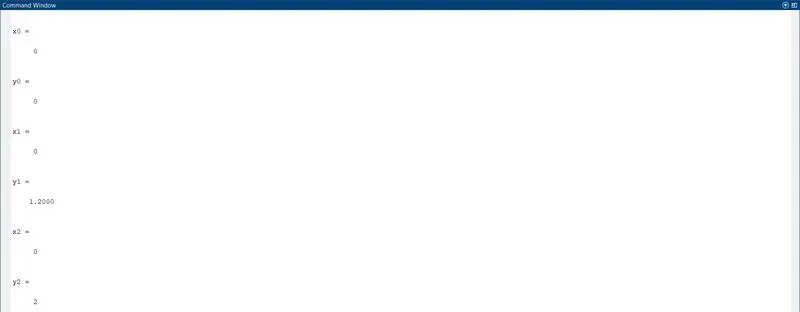
This is the few output values of the coordinates in the screenshot if you want to check all output then go for run the above program.
ERRORS
01.
I forget to end the loop , so ended the loop by using the end command.
02.
I used the unrecognized function ‘theta’ instead of a1, so I replaced the theta by a1 in first
loop and by a2 in second loop.
03.
04.
Both 03. and 04. are the errors come due to the confusion in lower or upper case of the commands, so to resolve this I conformed the command in proper way and resolve the error.
CONCLUSION
From the above challenge I have learn the MATLAB programming for the forward kinematics of 2R robotic arm and also learn the animation movie making using the MATLAB programming.