Week 2- 2R Robotic Arm Challenge
Aim:-
To write a program in MATLAB to simulate the forward kinematics of a 2R Robotic Arm.
Governing Equations:-
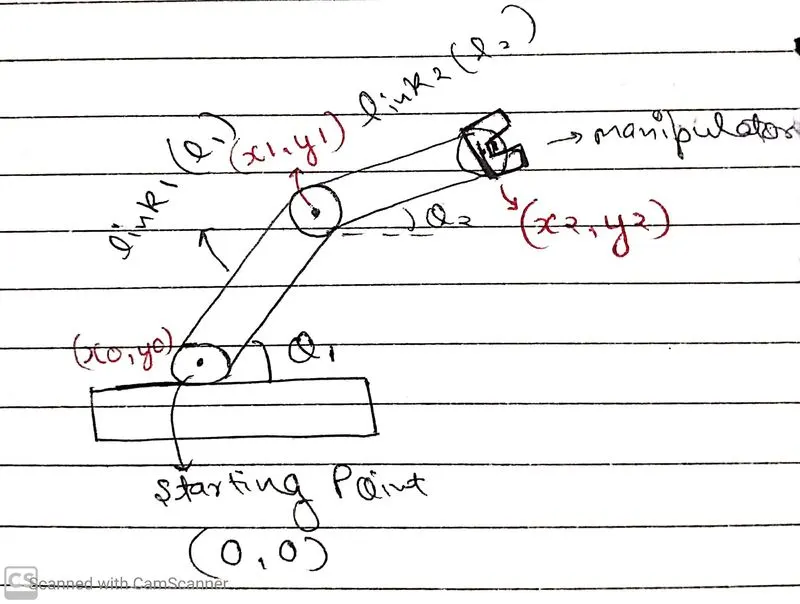
As shown in the figure, the coordinate of origin is (x0,y0) which is (0,0). And the endpoint of the first arm as (x1,y1), by trigonometry we can conclude that x1=L1*cos(THETA1), y1=L1*sin(THETA1). And similarly, I have taken the endpoint of the second arm as (x2,y2), by trigonometry we can conclude that x2=L2*cos(THETA2), y2=L2*sin(THETA2).
Body of the content:-(Code)
%Forward Kinematics of a 2R Robotic Arm
clc
clear all
close all

%Inputs
L1=2;
L2=1;
theta1=linspace(0,90,15);
theta2=linspace(0,90,15);

%Counter
count=1;

for i=1:length(theta1);%For first arm
    THETA1=theta1(i);

    for j=1:length(theta2);%For second arm
        THETA2=theta2(j);

        %Origin Coordinates
        x0=0;
        y0=0;

        %End point coordinates of first arm
        x1=L1*cosd(THETA1);
        y1=L1*sind(THETA1);

        %End point coordinates of second arm
        x2=x1+L2*cosd(THETA2);
        y2=y1+L2*sind(THETA2);

        %Plotting the lines from the points
        plot([x0 x1],[y0 y1],[x1 x2],[y1 y2],'linewidth',5);
        title('2R Robotic Arm');
        xlabel('X-axis');
        ylabel('Y-axis');
        axis([-0.2 3.5 0 3.5]);
        pause(0.01)
        M(count)=getframe(gcf);
        count=count+1;
    end
end
%Making the movie
movie(M);
videofile=VideoWriter('robotic_arm.avi','Uncompressed AVI');
open(videofile);
writeVideo(videofile,M);
close(videofile);
Explanation of code:-
1. Before starting the main code, I have used the commands. "clc" for clearing the command window, "clear all" for clearing all the previous variables, "close all" for closing all the previous plots.
2. Then I have added the inputs, I have taken the length of the first arm of the robotic arm as L1 and the second one as L2. And the angle made by the first arm with horizontal plane as theta1 and similiarly for the second one as theta2.
3. Both the values of theta1 and theta2 are varying, so I used "linspace" command as the starting angle as 0 degree, ending angle as 90 degrees and in between 0 to 90 total 15 intervals are there.
4. Then I added a counter variable as "count" for counting the total number of frames required for animation making.
5. So now the main logic comes, basically for each value of theta1, theta2 has 15 dirrefert values. So I used two for loop for that. First will give a value of theta1 and that particular value will be stored in THETA1. And for this THETA1 there will be 15 different value for theta 2. So the second for loop give a particular vaules of theta2 and that value is stored in THETA2.
6. Now, I have taken the origin as (x0,y0)=(0,0). And the endpoint of the first arm as (x1,y1), by trigonometry we can conclude that x1=L1*cos(THETA1), y1=L1*sin(THETA1). And similarly, I have taken the endpoint of the second arm as (x2,y2), by trigonometry we can conclude that x2=L2*cos(THETA2), y2=L2*sin(THETA2). In MATLAB, cos and sin values are in radians, so we have to take cosd and sind.
7. After calculating all points, we have to plot them. So for this, I used "plot" command as plot([x-coordinates of endpoints of first arm],[y-coordinates of endpoints of first arm],[x-coordinates of endpoints of second arm],[y-coordinates of endpoints of second arm], with a linewidth of 5).
8. Then I have added the title, and x & y labels for the plot.
9. Then I have given the axis for the plot. with "axis" command.
10. Now we are ready for a plot. But to see it nicely, we have to give a pause to it with a "pause" command.
11. Now for the animation of the plot, I have used "getframe" command to collect the current frame and stored it in an array as "M". Now after getting the frame, I have given an increment of +1 in "count" so that it can run again and collect the next frame.
12. After this I have closed the for loop with the "end" command.
13. Now for making the movie, I named it as "robotic_arm.avi", to make an uncompressed AVI file. Now opening this file with "open" command and then read and write all the frames collected in "M". And then closed the file.
Errors faced:-
Previously, I am using "line" command for plotting the lines, but it is showing all the lines.
%Forward Kinematics of a 2R Robotic Arm
clc
clear all
close all

%Inputs
L1=2;
L2=1;
theta1=linspace(0,90,10);
theta2=linspace(0,90,10);

%Counter
count=1;

for i=1:length(theta1);%For first arm
    THETA1=theta1(i);

    for j=1:length(theta2);%For second arm
        THETA2=theta2(j);

        %Origin Coordinates
        x0=0;
        y0=0;

        %End point coordinates of first arm
        x1=L1*cosd(THETA1);
        y1=L1*sind(THETA1);

        %End point coordinates of second arm
        x2=x1+L2*cosd(THETA2);
        y2=y1+L2*sind(THETA2);

        %Plotting the lines from the points
        line([x0 x1],[y0 y1],'linewidth',5,'color','b');
        line([x1 x2],[y1 y2],'linewidth',5,'color','r');
        title('2R Robotic Arm');
        xlabel('X-axis');
        ylabel('Y-axis');
        axis([-0.2 3.5 0 3.5]);
        pause(0.001)
        M(count)=getframe(gcf);
        count=count+1;
    end
end
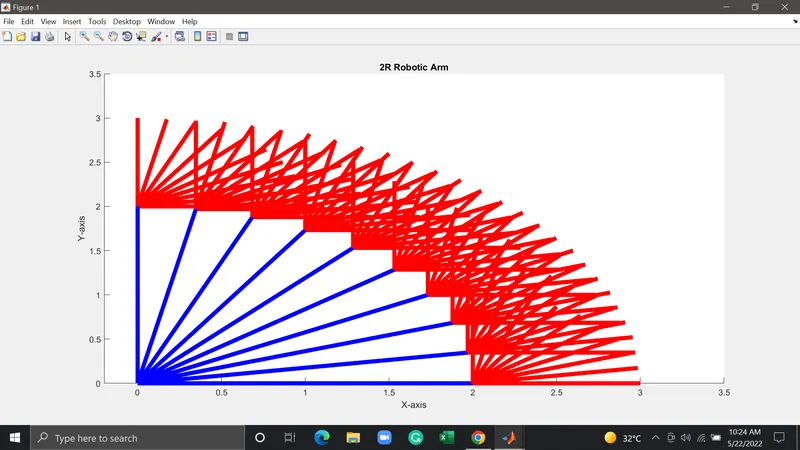
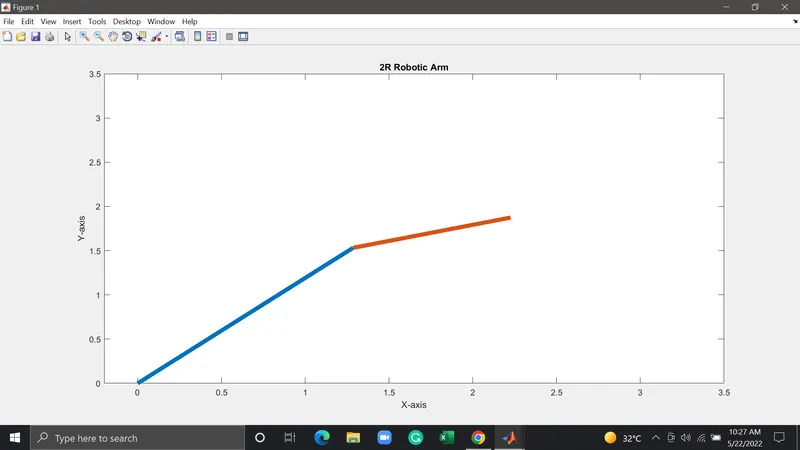
So finally I resolved this by using the plot command.
%Forward Kinematics of a 2R Robotic Arm
clc
clear all
close all

%Inputs
L1=2;
L2=1;
theta1=linspace(0,90,10);
theta2=linspace(0,90,10);

%Counter
count=1;

for i=1:length(theta1);%For first arm
    THETA1=theta1(i);

    for j=1:length(theta2);%For second arm
        THETA2=theta2(j);

        %Origin Coordinates
        x0=0;
        y0=0;

        %End point coordinates of first arm
        x1=L1*cosd(THETA1);
        y1=L1*sind(THETA1);

        %End point coordinates of second arm
        x2=x1+L2*cosd(THETA2);
        y2=y1+L2*sind(THETA2);

        %Plotting the lines from the points
        plot([x0 x1],[y0 y1],[x1 x2],[y1 y2],'linewidth',5);
        title('2R Robotic Arm');
        xlabel('X-axis');
        ylabel('Y-axis');
        axis([-0.2 3.5 0 3.5]);
        pause(0.01)
        M(count)=getframe(gcf);
        count=count+1;
    end
end
Conclusion:-
Got the plot and the animation for forward kinematics of 2R Robotic Arm.
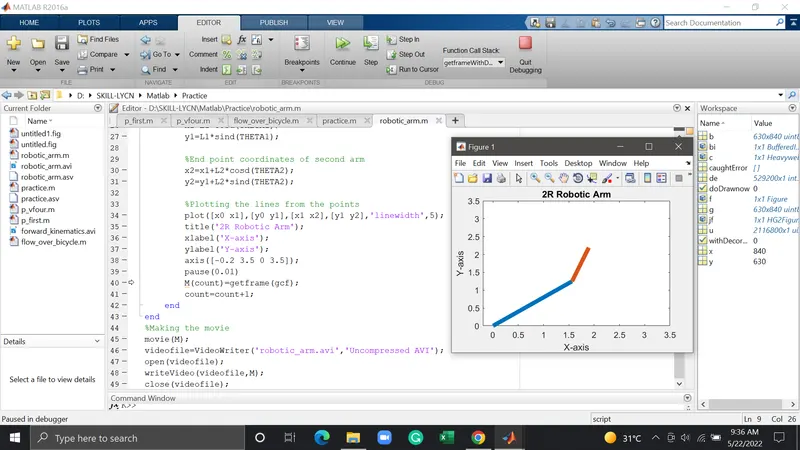
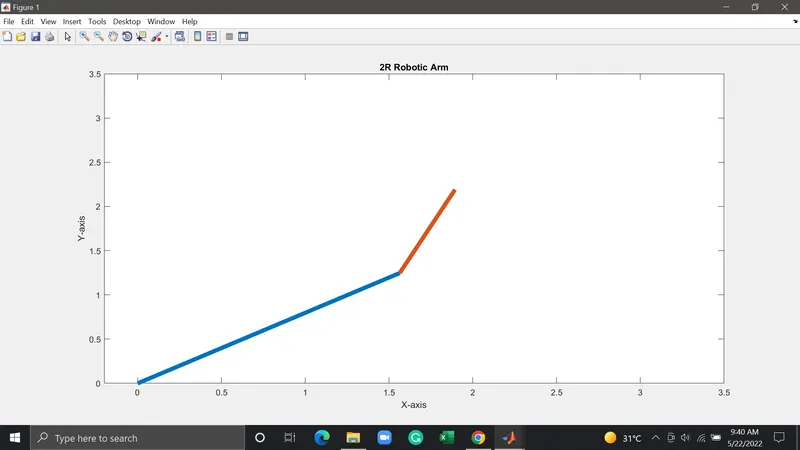
The animation file is too big(340+MB), I don't have much internet to upload this file. That's why I am recording the animation file and uploading on the drive.
Animation File Link:- https://drive.google.com/file/d/1FSKiH63I-3x67b6trmFJgRbpxKEDWq15/view?usp=sharing