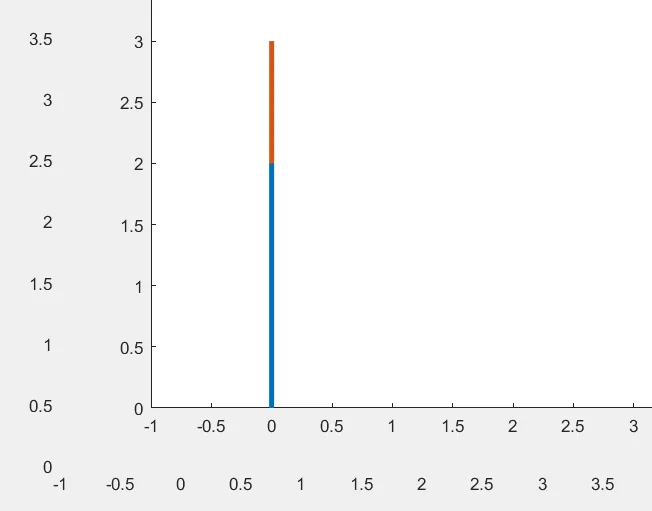
Week 2- 2R Robotic Arm Challenge
Write a program in Matlab to simulate the forward kinematics of a 2R Robotic Arm, as shown in the video?
clc
close all
clear all

%Two arm robotic kinematics manipulator
%Given datas

theta1=linspace(0,90,10);

theta2=linspace(0,90,10);


%I have used cos and sin to find the exact points of x and y for links
%For loop


ct=1

for i = 1:length(theta1);
THETA1=theta1(i);
for j =1:length(theta2);
THETA2=theta2(j);

L1=2;

L2=1;

x=0;
y=0;

x1=L1*cosd(THETA1);
y1=L1*sind(THETA1);

x2=x1+L2*cosd(THETA2);
y2=y1+L2*sind(THETA2);

%plotting the links

plot([x x1],[y y1],[x1 x2],[y1 y2],'linewidth',3)

axis([-1 3.5 0 3.5])

pause(.3)

M(ct)=getframe(gcf);

ct=ct+1

end
end

movie(M)

videofile=VideoWriter('Forward_kinematics_for_challenge.avi','Uncompressed AVI');

open(videofile)

writeVideo(videofile,M)

close(videofile)
Video link of a 2R Robotic Arm
If this link was not redirecting to youtube, please copy the link and paste it into the youtube search box.
In that video we could get to know what are the possible positions can achieve using those two links.
CODING EXPLANATION
Clear all = It clears all the data on a workspace.
close all = It will close the all back end running process.
(eg): plots
CLC = It will clear all the history on the command window.
What are theta1 and theta2?
Theta1 represents the first link angle and Theta2 represents the second link angle.
Linspace?
Linspace is a command which will split numbers equally between starting range and ending range as we needed.
(eg):
linspace(starting range, ending range, number of values needed).
For loop?
For loop is a command which will repeat a certain syntax, again and again, depending on how much value we feed.
Here, I used a for loop command to provide more theta values to links, so my links could attain many positions each time it moves.
In this problem, I have two links and each link has to move independently from one another, so I have used for loop into the for loop as result both links move Independently.
L1 and L2?
L1 is the length of the first link and L2 is the length of the second link.
Coordinates?
x = It is the base point of the first link in the x axis.
y = It is the base point of the first link in the y axis.
x1 = It is the end point of the first link in the x axis and starting point of the second link in the x axis.
y1 = It is the end point of the first link in the y axis and starting point of the second link in the y axis.
x2 = It is the end point of the second link in the x axis.
y2 = It is the end point of the second link in the y axis.
Plot?
plot is also called a graph.
To make a plot we need to feed x and y values.
Linewidth is used to increase the width of the respective line.
Axis will represent the origin values and ending values of both the x and y axis.
SYNTAX FOR MAKING AN ANIMATION MOVIE :
M(ct)=getframe(gcf);
Here M is variable
gcf=get current frame
ct=ct+1
Here, I am gradually changing the frame one by one in a single plot and making as video.
movie(M)
M is variable, so the movie will be created according to the position or values of the variable M.
videofile=VideoWriter('FILE_NAME.avi','Uncompressed AVI');
Here, I am creating a file name for the movie and how want it to be either compressed or uncompressed.
open(videofile)
opening the videofile
writeVideo(videofile,M)
Feeding the M values into a video file by writing the video
close(videofile)
closing the videofile.
Applications :
2R robotic arm has wide usage in manufacturing industries such as
Painting
Welding
Inspection purpose
Cutting
L1=1;
L2=0.5;
theta1=linspace(0,90,10);
theta2=linspace(0,90,10);
ct=1

for i = 1:length(theta1)
    THETA1=theta1(i)
    for j =1:length(theta2)
        THETA2=theta2(j)


%calculating the coordinators using a input values

x=0;
y=0;
x1=L1*cosd(theta1);
y1=L1*sind(theta1);
x2=x1+L2*cosd(theta2);
y2=y1+L2*sind(theta2);

%plotting the coordinators

hold on
plot([x x1],[y y1],'linewidth',3,'Color','r')
plot([x1 x2],[y1 y2],'linewidth',3,'Color','b')
axis([-1 2 0 1.5])

pause(.03)

ct=ct+1

end
end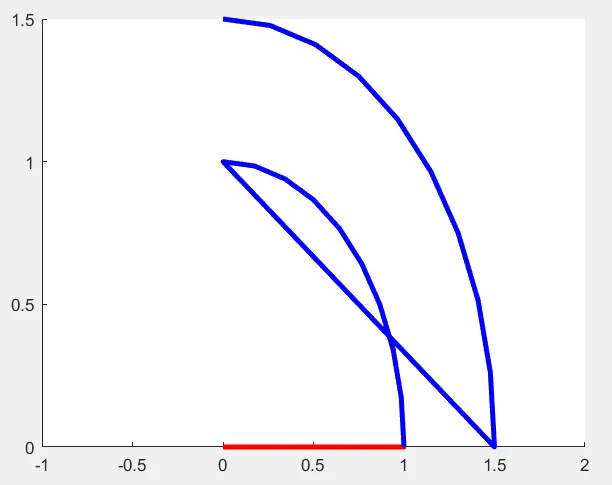
for i = 1:length(theta1);
THETA1=theta1(i);
for j =1:length(theta2);
THETA2=theta2(j);

L1=2;

L2=1;

x=0;
y=0;

x1=L1*cosd(THETA1);
y1=L1*sind(THETA1);

x2=x1+L2*cosd(THETA2);
y2=y1+L2*sind(THETA2);

%plotting the links
ct=1

plot([x x1],[y y1],[x1 x2],[y1 y2],'linewidth',3)

axis([-1 3.5 0 3.5])

pause(.3)

M(ct)=getframe(gcf);

ct=ct+1

end
end

movie(M)

videofile=VideoWriter('Forward kinematics_for_challenge.avi','Uncompressed AVI');

open(videofile)

writeVideo(videofile,M)

close(videofile)