Week 2- 2R Robotic Arm Challenge
Aim:
To write a program in Matlab to simulate the forward kinematics of a 2R Robotic Arm.
Introduction:
Robots are used in this type of physical automation. Automation is the use of computer software, machines or other technology to carry out tasks that would otherwise be done by a human. Robots are programmable machines that use sensors and actuators to interact with the physical world and perform actions autonomously or semi-autonomously. They can perform various tasks by changing the end manipulator like welding or machining tools. Many industires are moving towards automation to minimize human errors and to increase the efficiency.
By using matlab we an easily identify the workspace of the robots by defining the robot arm length and the degree of the arms, we can modify with accurate kinematics.
Robotic Arm:
In this program we are taking an robotic arm with two links and an end manipulator. The length of thr first arm is L1=1m and the length of the second arm L2=0.5m.
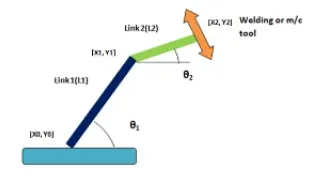
The angle between the base plate and the first arm makes an angle θ1 and the angle between the ending part of the firat arm and the starting of the second arm makes an angle θ2. The robotic arm contains three co-ordinates
Base point
(x0,y0) = (0,0)
Co-ordinates for Link 1
(x0,y0) = (0,0)
(x1,y1) = (L1*cosθ1,L1sinθ1)
Co-ordinates for Link 2
(x1,y1) = (L1*cosθ1,L1sinθ1)
(x2,y2) = (x1+L2*cosθ2,y1+L2*sinθ2)
Objective:
The main objective here is to find out the workspace of the robotic arm. We can find out by changing the values of the θ1 and θ2 ranging from 0 to 90. For one position of θ1 we get 10 different position for θ2 by joining all the plots we can make an animation from those results.
Program:
%a program to simulate forward kinematics of a 2R robotic arm
close all
clear all
clc

%Inputs
l1 = 1;
l2 = 0.5;

theta1 = linspace(0,90,10);
theta2 = linspace(0,90,10);

ct = 1;
for i = 1:length(theta1)
    THETA1 = theta1(i);
    for j = 1:length(theta2)
    THETA2 = theta2(j);
x0 = 0;
y0 = 0;

x1 = l1*cosd(THETA1);
y1 = l1*sind(THETA1);

x2 = x1 + l2*cosd(THETA2);
y2 = y1 + l2*sind(THETA2);

%Plotting

plot([x0 x1],[y0 y1],[x1 x2],[y1 y2],'linewidth',3)
axis([-0.1 1.5 0 1.5])
title('kinematics of 2R robotic arm')
xlabel('movement in x-axis')
ylabel('movement in y-axis')
pause(0.03);
grid on
M(ct) = getframe(gcf);
ct=ct+1;
    end
end
movie(M)
videofile = VideoWriter('forward_kinematics.avi','Uncompressed AVI');
open(videofile)
writeVideo(videofile,M)
close(videofile)
Explanation:
First of all the inputs should be given
l1 = 1;
l2 = 0.5;
The inputs length of the arm in given.
theta1 = linspace(0,90,10);
theta2 = linspace(0,90,10);
The angles for theta 1 and theta 2 is given. It is given using the linspace command, so what it does is from 0 to 90 degree it automatically chooses 10 values.
ct = 1;
The counter value is given as 1.
for i = 1:length(theta1)
The value of i wil lchange from 1 to the length of 10, where lenth(theta1) contains 10 values which is generated by linspace command , i is the loop counter.
THETA1 = theta1(i);
THETA 1 is just a variable which contains only one variable where theta1(i) is an array which contains 10 values from 0 to 90, i is the loop counter it decides how many tmes the for loop will be executed. For each value of theta1 the theta2 will change 10 positions.
for j = 1:length(theta2)
THETA2 = theta2(j);
For each for loop the loop counter should be different from the one used before,here j is the loop counter. This command is same as the previous for loop instead of i we are using j and theta1 to be replaced by theta2.
x0 = 0;
y0 = 0;
x1 = l1*cosd(THETA1);
y1 = l1*sind(THETA1);
x2 = x1 + l2*cosd(THETA2);
y2 = y1 + l2*sind(THETA2);
These were the co-ordinates for the robotic arm.
%Plotting
plot([x0 x1],[y0 y1],[x1 x2],[y1 y2],'linewidth',3)
These commands are required to generate the plot. The values[x0 x1],[y0 y1],[x1 x2],[y1 y2] are computed and the plot will be generated. The 'linewidth',3 is used to change the thickness of the line.
axis([-0.1 1.5 0 1.5])
The axis command is given for the range of values in the x and y axis.
title('kinematics of 2R robotic arm')
xlabel('movement in x-axis')
ylabel('movement in y-axis')
The title and name of the axis is specified using these above commands.
pause(0.03);
A pause of 0.03 sec is given for better and smooth animation of the plot.
grid on
This command is used to turn on the grid in the plot.
M(ct) = getframe(gcf);
This command is used to get frames from the figure window.
ct=ct+1;
An increment to the counter is given for for loop execution.
movie(M)
videofile = VideoWriter('forward_kinematics.avi','Uncompressed AVI');
With the help of these commands the above generated plot is saved as a video file. We need to give the name for the video file as well as the extension.It will be saved in the working directory.
open(videofile)
writeVideo(videofile,M)
close(videofile)
As the name of the command implies the video file will be opened played and closed.
Errors:
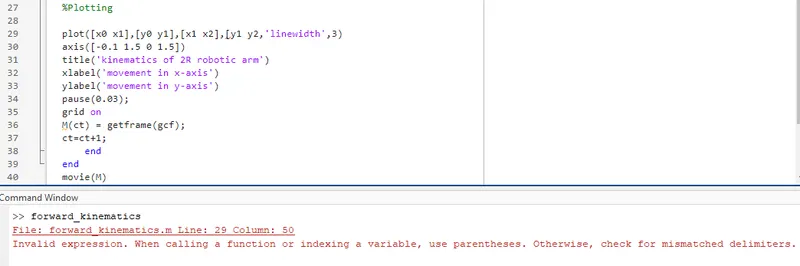
Forgot to add square brackets while typing. It showed the following error.
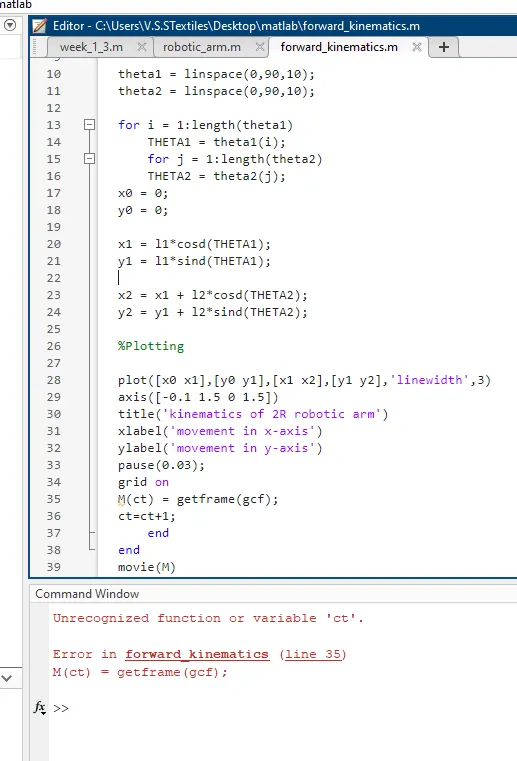
Failed to add the counter value as a result i got an error which says unrecognized function or variable'ct'. After entering the value the error as fixed.
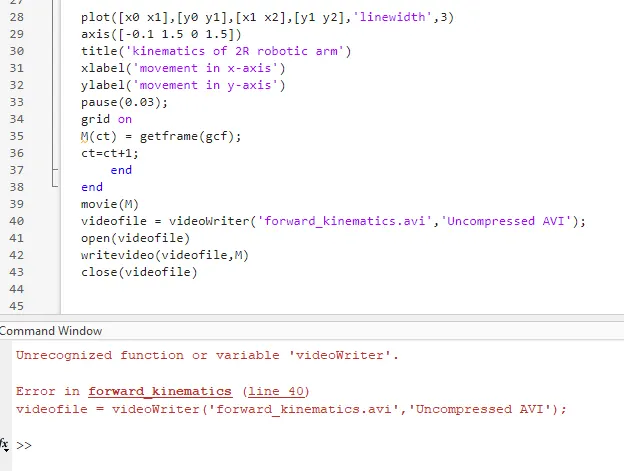
Everything worked fine but the video wasn't saved in the working directory i got the above mentioned error. Then after realizing that i made a mistake in typing the command i fixed it.Instead of using Upper case i used lower case videofile = Videowriter and writevideo(videofile,M) in these commands.
Output:
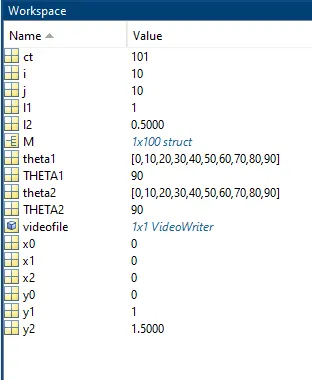
This is the output obtained from the program.
Google Drive link for the animated video:
https://drive.google.com/file/d/1_k3-2LFFt9jwsFOLUEFaI2pRZimisnDv/view?usp=sharing
Conclusion:
Thus we have written a program in Matlab to simulate the forward kinematics of a 2R Robotic Arm and animated the video to analyse the workspace of the arm.