Week 2- 2R Robotic Arm Challenge
AIM:
Program in Matlab to simulate The Forward Kinematics of a 2R Robotic Arm
FORWARD KINEMATICS:
- The forward kinematics of robotics arm is which used to computerize the position of the robot end effector for the specified values of the joint parameters.
- The kinematics equations of the robot are used in robotics, computer games, and animation.
- Now a days in automobile industries the robotic arms are used to weld the body of the car and to paint the car body.By which using the MAT lab we are going to stimulate the position of the robotic hands and how its going to move etc.
GOVERING EQUATION:
In which refer the below image as the reference as the robotic arm which has two links. 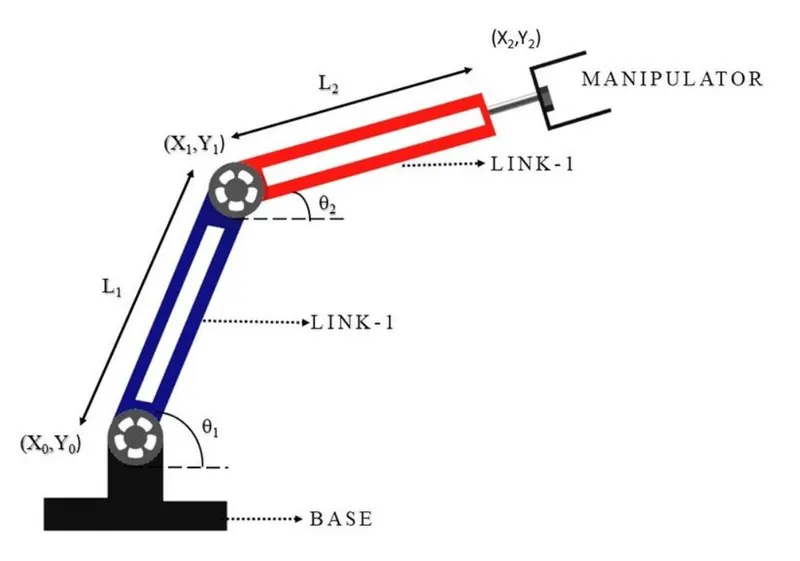
Here,
- L1=Length of the Link 1
- L2=Length of the Link 2
- θ1=Angle of the Link 1
- θ2=Angle of the Link 2
- Equation for calculate the co-ordinates of the Links Staring and Ending points
Co-Ordinates of the Link 1
- Starting point - [X0,Y0]=[0,0]
- Ending point - [X1,Y1]=[L1cosθ1,L1sinθ1]
Co-Ordinates of the Link 2
- Starting point - [X1,Y1]=[L1cosθ1,L1sinθ1]
- Ending point - [X2,Y2]=[X1+L2cosθ2,Y2+L2sinθ2]
close all
clear all
clc
%INPUTS FOR THE LENGTH AND ANGLE OF THE LINK 1&2
l1=1;
l2=0.5;
theta1 = linspace(0,90,5);
theta2 = linspace(0,90,5);

ct=1;
for i= 1:length(theta1)
    THETA1=theta1(i);
    for j= 1:length(theta2)
        THETA2=theta2(j);
%DETAILS FOR CO-ORDINATES OF LINK 1&2
        x0=0;
        y0=0;

        x1=l1*cosd(THETA1);
        y1=l1*sind(THETA1);

        x2=x1+l2*cosd(THETA2);
        y2=y1+l2*sind(THETA2);

       %PLOTTING
        plot([x0,x1],[y0,y1],[x1,x2],[y1,y2],'linewidth',3)
        axis([-0.1 1.5 0 1.5])
        pause(0.3)
        M(ct)=getframe(gcf);
        ct=ct+1;
    end
end
movie(M)
videofile=VideoWriter('Forward_Kinematics_of_robotic_arm.avi','Uncompressed AVI');
open(videofile)
writeVideo(videofile,M)
close(videofile)
PROGRAM:
%PROGRAM STARTS
close all
clear all
clc
%INPUTS FOR THE LENGTH AND ANGLE OF THE LINK 1&2
l1=1;
l2=0.5;
theta1 = linspace(0,90,5);
theta2 = linspace(0,90,5);
ct=1;
for i= 1:length(theta1)
THETA1=theta1(i);
for j= 1:length(theta2)
THETA2=theta2(j);
%DETAILS FOR CO-ORDINATES OF LINK 1&2
x0=0;
y0=0;
x1=l1*cosd(THETA1);
y1=l1*sind(THETA1);
x2=x1+l2*cosd(THETA2);
y2=y1+l2*sind(THETA2);
%PLOTTING
plot([x0,x1],[y0,y1],[x1,x2],[y1,y2],'linewidth',3)
axis([-0.1 1.5 0 1.5])
pause(0.03)
M(ct)=getframe(gcf);
ct=ct+1;
end
end
movie(M)
videofile = VideoWriter ('Robotic_arm.avi','Uncompressed AVI');
open(videofile)
writeVideo(videofile,M)
close(videofile)
%PROGRAM END
EXPLANATION:
1.The value for the length and angle of the Link is been assigned
l1=1;
l2=0.5;
2.By using this command therare 5 values for theta value have been calculated from 0 to 90.
theta1 = linspace(0,90,5);
theta2 = linspace(0,90,5);
3.Counter increament value has been assinged as 1.
ct=1;
4.For loop action is used to repeat the action for the 5 values of theta between 0 to 90 which was assigned and which THETA1 is avariable which has the theta1 array value with i as loop counter which makes the for loop to repeat the action.the same thing which is followed for THETA2
for i= 1:length(theta1)
THETA1=theta1(i);
for j= 1:length(theta2)
THETA2=theta2(j);
5.Starting and point Co-ordinated of the Link 1&2has been provided
x0=0;
y0=0;
x1=l1*cosd(THETA1);
y1=l1*sind(THETA1);
x2=x1+l2*cosd(THETA2);
y2=y1+l2*sind(THETA2);
6.Plotting is been done with the plot commanda,and axis is been assigned to fix the plot area,pause command is used as the speed of the link movement,count increament also provided in the loop.
plot([x0,x1],[y0,y1],[x1,x2],[y1,y2],'linewidth',3)
axis([-0.1 1.5 0 1.5])
pause(0.03)
M(ct)=getframe(gcf);
ct=ct+1;
7.This commands is used to create the animation video.
movie(M)
videofile = VideoWriter('Robotic_arm.avi','Uncompressed AVI');
open(videofile)
writeVideo(videofile,M)
close(videofile)
ERRORS FACED:
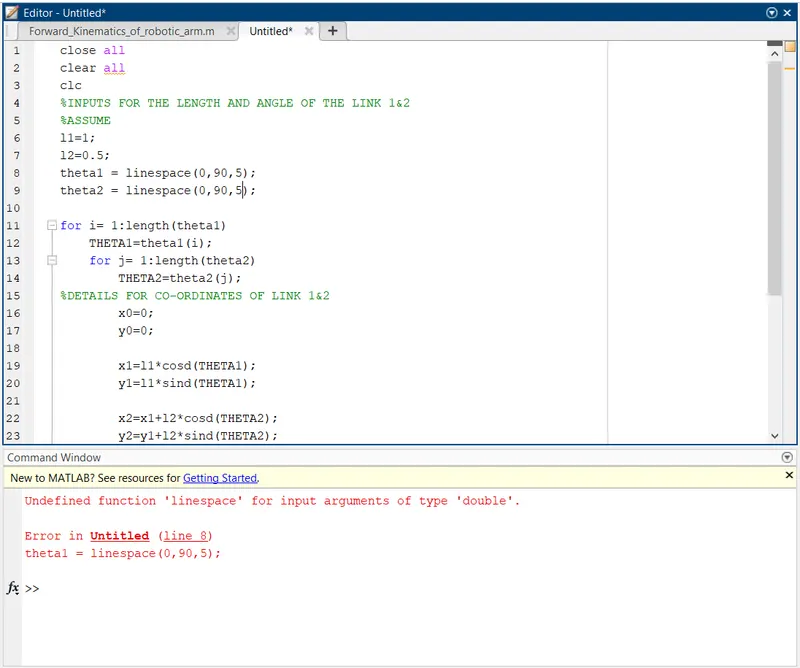
Error 1: For typeing linspace for the theta i have typed linespace
Action:The Letter "e" was eliminated.
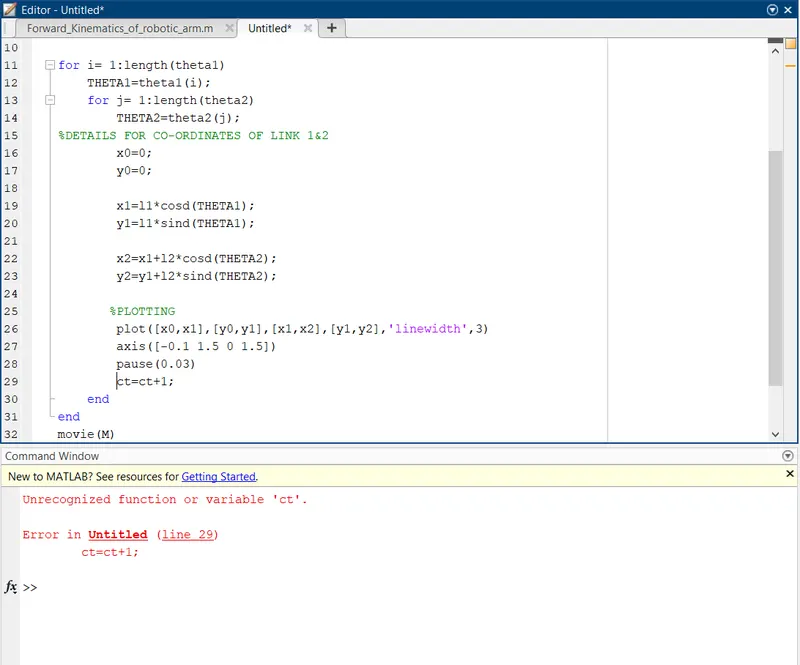
Error 2: Counter increament ct value was not assingned in the program I have used in for loop.
Action: Counter increament ct value was assigned before the for loop starts
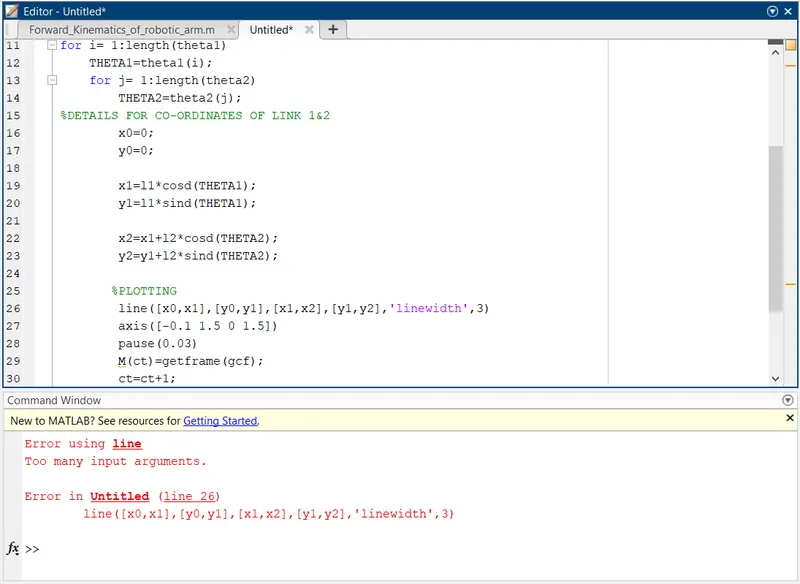
Error 3: While plotting Instead of plot command i have used line command with too many input argument
Action: Plot command is used for is program with many input argument.
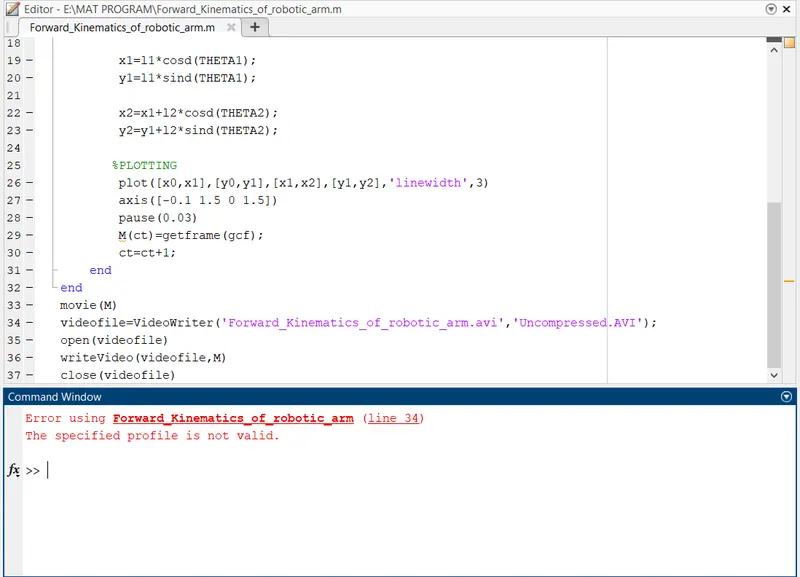
Error 4: While creating the videofile for the profile name i have typed Uncompressed.AVI instead of Uncompressed AVI
Action: The DOT is removed and space provided.
RESULT:
The Google drive link:
https://drive.google.com/file/d/1jymqAe_vmcDnLssc8fvtawjqgszEGbkJ/view?usp=sharing