Week 2- 2R Robotic Arm Challenge
Aim= To simulate the forward kinematics of a 2R Robotic Arm
Procedure=
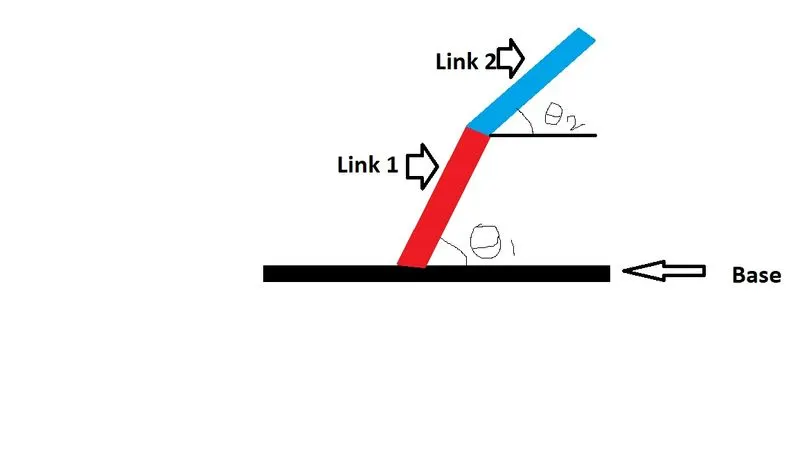
- Figure shows that the pictorial view of 2R Robotic Arm .
- In this figure there are two links such as link 1,link 2,which is connected by joint
- `theta1`and `theta2`is angle made by link 1, link 2 respectively.
Matlab code for Simulating the forward kinematic of a 2R Robotic Arm
clear all
close all
clc
% inputs
% Length of robotic arm link 1 and  link 2
l1=1;
l2=0.5;
% Angle between base and robotic arm
theta1=linspace(0,90,10);
theta2=linspace(0,90,10);
ct=1;
for i=1:length(theta1)
    THETA1=theta1(i);
    for j=1:length(theta2)
    THETA2=theta2(j);
    % Coordinates for Robotic Arms
    x0=0;
    y0=0;

    x1=l1*cosd(THETA1);
    y1=l1*sind(THETA1);

    x2=x1+l2*cosd(THETA2);
    y2=y1+l2*sind(THETA2);
    % Plotting

    plot([x0 x1],[y0 y1],[x1 x2],[y1 y2],'linewidth',3)
    axis([-0.1 1.5 0 1.5])
     pause(0.03)
     M(ct)=getframe(gcf);
     ct=ct+1;

    end
end
% Conversion for plot into video file
movie(M)
videofile=VideoWriter('forward_kinematics.avi','uncompressed AVI');
open(videofile)
writeVideo(videofile,M)
close(videofile)
Explanation of above matlab code
Step 1) Take a inputs ie length of a robotic arm link1 and link2 we consider for link1=1m and link 2=0.5m,and also the value for angle made by link1 and link2 which is required to simulate the robotic arm, we take the ten values of `theta`between 0 to 90 degree,by using linspace command and represent it by theta1 and theta2 respectively.
Step 2) We use for loop due to which the all values of theta1 and theta2 are used to simulate the robotic arm
Step 3) For Simulating the robotic arm we required the coordinates of a robotic arms (x0, y0),(x1, y1).(x2, y2)
the value of (x1,y1) and (x2.y2) are calculated by using trignometric relation.
Step 3) for Plotting we use plot command and linewidth is taken 3
we use axis command for visualize the plot between minimum and maximum value of x and y axis respectively.
Step 4) Conversion of plot into video file for that we use 1st movie command and then use video file command which required file name and profile after submitting this the avi file is created .
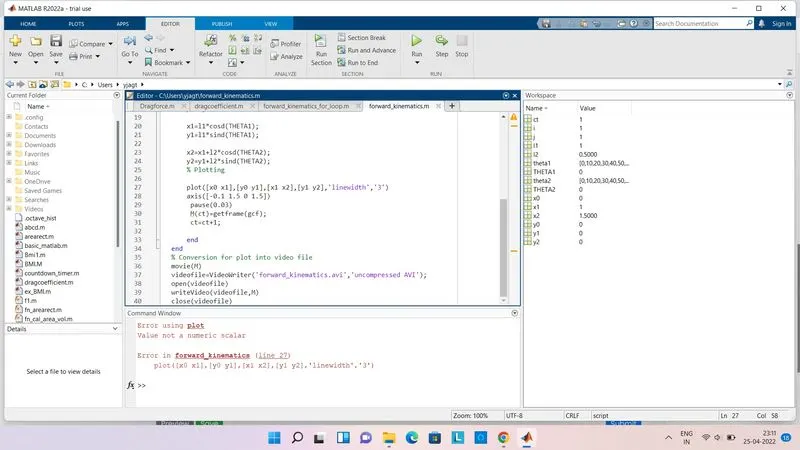
Error occured while running the program
While running the program we got error in line no 27 due to linewidth size
Incorrect syntax = plot([x0 x1],[y0 y1],[x1 x2],[y1 y2],'linewidth','3')
Result:
The Simulation video link is follows:
https://drive.google.com/file/d/1jI5WpF-fZOyoS2bLVCBqXZcbNruoq3UE/view?usp=sharing