Week 2- 2R Robotic Arm Challenge
FORWARD KINEMATICS OF A ROBOTIC ARM
AIM: To simulate the forward kinematics of a 2R robotic arm using matlab software.
SOFTWARE USED : MatlabR2022
THEORY:
- Forward kinematics refers to process of obtaining position and velocity of end effector, given the known joint angles and angular velocities.
- The 2R robotic arm consists of base, two arms or kinematic links and two rotational joints. These links will have motion in them when they are programmed. The link one will make make an angle theta1 with respect to base, similarly link two will make an angle theta2.
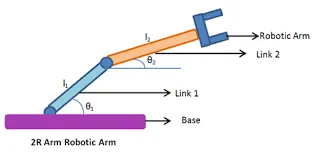
- l1,l2=lengths of link1 and link2
- θ1,θ2=angles of link1 and link2 with respect to the base
- (x0,y0)=starting point of link1(fixed to base).
- (x1,y1)=ending point of link1 and starting point of link2.
PROGRAM:
%FORWARD KINEMATICS OF 2R ROBOTIC ARM
close all
clc

%inputs
l1=1;
l2=0.5;
theta1=linspace(0,90,10);
theta2=linspace(0,90,10);
ct=1;
for i=1:length(theta1)
    THETA1=theta1(i);
    for j=1:length(theta2)
        THETA2=theta2(j);
x0=0;
y0=0;
x1=l1*cosd(THETA1);
y1=l1*sind(THETA1);
x2=x1+l2*cosd(THETA2);
y2=y1+l2*sind(THETA2);

%plotting
plot([x0 x1],[ y0 y1],[x1 x2],[y1 y2],'linewidth',3);
axis([-0.1 1.5 0 1.5])
pause(0.03)
M(ct)=getframe(gcf);
ct=ct+1;

    end
end
movie(M)
videofile=VideoWriter('forward_kinematics.avi','uncompressed avi');
open(videofile);
writeVideo(videofile,M)
close(videofile)
PLOT DIAGRAM
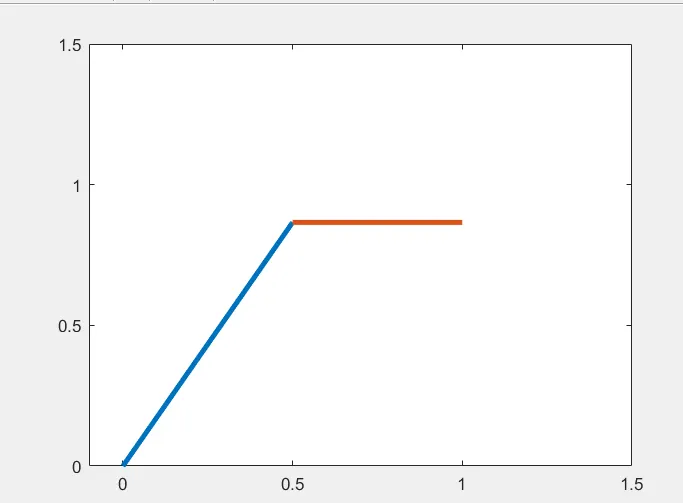
PROCEDURE:
- Initially the lengths of the two links were defined.
- Both the angles theta1 and theta2 were defined using the 'linspace' function.The 'linspace' function is used to generate linearly spaced vectors.
- The positions of the end points of both the links(lin1 and link2) were defined.
- A 'count' command is written.This function is used to count the number of events in a loop.
- A for loop condition is used in this program.'For loop' is a repitition control structure that allows us to write a loop that needs to execute a specific number of times.
- since theta1 and theta2 will contain multiple values for both the angles,two variables are created namely THETA1 and THETA2 for each iteration of the loops.
- 'plot' function is used to plot the graph.
- The 'pause' command was used to pause the command for certain period of time.in this project 0.03sec was used.
- The 'getframe(gcf)' command is used to get the current frame.
- The final step is to create an animation of the robotic arm,so the movie command(M) was used.
- The next step of the loop is to add +1 to the count variable.
- 'End' command is used for the 'for loop' to end.
- The 'VideoWriter' command is used to create a empty video file in the name of 'forward_kinemaatics' in the format '.avi' and is stored in the variable 'videofile'.
- The 'open'command was used to open the videofile.
- 'writeVideo' command was used to write the video with plot frames.
- Finally,'close' command was used to close the videofile.
ANIMATION VIDEO:
https://drive.google.com/file/d/1RKo0dif1FqgOoYP2gPNWxREtaZp8Mtyj/view?usp=sharing
ERRORS FACED DURING EXECUTION OF CODE:
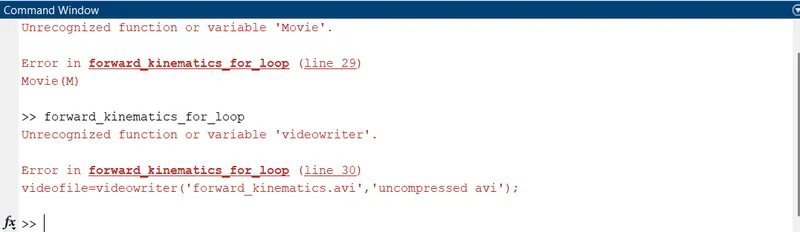
- The error I faced while doing this program was usage of uppercase letters in 'Movie' command and failed to execute the function due to case sensitivity in 'VideoWriter' function.
STEPS TAKEN TO OVERCOME THOSE ERRORS:
- I checked the syntax and performed the execution of code again.
- I watched the video to make sure there is no mistake.
- I checked the functions I used here are case-sensitive.
RESULT:
The code was successfully executed.