Week 2- 2R Robotic Arm Challenge
Program to simulate the forward kinematics of a 2R Robotic Arm
Abstract
The main objective of this project is to do Simulation and animation of the forward kinematics of a 2R Robotic Arm and to understand the movement of manipulator. In 2R Robotic arm, it has two links and two rotational Joints. Link1 makes angle of theta1 w.r.t xaxis and Link2 makes angle of theta2 w.r.t xaxis.This program was done by using matlab software
Keywords
Mat lab,2R Robotic arm,link1,link2,theta1,theta2,Manipulator
Input Data
l1=1(assumed)
l2=0.5(assumed)
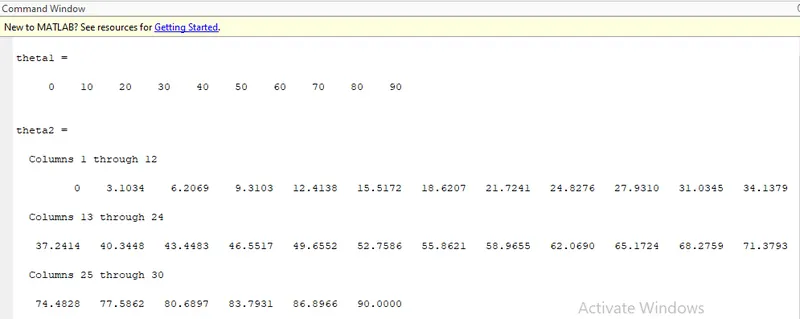
theta1= 0,10,20,30,40,50,60,70,80,90(assumed)
theta2= 0,3.1034,6.2069,9.3103,12.4138,15.5172,18.6207,
21.7241,24.8276,27.9310,31.0345,34.1379,37.2414,
40.3448,43.04483,46.5517,52.7586,55.8621,58.9655,
62.0690,65.1724,68.2759,71.3793,74.4828,77.5862,
80.6897,83.7931, 86.8966,90(assumed)
where,
l1=length of link1
l2=length of link2
FORMULA
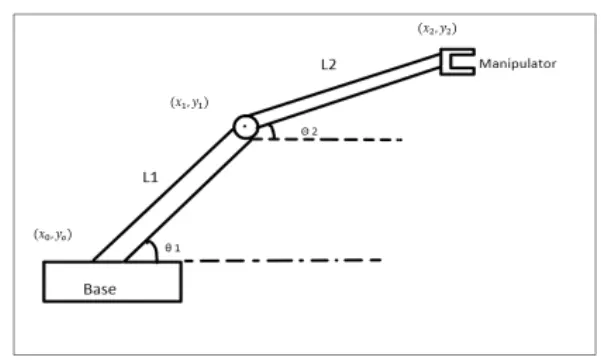
where,
Starting point/ Origin point(x0,y0),
(x0,y0)=(0,0)
To calculate the position of link1(x1,y1),
link1 is connected to base (i.e)starting point,
(x1,y1)=(l1*cosd(theta1),l1*sind(theta1))
To calculate the position of link1,
End point of link1 is the starting point of link2 and end of manipulator (x2,y2),
(x2,y2)=(x1+(l2*cosd(theta2),y2+(l2*sind(theta2))
PROGRAM USING MATLAB
clear all
close all
clc
% STEP 1:INPUTS DEFINED IN PROGRAM
% inputs for (l1,l2,theta1,theta2 were assumed)
l1=1;
l2=0.5;
theta1=linspace(0,90,10)
theta2=linspace(0,90,30)

ct=1;
% STEP-2(CALCULATION COMMANDS DEFINED IN PROGRAM)
% For loop was used to simulate the different values (theta1,theta2) automatically
% i was used for theta 1
% j was used for theta 2

for i=1:length(theta1);
    THETA1=theta1(i);
    for j=1:length(theta2);
        THETA2=theta2(j);
%         FORMULA TO FIND THE LINKS CO-ORDINATES((x0,y0),(x1,y1),(x2,y2)
        x0=0;
        y0=0;

        x1=l1*cosd(THETA1);
        y1=l1*sind(THETA1);

        x2=x1+l2*cosd(THETA2);
        y2=y1+l2*sind(THETA2);

%         plot command was used to plot different graphs
        plot([x0 x1],[y0 y1],[x1 x2],[y1 y2],'linewidth',3);
        axis([-0.1 1.5 0 1.5]);
        xlabel('XAXIS');
        ylabel('YAXIS');
        title('FORWARD KINEMATICS OF 2R ROBOTIC ARM');
        pause(0.1);
        M(ct)=getframe(gcf);
        ct=ct+1;

    end

end
% to save the simulation into video file the below commands are used
movie(M);
Videofile = VideoWriter('forward_kinematics.avi','uncompressed AVI');
open(Videofile);
writeVideo(Videofile,M);
close(Videofile);
EXPLANATION OF CODE
STEP-1(INPUTS DEFINED IN PROGRAM)
- l1,l2,theta1,theta2 defined.
- theta1 and theta2 linspace command is used.
- semicolon is not used to display the output of theta1 and theta2
STEP-2(CALCULATION COMMANDS DEFINED IN PROGRAM)
- Nested for loop is used to automate the different theta1 and theta2 values.
- Formula for (x1,y1) , (x2,y2) defined. And starting point(x0,yo)defined.
STEP-3(PLOTING COMMANDS FOR DIFFERENT GRAPH IN PROGRAM)
- plot commands used for plotting. And axis command is used for better understanding.
- axis,xlabel, ylabel,title commands are used for better understanding of graph.
- to save the simulation as a video file some commands are used. which are defined in program.
ERRORS FACED WHILE PROGRAMMING
- No Errors were found while programming
- Screenshot attached for reference.
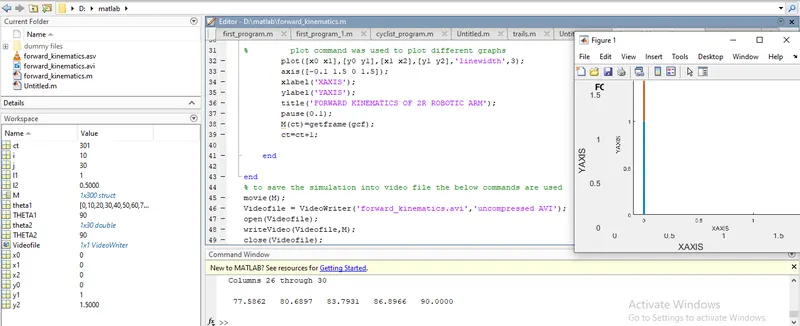
OUTPUT
- It is for theta1 and theta2
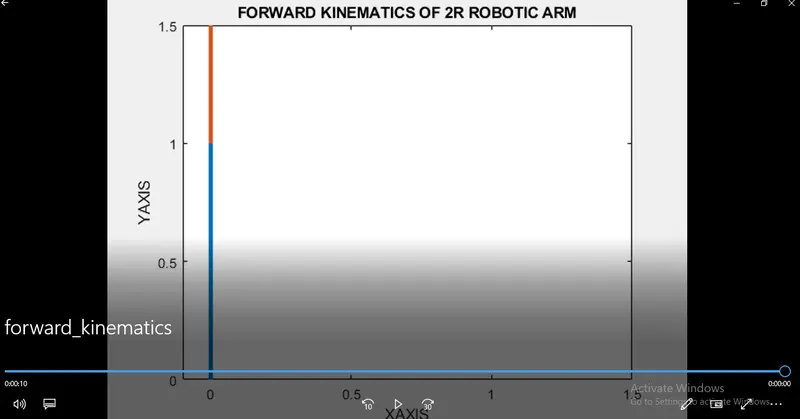
- Screenshot of video file (for reference).
- Video file link attached below for YouTube and Google drive.
Conclusion
- Different theta1 and theta2 values were plotted in graph with l1 and l2.
- Result is saved as a video format for better understanding.
- Link attached for reference.
YouTube link
Google drive link
https://drive.google.com/file/d/1pM3PUO4Tm5zSKdWJdM9u_pBnxR6sg7iy/view?usp=sharing