Week 2- 2R Robotic Arm Challenge
2R Robotic Arm (MATLAB)
Aim :
To write a program in MATLAB to simulate the forward kinematics of a 2R Robotic Arm in 2D and create an animation file of the plot.
Objective :
1) The mathematical process to calculate the position of end-effector by using the angles of the robotic joint arm.
2) To program to plot Forward kinematics of a 2R Robotic Arm.
3) To program to create an Animation file of a plot.
Theory :
Forward kinematics :
The forward kinematics problem is concerned with the relationship between the individual joints of the robot manipulater and the position and orientation of the tool or End-effector. Stated more formally,the forward kinematics problem is to determine the position and orientation of the end-effector,given the values for the joint variables of the robot. The joint variables are the angle between the links and length of the links. This part is very important to calculate the position and orientation of the end-effector.
A 2R robotic arm is a type of mechanical arm as shown in Figure 1. It consist of base support which is linked with two links and further to the manipulator.This links and manipulator are connected by joints which allows them to linear and rotational motion.
As shown in figure1 we has base and two links are connected and at the end we has end-effector. And it has different length and the angle link1 and link2 are different with reference to the base.
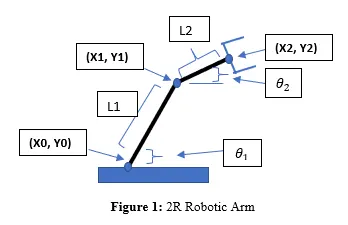
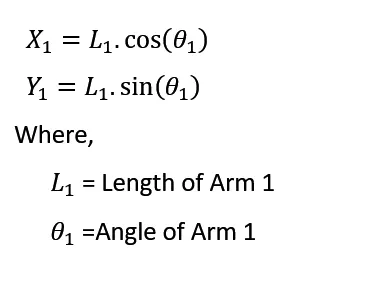
By concider link1 and link2 and angles with reference to the base are angle1 and angle2.we can further calculate end point of first link.
The formulas to calculate position of link1
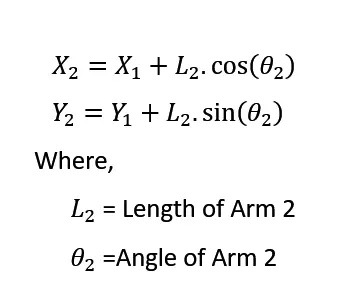
And, the formulas to calculate position of link2
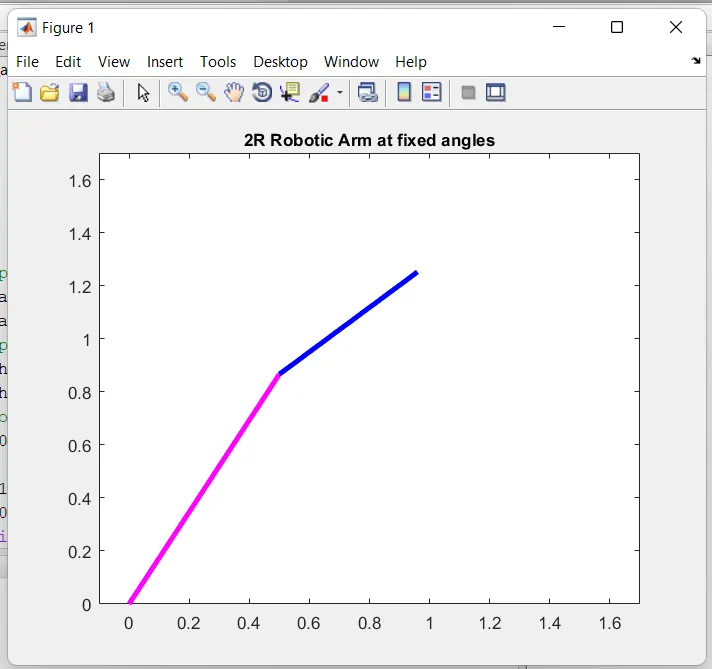
Program to plot 2R Robotic Arm at fixed angles :
% program to plot 2R Robotic Arm at fixed angles
clear all
close all
clc
%inputs
l1=1;
l2=0.6;
x0=0;
y0=0;
theta1=60;
theta2=40;
% To calculate position of link1
x1=l1*cosd(theta1);
y1=l1*sind(theta1);
% To calculate position of link2
x2=x1+l2*cosd(theta2);
y2=y1+l2*sind(theta2);
% To plot the position of link1 and link2
plot([x0 x1],[y0 y1],'linewidth',3,'color','m')
hold on
plot([x1 x2],[y1 y2],'linewidth',3,'color','b')
axis([-0.1 1.7 0 1.7])
title('2R Robotic Arm at fixed angles','fontsize',10)
Code Explanation :
1) In matlab begins with the command "clc" to clear other computed data in the command window ,"clear all" for clear data from workspace,"close all" for clear old graph data.
2) The next step is give the known value of length of link1 and link2, And angles of link1 and link2.
3) Using the forward kinematics formula calculate position of link1 and calculate position of link2.
4) To plot a graph use "plot" command and "linewidth" command use to give thickness to the line and "color" command use to give particular color to lines.
5) To plot the second link in the same plot the "hold on" command used.By this command we can draw multiple line in the same plot.
6) "axis" command is use for particular range of x axis and y axis. And by using "title" command give heading tag "2R Robotic Arm at fixed angles" to the plot.
Errors Faced :
While run the program some errors shown in command window as shown in following figure2.
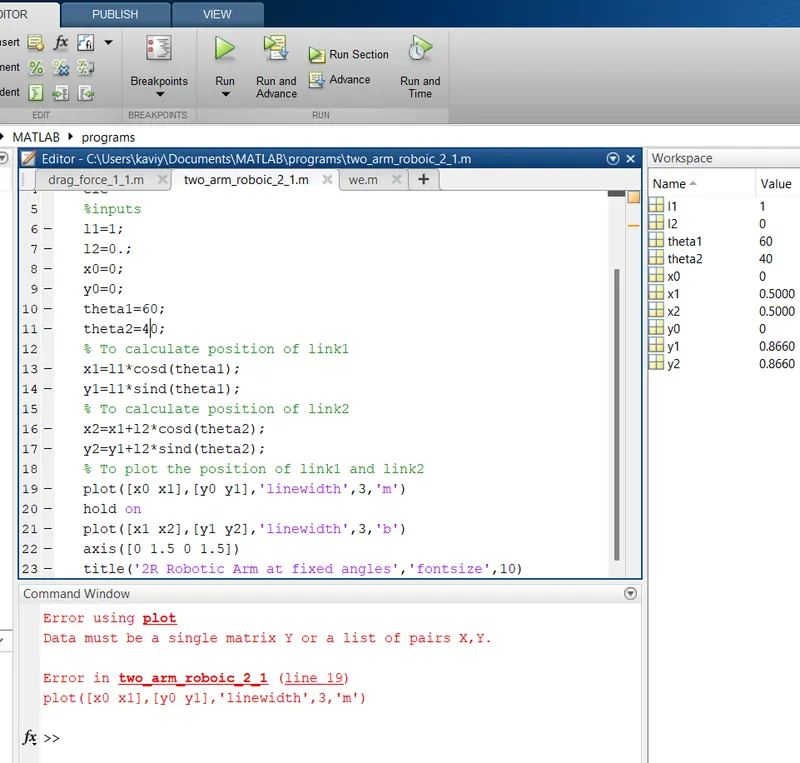
this kind of massage i got in the command window. In (line 19) there is some problem in my codes. Actually i try to plot link1 with the thickness of 3 and the line color. But, i did't code in the line 19 "color" thats the reason for this error. After that i correct it and give command ('color','m') and error solved.
Output :
Program to plot 2R Robotic Arm at various (0 to 90 deg) angles :
% program to plot 2R Robotic Arm at various angles of links
clear all
close all
clc
%inputs
l1=1;
l2=0.6;
% At various angles from 0 to 90 deg
theta1=linspace(0,90,20);
theta2=linspace(0,90,20);
ct=1;
for i=1:length(theta1)
     THETA1=theta1(i);
   for j=1:length(theta1)
      THETA2=theta2(j);
x0=0;
y0=0;
x1=l1*cosd(THETA1);
y1=l1*sind(THETA1);
x2=x1+l2*cosd(THETA2);
y2=y1+l2*sind(THETA2);
%plotting forward kinematics of 2R Robotic Arm
plot([x0 x1],[y0 y1],[x1 x2],[y1 y2],'linewidth',3)
axis([-0.1 1.7 0 1.7])
grid on
pause(0.03)
M(ct)=getframe(gcf)
ct=ct+1;
   end
end
% Animation of Robotic Arm manipulator
movie(M)
videofile=VideoWriter('2D_Forward_kinemaics.avi','Uncompressed AVI');
open(videofile)
writeVideo(videofile,M)
close(videofile)
Code Explanation :
1) First step is clear the memory and close all plots using "claer all", "close all", "clc" commands.
2) Then need to provide required inputs to the program like length of the links and angles of the link.In our problem link1 length is 1 and link2 length is 0.6.
3) By using "linspace" command generate array of fixed length.So lets take theta1 and theta2 are starts from 0 degree to 90 degree with 20 interval values.
4) we know links1 starts at fixed base so here coridnates are (x0=0 and y0=0) now to calculate next coridnates which are x1,y1,x2,y2 we need to use "for" loop to take geometry calculations.
X1=L1*cosd(THETA1)
Y1=L1*sind(THETA1)
X2=X1+L2*cosd(THETA2)
X2=Y1+L2*sind(THETA2)
5) After that using "plot" command plot the two link lines,and "linewidth" command used to give thickness to the both links and give axis, grid by using "axis","grid on" command in matlab.
6) Next step is to create Animated movie of kinematic movement. So, now using "getframe" command we can capture the frames. To generate animated movie use "movie(M)" command. Now, generate video file using "videofile=(VideoWriter)" to give specific name and make it uncompressed AVI file for clear visualization.
7) Now write video file in our hard disk and close the file.
Output :
Here the some of output animated video file screenshort..,
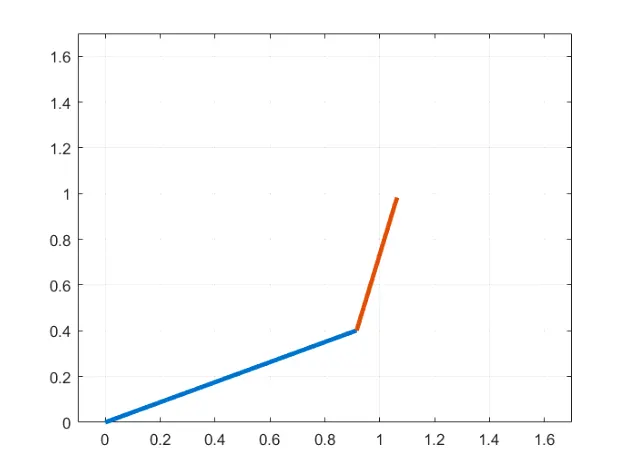
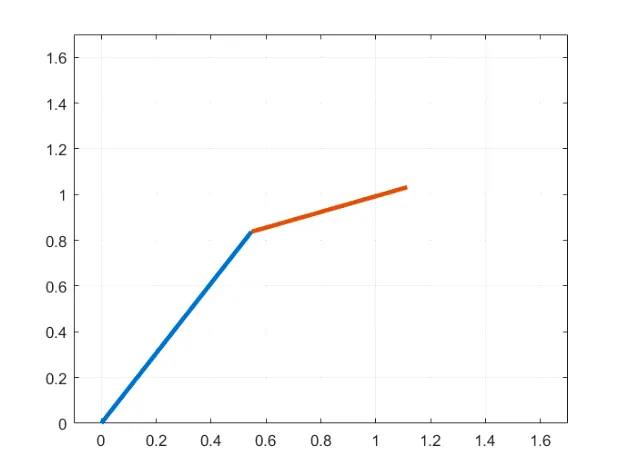
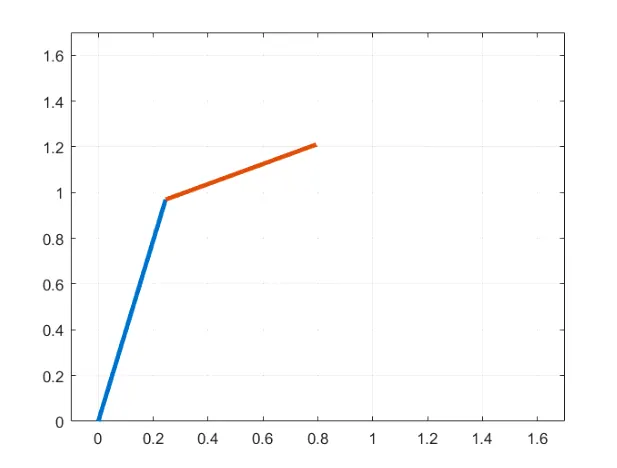
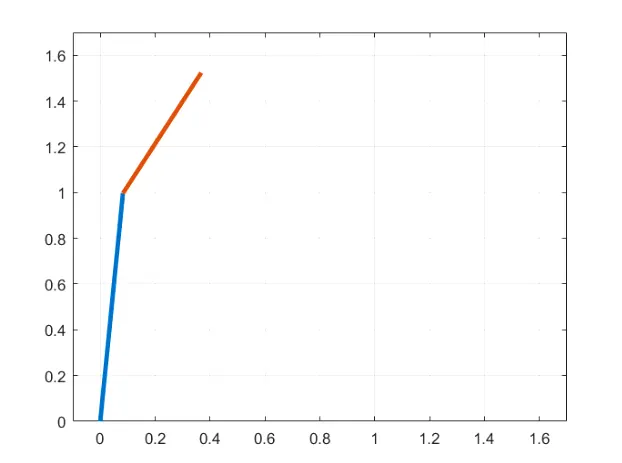
Animated Video file of 2R Robotic Arm :
The Animation video of the 2R Robotic Arm created and upload on YOU TUBE. And the link for video file given below..,
https://www.youtube.com/watch?v=4doc0o029Y8
Conclusion :
Hence we have calculate the position of end-effector and plot Forward kinematics of a 2R Robotic Arm. And the Animation video created sucessfully. And it upload on YOU TUBE the link is given below..,
https://www.youtube.com/watch?v=4doc0o029Y8