Week 2- 2R Robotic Arm Challenge
1. CODE with Comments
% simulate the forward kinematics of a 2R Robotic Arm

clear all
close all
clc

% Input parameters

% Base_link (in meter) which one end is pin joined from base (floor)
Base_link = 2;

%Manipulator_link (in meter) which one end is pin joined from the free end of Base_link and other end from end effector
Manipulator_link = 1;

% Let Base_Link and Manipulator_Link is inclined and making angle fi_1 and fi_2 from Horizontal
% Angle fi_1 and fi_2 is varying between 0 to 80 and 0 to 60 deg
fi_1 = linspace(0,80,30);
fi_2 = linspace(0,80,50);

% for giving the range of angle and repeat for making animation of robotic arm
ct=1;
for i = 1:length(fi_1)
    Theta_1 = fi_1(i);
    for j = 1:length(fi_2)
        Theta_2 = fi_2(j);

% Defining the Co-ordinates point for sketching the links

% starting point for Base_link one end
X0 = 0;
Y0 = 0;

% Ending point for Base_link and starting point for manipulator_link
X1 = Base_link*cosd(Theta_1);
Y1 = Base_link*sind(Theta_1);

% Ending point for manipulator_link
X2 = X1+Manipulator_link*cosd(Theta_2);
Y2 = Y1+Manipulator_link*sind(Theta_2);

% Drawing the Robotic arm by Plotting and Animate them

% For Base_link and manipulator_link
plot([X0 X1],[Y0 Y1],[X1 X2],[Y1 Y2],'linewidth',2.5);
xlabel('Horizontal plane');
ylabel('vetical plane');

%To stop the variation in x and y axis parameter while arm is animating x and y taken as 3(m) and 3(m)length
axis([-0.01 3 0 3]);
% to visible the motion of linkage arm we have to reduce the speed
pause(0.00001);
  ct = ct+1;
    end
end
2. EXPLANATION OF CODE :
Inputs:
First of all, I have defined the length of both links i.e. Base link = 2 meters and manipulator link = 1 meter, now total link length is 3 meters.
let the Base link and manipulator link is making an angle from the horizontal plane i.e fi_1 and fi_2
I have to rotate both links within the maximum and minimum angle limit i.e. Base link will rotate 80 deg in 30 steps and the Manipulator link will rotate 80 deg in 50 steps.
So I used the linspace command so that 80 deg (base) can break into 30 equal steps and 80 deg (manipulator) into 50 equal steps.
Define the Coordinates and loop statements:
We need to apply for loop to repeat the below coordinate calculation and counter(ct) command (start from 1 and increment by 1) for each and every execution of for loop so my plot can not affect by the previous position but without ct my program is still working
Angle fi_1 has 30 different values and for each value, we have to repeat coordinate variables [X1 Y1] for which I have to define the variable (i) length which contains the 30 values ( 1 to 30)
Similarly, Angle fi_2 has 50 different values and for each value, we have to repeat the coordinate variable [X2 Y2] for which I have to define the variable (j) length which contains 50 values ( 1 to 50)
So in this way, I will find the 1500 combination for the rotation of the robotics Arm.
for each value of Theta_1 of the Base link, the manipulator link takes multiple positions (50 ) of Theta_2.
Now I have to define the coordinates of links (which are mentioned in the code above)
The base link starts from [0,0] and ended in[X1 (from the horizontal direction point) Y1 (from the vertical direction point)] making angle fi_1 from the horizontal plane and the manipulator link is just started from [X1 Y1] and ended on [X2 (from the horizontal direction point) Y2(from the vertical direction point)] making angle fi_2 from the horizontal plane.
Plotting and making the animation :
To sketch the Base link and Manipulator link of the robotic arm, I use the plot or line command in which the Base link is sketched from X0 to X1 and Y0 to Y1 coordinate points, similarly Manipulator link is sketched from X1 to X2 and Y1 to Y2 coordinate points with a common line thickness of 3.5 and simply mentioned the horizontal and vertical plane in x and y-axis.
In the plot command, the most recent command is split so only one link shows So I combined both links in one plot command.
But the X and Y axis values of Plot windows are varying with the animation of links so I will fix the limit of the Plot window by axis command which limit is defined from -0.01 to 3 in X-direction and from 0 to 3 in the y-direction.
but links motion is too fast which results in only the last position of links showing so to visible the motion of the linkage arm we have to reduce the speed.
So I will use the pause command by which every position of the link will pause for 0.00001 seconds for a better experience of animation.
------------------------------------------------------------------------------------------------------------------------------------------------------------------------------------------------------------------------------------------
Error facing while writing the Program and solution:
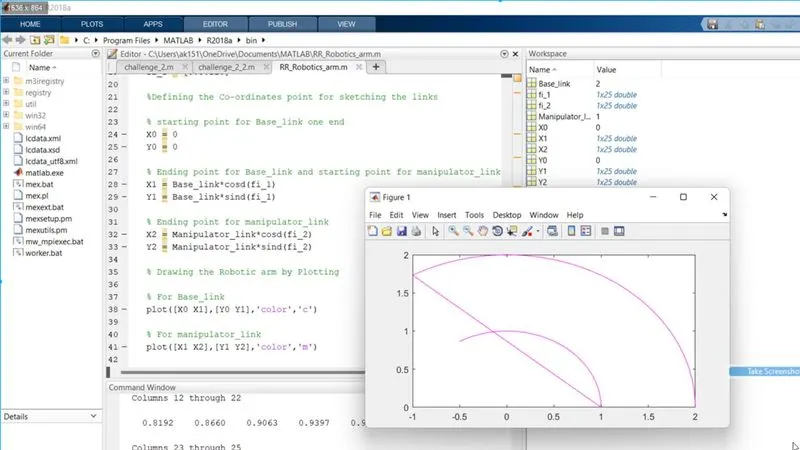
Problem_1:
Here my Base_link is not visible and the fig is like a curvature, not 2 rotation arm robot,
Solution:
After this error, I add the endpoints (X1 and Y1 )of Base_link to the endpoints of the manipulator link [X2 Y2] and I replace the range of angle fi_1 and fi_2 [0:5:120] with constant values of 45 and 90 then I got the robotics arm
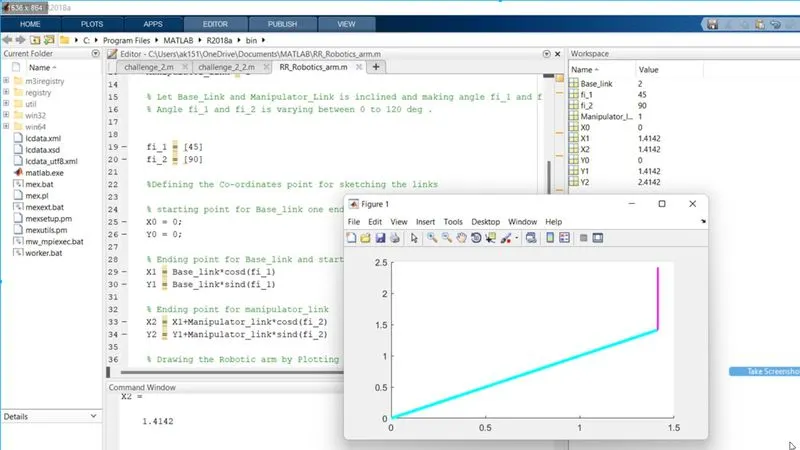
Problem_2: Here the problem is Undefined variable Theta_1
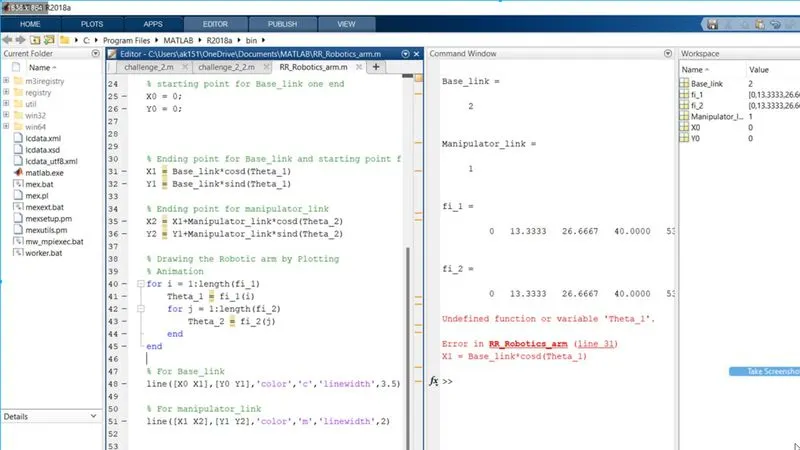
Solution: I have to define for loop firstly so that the value of Theta_1 and Theta_2 can be operated in X_1, X_2 and Y_1, Y_2 points to the last steps of the script.
But still Problem: The robotic arm is like a straight line and maximum range workspace not showing between 0 to 120
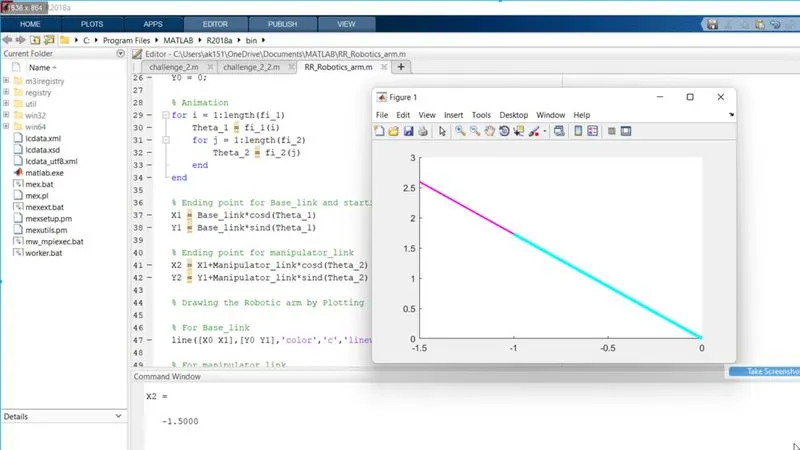
solution: Here I forgot that I have to write the both If conditions "end" very last line of script so that my for loop can be work
here I temporary changed the value of fi_1 and fi_2
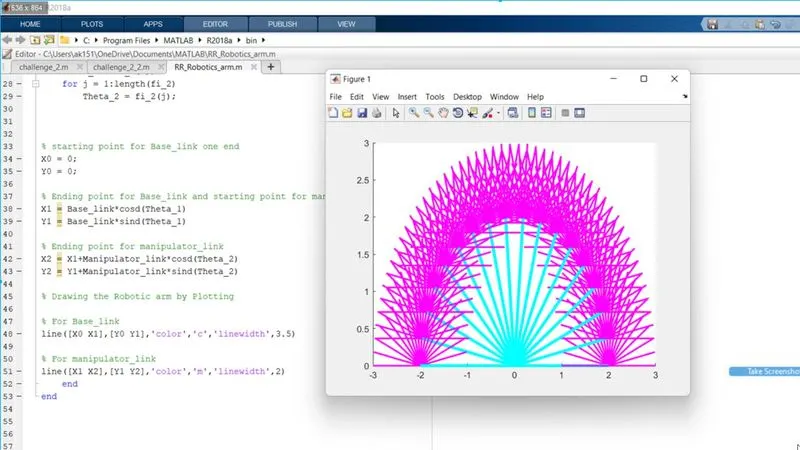
But still Problem: this is not an animated plot
Solution: so I will use the counter (ct) command (at starting of for loop, starting from 1 and incrementing by 1 till the end of for loop ) to show the many positions but in different plot windows and change the line to plot command which Causes only the manipulator link is showing because in the plot command most recent command is split only.
so I will use the single plot command and apply all coordinate points of both links in a single line plot command
But link motion is too fast which results in the last position of links shown so to visible the motion of the linkage arm we have to reduce the speed.
so I will use the pause command by which every position of the link will pause by 0.00001 seconds for a smooth animation experience.
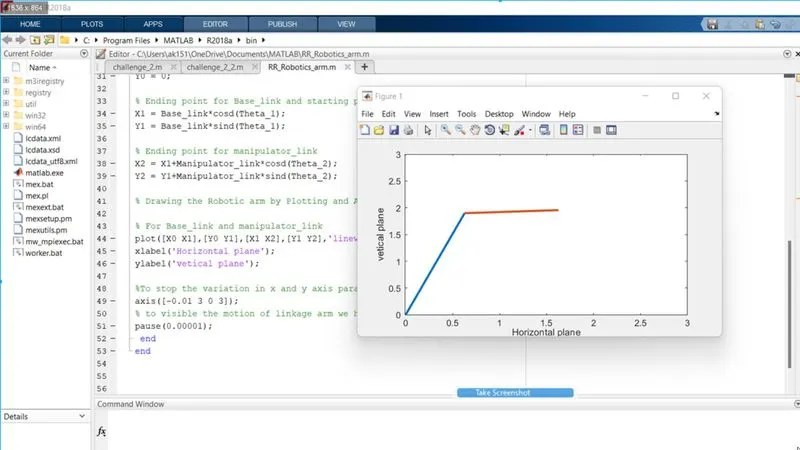
--- --- --- ---- ---- ---- ---- ---- ---- ---- ---- ---- ---- ---- ---- ---- ---- --- - ---- --- -- --
Output: animation