Week 2- 2R Robotic Arm Challenge
Forward kinamatics of robotic arm
AIM:- Simulate forward kinamatics of 2R robotic arm
Inputs:-
(xo yo) -co ordinates of origen
(x1 y1)- end co ordinates of link one
(x2 y2)-end co ordinates of link two
l1-lenght of link one (l1)
l2-length of link two (l2)
theta1-angle between the base and link one
theta2-angle between the link one and link two
EXPLINATION:-
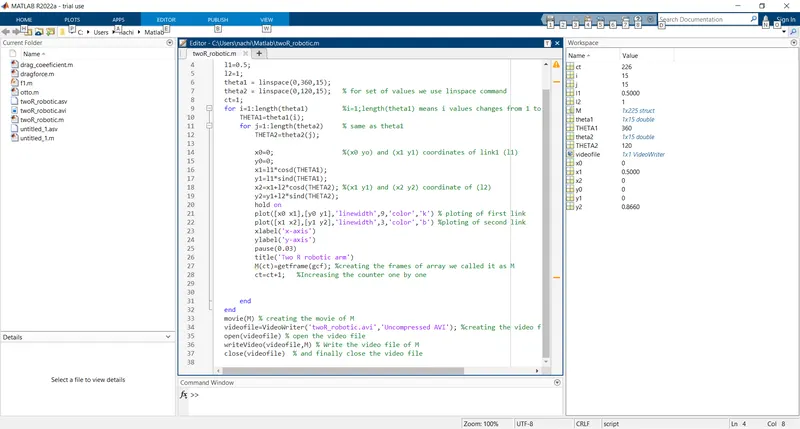
clear all- used for clear all the data stored in previous workspace
close all- used for colse the all the figures and plots of before program
clc-use for clear the command window
l1-length of link 1
l2-length of link 2
theta1-angle between the basde and link1, (range of values 0 to 360)
theta2-angle between the link1 and link2,(range of values 0 to 120)
limspace-this commmand is used for providing equal gap points with in the range
for loop- used for caliculating the x,y co ordinates link 1 , link 2, as the theta1 and theta2 are the arraysand having the maltiple values of theta with x axis. then we need an other variable to store only one value at atime. So the we can get the set of values of x and y that are different thats why we introduse two variables called as THETA1, THETA2.
(xo yo) -co ordinates of origen
(x1 y1)- end co ordinates of link one and staring co ordinates of link two
(x2 y2)-end co ordinates of link two
plot -command is used for plotting the all the co ordinaters of x and y with some specifications like linewidth and color
pause- command is used of paussing the program for certain time before prossesing the new set of values
for creating a movie of the result a counter variable is itroduced before the first for loop as "ct"
m-for capture the current frame for every time untill the for loop ends
ct+1- used for increment of frame addend to the variable "ct"
movie(M)-used for cteating a movie of M
VideoWriter-command is used for write the videofile int formate of .avi
open(videofile)-is used of open that videofile
Writevideo-used for write the video file with plot frames
close(videofile)-used for clos the video file
for running the program we can use start and run option of simole press the F5
CODE:-
ERRIRS:-
i am getting an error when i was entering into the for loop, i'm went next line thats why i'm getting error
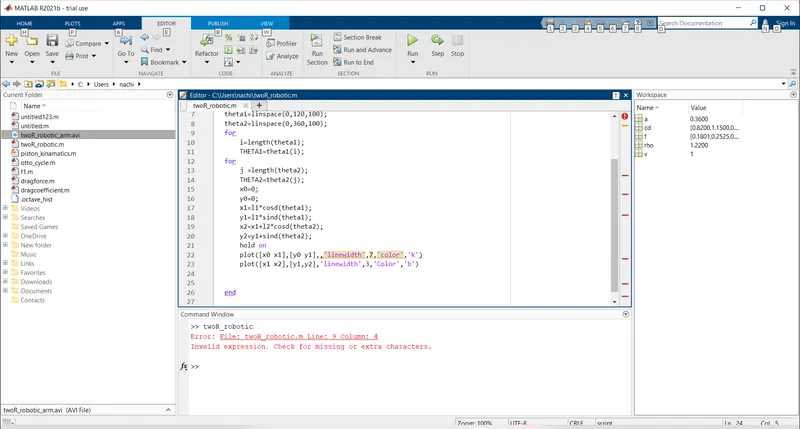
Solution: taking the i value from 10th line to 9th line, and enter space inbitween for loop and i value
2. I'm getting error in side the VideoWriter command
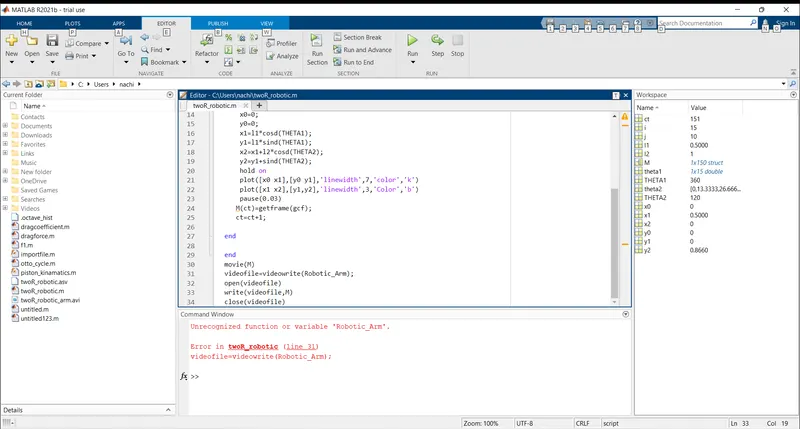
Solution: By entering the correct form of file name in .avi file formate i resolve this error
RESULT:-
Hence the simulation of forward kinematic motion of 2R robitic arm was done
crated the animation of forward kinematic motion of 2R robitic arm
TOU TUBE LINK:-
https://youtu.be/Q6pGI4uengo
GOOGLE DRIVE LINK:-
https://drive.google.com/file/d/1B3st4qNbt4QRySahp3jDtJISrIM2RPie/view?usp=sharing