Week 2- 2R Robotic Arm Challenge
AIM: Show the mechanism of Robotic Arm moving in circular manner.
Program :
clear all
close all
clc

%Inputs
l1 =1;
l2 =0.5;

theta1 =linspace(0,90,10);
theta2 =linspace(0,90,10);

ct=1;
for i=1:length(theta1)
    THETA1= theta1(i);
    for j= 1:length(theta2)
        THETA2= theta2(j);
        x0 =0;
        y0 =0;

        x1 =l1*cosd(THETA1);
        y1 =l1*sind(THETA1);

        x2 =x1+ l2*cosd(THETA2);
        y2 =y1+ l2*sind(THETA2);

        %Plotting
        plot([x0 x1],[y0 y1],[x1 x2],[y1 y2],'linewidth',3)
        axis([-0.1 1.5 0 1.5]);
        xlabel('X')
        ylabel('Y')
        legend('Link1', 'Link2')
        pause(0.3)
        M(ct)= getframe(gcf);
        ct=ct+1;
    end
end


movie(M)
videofile = VideoWriter('C:\Users\Saurabh\Desktop\code\Matlab\twoR_Robotic_Arm');
open(videofile)
writeVideo(videofile,M)
close(videofile)
Report:
- Code Explaination :
- First we have to give an inputs which will be lengths of "link1" and "link2" and an angles between links and surface.
- Initializing the length of "link1" is 1 and that of "link2" is 0.5.
- Providing the angle of each link i.e. theta1 and theta2 using "linspace" command starting from 0deg to 90deg with 10deg of increament.
- ct is counter commmand which stores every frame started from value 1.
- The command "for" is used to repeat the specified commands using variables. Here this command using "i" variablefor "link1" varies from 1 to length of theta1 i.e. 10 and for each value of "theta1", the value of "THETA1" will vary from 0 to 90 with increment of 10.
- Similarly for loop command is used for link2 theta2 will vary from 0 to 90 with increment of 10 by using "j" as a variable.As theta2 is increased the value of THETA2 also increases.
- Giving starting coordinates of link1 as x0 and y0 are (0,0).
- For ending coordinates of link1 and starting coordinates of link2 as (x1, y1).
- x1= l1*cosd(THETA1)
- y1= l1*sind(THETA1)... where THETA1 is the final values of angle of link1.
- For ending coordinates of link2 as (x2, y2).
- x2=x1+ l2* cosd(THETA2)
- y2=y1+ l2* sind(THETA2)... where THETA2 is the final values of angle of link2.
- Now to plot the graph starting and ending coordinates of link1 and link2.
- plot([x0 x1],[y0 y1],[x1 x2],[y1 y2], 'linewidth', 3)
- To give the limits to graph using axis command, ranging x-axis from -0.1 to 1.5 and y-axis from 0 to 1.5.
- axis([-0.1 1.5 0 1.5])
- Added x-label and y-label as "X" and "Y" to identify the names of the axes.
- Indicated blue line as "Link1" and red line as "Link2".
- Pause is used to pause the frame for that period of time. We are using the for it is "0.3 sec".
- Adding an array called M storing all the frames by using getframe command. In this command the current frame will be stored in an array called M.
- M(ct)= getframe(gcf)... gcf= get current frame
- Now the counter value will increase by 1 after storing the frame. This indicates the number of frame is increasing with increasing the value of counter.
- Ending "for"command of "j" variable the "for" command for will increase by 10 and the process will be repeated again and again.
- To make the animation of array M we initiate movie command.
- We are going to make the video file by videowriter command saving with the name of file and the profile of the file.
- videofile= VideoWriter('Robotic_Arm.avi','uncompressed AVI');
- To open that "videofile" and write an array M in it, we use open and writeVideo commands.
- open(videofile)
- writeVideo(videofile,M)
- And after this we will close the "videofile".
- Errors faced while programming:
- In the linspace command the I wrote sqaure brackets which was wrong and was not working also showing the error.
- Everytime I forgot to complete the statements with ";", which was also wrong and showing the error.
- I had written for "sind" and "cosd" angles with "theta" instead of "THETA", which was showing the different answer that not required. To overcome this problem I replace "theta" by "THETA".
- While plotting the graph I used "line" command for each link but in result it was showing me all the lines. So then I used "plot" command to get only two links in the graph using end points of each link.
- At the end of the program I forgot to write pause command which holds the frame for that specific time. The answer of this mistake was only the last links verticle in position. To recover this mistake I need to give the pause command with specific time which will hold the frame for that much of time.
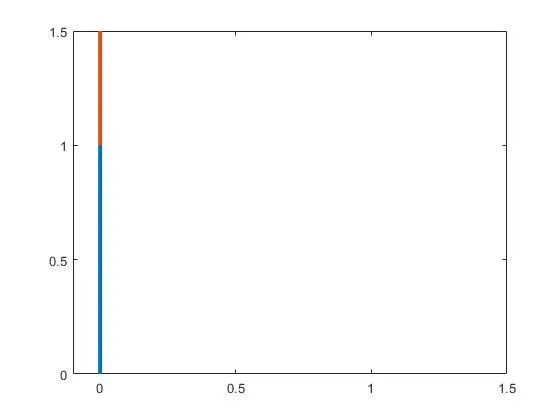
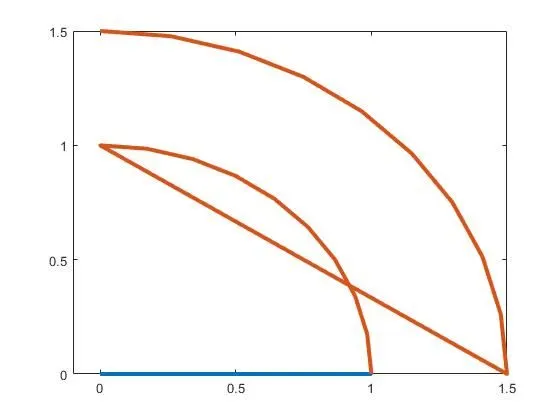
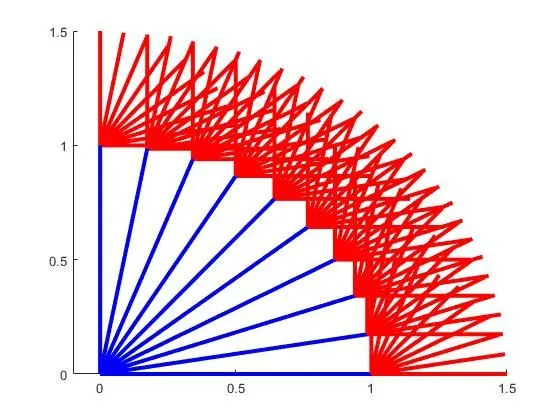
Result: After running the program we get the following result.
https://drive.google.com/file/d/11m4R2To61cdAIvr4CTo0W7t77SVDqevd/view?usp=sharing