Week 2- 2R Robotic Arm Challenge
Writing a program in MatLab to Simulate the Forward Kinematics of a 2R Robotic Arm.
Objective:
- Write a program to plot the arm movements.
- Create an Animation file of the plot.
- Understanding the 2R Robotic Arm.
Theory:
Robotic arm are the mechanical arm, where it consist of multiple joints and links which may have either rotation or translation movements. Robotic arm are mainly programmable and also behave like a human arm which can be apart of a complex structure robot or the solo mechanism which is working on a same pick and drop automation, in these way it can be used. in this at the end effoctor is attach according to the task which has to performed.
The 2R robotic arm can be seen in the below fig 1. where 2 define the no of the link and R define it can perform rotation.
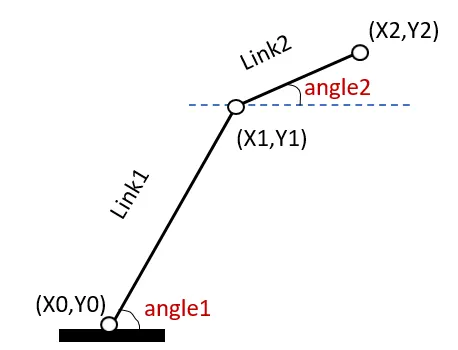
Fig 1. The schemetic diagram for 2R Robotic arm
In this particular experiment, it will talked about 2R Robotic Arm which means the arm has two link which can perform rotary motion. In the 2 link and the possible angle can be seen from the above direction as how much movement can be done by the arm for movement. Forward kinematics refers to process of obtaining position and velocity of end effector, given the known joint angles and angular velocities.
In the the link 1 is fixed on the base where the position is (x0,y0) and and its end is (x1,y1). which has the rotation angle of angle 1 and similar goes for the link 2 where the movement angle is angle 2 and the starting and end point of the link are (x1,y1) and (x2,y2) respectively. This in combination decide the final position of the manipulator or end effector.
The program below show the animation of the plot which is being made by movement of the robotic arm.
% Program to simmulate the forward kinematic of 2R Robotic Arm.
clear all
close all
clc

%Input variable
%Length of the lower arm
L1 = 1;
%Length of the upper arm
L2 = 0.7;

%Intial Coordinate of lower arm
x0 = 0;
y0 = 0;

%Angle of rotation which can performed by both arm
theta1 = linspace(0,90,30);
theta2 = linspace(0,90,90);

%counter
start = 1;

%main programm
for i = 1:length(theta1)
    THETA1= theta1(i)
    for j=1:length(theta2)
        THETA2 = theta2(j)

        x1 = L1*cosd(THETA1);
        y1 = L2*sind(THETA1);

        x2 = x1 + L2*cosd(THETA2);
        y2 = y1 + L2*sind(THETA2);

        %PLots

        plot([x0 x1],[y0 y1],[x1 x2],[y1 y2],'r', 'linewidth', 4)
        axis([-0.1 2 0 2])
        pause(0.0001)
        M(start) = getframe(gcf)
        start = start + 1;

    end

end
movie(M)
videofile = VideoWriter('Forward_Kinematic.avi','Uncompressed AVI')
open(videofile)
wirteVideo(videofile,M)
close(videofile)
From this program it is seen that position of x1,y1 is calculated using the formala:
x1= L1*cosd(THETA1)
y1= L1*sind(THETA1)
where the L1 is the length of the link 1 and THETA 1 is the angle made at that instant.
Similarly, x2,y2 are being calculated:
x2 = x1 + L2*cosd(THETA2)
y2 = y1 + L2*sind(THETA2)
where the L2 is the length of the link 2 and THETA 2 is the angle made at that instant.
The drive link for the animated video is attached below:
https://drive.google.com/file/d/1jSwI8gbgDHnJMZ65cbkZmBx6iW5jBGlJ/view?usp=sharing
The video for the same which is compressed is also been shared.