Project 1 - English Dictionary App & Library Book Management System
Aim:
Part 1: Make a English dictionary.
Part 2: Library Book Management System
Project Part 1:
Reqiurement for the dictionary:
Main Menu
Add a new word
Find the meaning
Update a word
Exit
Firstly libraries are been imported for the Dictionary.
# import of Json file
import json
from PyDictionary import PyDictionary
dictionary = PyDictionary()
Now in next step the dictionary working is been described to the user for easy access.
#Description of Dictionary
print('Welcome to the Dictionary App')
print('Please select your choice')
print('1. Add a word')
print('2. Find the meaning')
print('3. Update the word')
print('4. Exit')
Dictionary file is been open to look for storeed meaning
# Opening the dictionary file for meaning finding.
f = open('words.txt','w')
word = {}
json.dump(word,f)
f.close()
User input is been taken and according task is been performed for the user requirement.
# Identification of user choices.
while True:
    print('-'*50)
    i = int(input('Enter the Choice:'))
    print('-'*50)

    if i == 1:
        import json
        f = open('words.txt','w')
        word0 = input('Enter a word : ')
        meaning = input('Enter its meaning : ')
        word[word0] = meaning
        json.dump(word,f)
        f.close()

    elif i == 2:
        import json
        f = open('words.txt','r+')
        dic = json.load(f)
        find = input('Enter the word to find: ')
        mean = dictionary.meaning(find)
        print(" The meaning of word from PyDictionary",mean)
        if find in word:
            print('\nThe meaning is from the word in personal json: ',word.get(find))
        else:
            print('Sorry the word is not found in personal json')
        json.dump(word,f)
        f.close()

    elif i == 3:
        import json
        f = open('words.txt','w')
        word1 = input('Enter the word:')
        updated_meaning = input('Enter the updated meaning: ')
        word[word1] = updated_meaning
        json.dump(word,f)
        f.close()
    elif i == 4:
        print('Thank you for choosing Dictionary app')
        print('*'*50)
        break
    else:
        print('Please enter the mentioned choice')
        print('1. Add a word')
        print('2. Find the meaning')
        print('3. Update the word')
        print('4. Exit')
Resultant output from the Dictionary
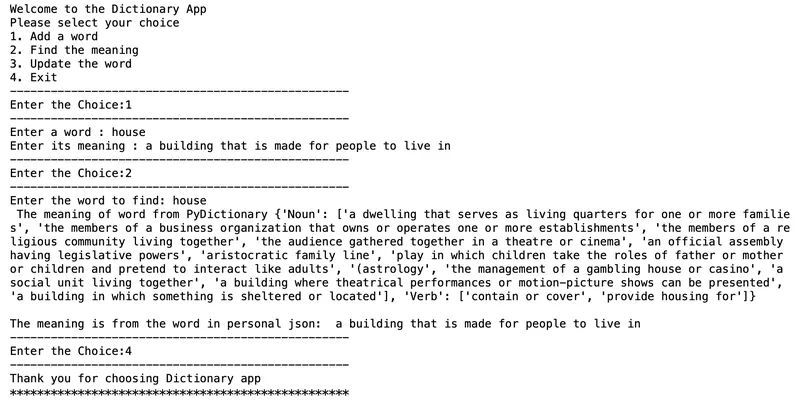
Fig 1.1 Display the working of English Dictionary
Project Part 2:
Library Book Management System
For the first step importing all the library for the program
# ============================== importing Library ==============================
from tkinter import *
import sqlite3
import tkinter.ttk as ttk
import tkinter.messagebox as tkMessageBox
Intiate and naming the window title
root = Tk()
root.title('A Library Application')
Defining the main database.
# ============================== Method ==============================

def Database():
    global conn, cursor
    conn = sqlite3.connect('library.db')
    cursor = conn.cursor()
    cursor.execute("CREATE TABLE IF NOT EXISTS member(mem_ID INTEGER PRIMARY KEY AUTOINCREMENT NOT NULL, booktitle TEXT , author TEXT, year TEXT, isbn TEXT, username TEXT, password TEXT )")
Defining the commands for the execution of the operation.
# ========================== Defining commands ===============================
def Add():
    if BOOKTITLE.get() == "" or AUTHOR.get() == "" or YEAR.get() == "" or ISBN.get() == "" :
        txt_result.config(text="Please fill all entry", fg='red')
    else:
        Database()
        cursor.execute("INSERT INTO member(booktitle,author,year,isbn) VALUES (?,?,?,?)",(str(BOOKTITLE.get()),str(AUTHOR.get()),str(YEAR.get()),str(ISBN.get())))

        conn.commit()
        BOOKTITLE.set("")
        AUTHOR.set("")
        YEAR.set("")
        ISBN.set("")
        cursor.close()
        conn.close()
        txt_result.config(text = "Record Inserted !", fg = "green")

def Display():
    tree.delete(*tree.get_children())
    Database()
    cursor.execute("SELECT * FROM member ORDER BY author ASC")
    fetch = cursor.fetchall()
    for data in fetch:
        tree.insert('','end',values= (data[1],data[2],data[3],data[4]))
    cursor.close()
    txt_result.config(text = "Successfully fetched data !", fg ='black')

def Exit():
    result = tkMessageBox.askquestion('Do you want to exit? (y/n)', icon = 'warning')
    if result == 'yes':
        root.destroy()
        exit()
Declaration of the variable.
# ============================== Variable declaration ==============================

BOOKTITLE = StringVar()
AUTHOR = StringVar()
YEAR = StringVar()
ISBN = StringVar()
Making the frame working and it dimension.
# ============================== Frame ===============================

Top = Frame(root,width=900,height=50,bd=8,relief='raise')
Top.pack(side=TOP)

Left = Frame(root,width= 300, height = 500, bd = 8, relief='raise')
Left.pack(side = LEFT)

Right = Frame(root,width= 600, height = 500, bd = 8 , relief='raise')
Right.pack(side = RIGHT)

Forms = Frame(Left,width=500, height=450)
Forms.pack(side= TOP)

Buttons =Frame(Left,width= 300, height = 100, bd = 8 , relief='raise')
Buttons.pack(side= BOTTOM)
Giving the title and labels to show
# ================================== Labels ==================================

txt_title = Label(Top,width=700, font=('arial',24),text = "....Library Management Application....")
txt_title.pack()
txt_booktitle = Label(Forms, text="Booktitle:", font=("arial", 16), bd=25)
txt_booktitle.grid(row=0, stick="e")
txt_author = Label(Forms, text="Author:", font =('arial', 16), bd=25)
txt_author.grid(row=1, stick="e")
txt_year = Label (Forms, text= "Year:", font=('arial', 16), bd=25)
txt_year.grid(row =2, stick="e")
txt_isbn = Label(Forms, text="ISBN:", font=("arial", 16), bd=25)
txt_isbn.grid(row=3, stick="e")

txt_result = Label(Buttons)
txt_result.pack(side=TOP)
Making the entry for display.
#================================== Entry ==================================

booktitle = Entry (Forms, textvariable=BOOKTITLE, width=30)
booktitle.grid(row=0, column=1)
author=Entry(Forms, textvariable=AUTHOR, width=30)
author.grid(row=1, column=1)
year = Entry(Forms, textvariable=YEAR, width=38)
year.grid(row=2, column=1)
isbn = Entry (Forms, textvariable=ISBN, width=30)
isbn.grid(row=3, column=1)
The code for making the button and assigning command to it.
# ================================== Button =============================

btn_display = Button (Buttons, width=18, text="Display", command=Display)
btn_display.pack(side=LEFT)
btn_search = Button (Buttons, width=18, text="Search", state=DISABLED)
btn_search.pack(side=LEFT)
btn_add = Button (Buttons, width=10, text="Add", command=Add )
btn_add.pack(side=LEFT)
btn_issue = Button (Buttons, width=18, text="Issue", state=DISABLED)
btn_issue.pack(side=LEFT)
btn_delete = Button (Buttons, width=18,text="Delete", state=DISABLED)
btn_delete.pack(side=LEFT)
btn_exit = Button (Buttons, width=18, text="Exit", command=Exit)
btn_exit.pack(side=LEFT)
The code for listing the columns:
# ================================== LIST =============================

scrollbary = Scrollbar(Right, orient=VERTICAL)
scrollbarx = Scrollbar(Right, orient=HORIZONTAL)

tree = ttk.Treeview(Right,column =("Booktitle", "Author", "Year", "ISBN"))

scrollbary.config(command=tree.yview)
scrollbary.pack (side=RIGHT, fill=Y)
scrollbarx.config(command=tree.xview)
scrollbarx.pack (side=BOTTOM, fill=X)
tree.heading('Booktitle', text="Booktitle", anchor=W)
tree.heading("Author", text="Author", anchor=W)
tree.heading('Year', text="Year", anchor=W)
tree.heading('ISBN', text="ISBN", anchor=W)
tree.column('#0', stretch=NO, minwidth=0, width=0)
tree.column('#1', stretch=NO, minwidth=0, width=80)
tree.column('#2', stretch=NO, minwidth=0, width=120)
tree.column('#3', stretch=NO, minwidth=0, width=80)
tree.column('#4', stretch=NO, minwidth=0, width=150)
tree.pack()
The step to initiate the program:
# ============================= INITIALISATION =========================

if __name__ =='__main__':
    root.mainloop()
Resultant Output for the Application
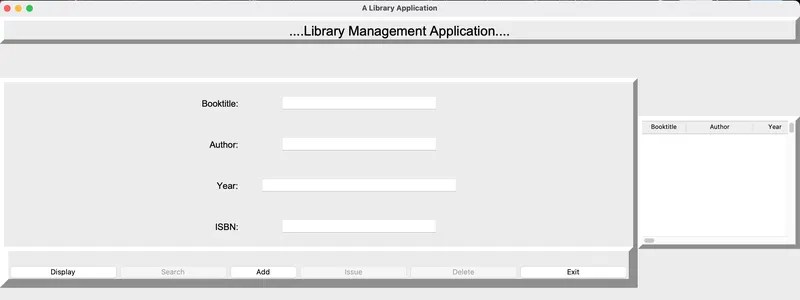
Fig 1.1 Display the working of Library Management System