Week 2- 2R Robotic Arm Challenge
Forward Kinematics of a 2R Robotic Arm :
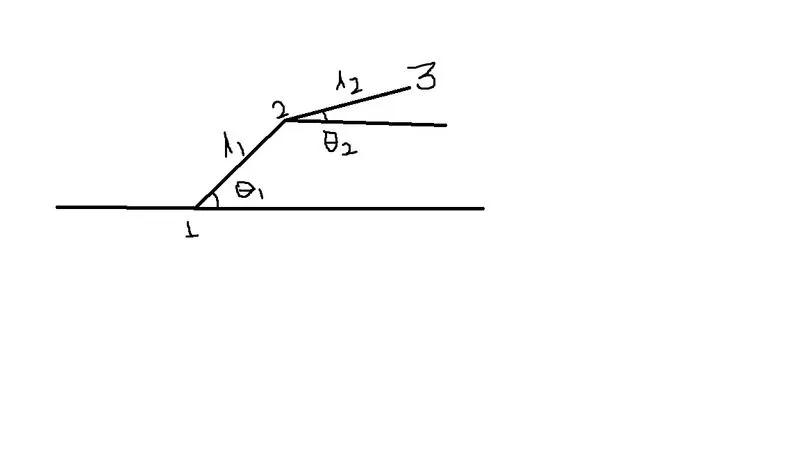
Simply look at the above fig,
Here I mention the no like 1,2,3 are positions of arm, at position 3 the manipulator is being attached,
L1 is the length of the first link
L2 is the length of thesecond link
Theta 1 is angle of first link
Theta 2 is angle of second link
Here at positin no 1 the (x0,y0) are the co ordinates
Position2= (x1,y1)
Position3=(x2,y2)
Let; l1=1,
l2=0.5,
theta 1=45
theta 2=30
Program for 2R Robotic arm are as follows,
% forward kinamatics of a robotic arm manipulator

clear all
close all
clc

%inputs
l1=1;
l2=0.5;
theta1=45;
theta2=30;

%coordinates
x0=0;
y0=0;

x1=l1*cosd(theta1);
y1=l1*sind(theta1);

x2=x1+l2*cosd(theta2);
y2=y1+l2*sind(theta2);

%plotting
line([x0 x1],[y0 y1],'linewidth',3,'color','r')
line([x1 x2],[y1 y2],'linewidth',3,'color','g')
in above program firstly i used plot command and the result is only one line is appeared in green color then i put line command and the plot i obtained that is i uploaded.
For animation of the robotic arm the program is as mention below,
% for animation of robotic links

clear all
close all
clc

%inputs
l1=1;
l2=0.5;
theta1=linspace(0,90,10);
theta2=linspace(0,90,10);
ct=1

for i=1:length(theta1)
    THETA1=theta1(i);
    for j=1:length(theta2)
        THETA2=theta2(j);
        x0=0;
        y0=0;
        x1=l1*cosd(THETA1);
        y1=l1*sind(THETA1);
        x2=x1+l2*cosd(THETA2);
        y2=y1+l2*sind(THETA2);
        %plotting

        plot([x0 x1],[y0 y1],[x1 x2],[y1 y2],'linewidth',3)
        axis([-0.1 1.5 0 1.5])

        pause(0.03)
        M(ct)=getframe(gcf);
        ct=ct+1
    end
end
movie(M)
videofile=VideoWriter('forward_kinematics.avi','Uncompressed AVI');
open(videofile);
writeVideo(videofile,M);
close(videofile)
similarly as above program i use line commamd for plot but it does not works then i put plot command
also i found error in movie command that is i put capital M in command ,when small m is added then error gone.
the screenshots of errors are uploaded
in this program i used for loop command for animation also axis and pause for animation effet also line and plot command.
The link of animation is https://youtu.be/mOhSkiR-9no