Week 2- 2R Robotic Arm Challenge
WEEK 2: 2R ROBOTIC ARM
AIM: To write a program in Matlab to simulate the forward kinematics of a 2R Robotic Arm.
THEORY:
-
For a given kinematic chain composed of links and joints with multiple degree of freedom, finding the position and orientation of the end-effector in the operational workspace when all the joint parameters are known. This is called FORWARD KINEMATICS.
-
Forward kinematics is the process of calculating the frames of a robot's links, given a configuration and the robot's kinematic structure as input.
SETUP:
- The 2R robotic arm consists of base support and has 2 links and an eng manipulator.
- The link d1 makes an angle θ1 with base and θ2 is the angle between links d1 and d2.
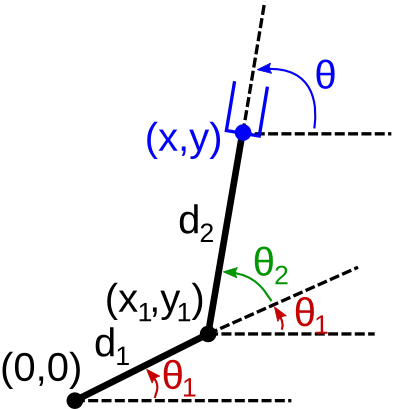
- The governing equation for link d1 is,
x1= d1cosθ1 and y1= d1sinθ1 - Similarly for link d2 the governing equation is,
x2= x1+d2cosθ2 and y2= y1+d2sinθ2
PROCEDURE:
A matlab program to get the desired is written given below
clear all
close all
clc

%inputs
d1= 0.75;
d2= 0.325;

%Angle between the base and link1; and angle between the two links
THETA1= linspace(0,90,15);
THETA2= linspace(0,90,15);

ct=1;
for i=1:length(THETA1)
  theta1=THETA1(i);
  for j=1:length(THETA2)
    theta2=THETA2(j);
    x0=0;
    y0=0;

    x1=d1*cosd(theta1);
    y1=d1*sind(theta1);

    x2= x1+d2*cosd(theta2);
    y2= y1+d2*sind(theta2);

    %plotting the coordinates
    plot([x0 x1],[y0 y1],[x1 x2],[y1 y2],'linewidth',2.5)
    axis([-1 1.5 0 1.5])
    pause(0.04)
    M(ct)= getframe(gcf);
    ct= ct+1;

  end
end

movie(M)
videofile=VideoWriter('2R_robotic_arm.mp4','MPEG-4');
open(videofile)
writeVideo(videofile,M)
close(videofile)
CONCLUSION AND LEARNING OUTCOME:
- Learnt what is forward kinematics in robotics and also the uses.
- Learnt creating loops in matlab.
- Learnt how to create a video by capturing frames using matlab commands.
Gdrive link of animation: https://drive.google.com/file/d/1JnXybXjmLTmzrEYCceclq-E2f1w2KJJJ/view?usp=sharing