Week 2- 2R Robotic Arm Challenge
To write a program in matlab to simulate the forward kinematics of a 2R robotic arm.
Kinematics is the relationships between the positions, velocities and accelerations of the links of a manipulator. The forward kinematics is when the kinematical data are known for the joint coordinates
This is below program is following matlab is used to solving the forward kinematics of the 2R robotic arm manipulator.
Robotic arm is machines that are programmed to execute the specific task or job quickly, efficiently and extremely accurate. Generally repetative procedure used that time robotic arm can be used.
This robotic arm valued in especially manufacturing inustries, assembly sectoers. This robotic arm used to maintain the quality production.
In this matlab program used length of link and angle of theta to solving forward kinematics of the 2R robotic arm manipulator. In this forward kinematic of the 2R robotic arm having two links and two angles.
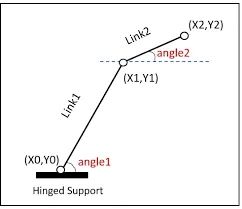
fig.Basic robotic 2R arm manipulator
In this figure we have seen Link1=l1, Link2=l2 and Link one create a angle theta1 and Link2 create angle theta2.
Link1 starting point is fixed at the base, since Link1 starting point is (x0,y0), Link1 ending point and Link2 starting point is (x1,y1). Link2 ending point is also called as manipulator. Manipulator coordinates is (x2,y2).
whereas,
x0=0, y0=0...(at the base or starting point)
x1=l1*cosd(theta1)
y1=l1*cosd(theta1)
x2=x1+l2*cosd(theta2)
y2=y1+l2*sind(theta2)
All this value taken by trignomatric rule. we took sind and cosd this 'd' is form degree value because in matlab program sin and cos value gave in radian for that reason we took values sind and cosd.
This is the basic program of forward kinematics of 2R robotic arm.
% Forward kinematics of 2R robotic arm
% Inputs
l1=2;
l2=1.5;
theta1=45;
theta2=30;
% coordinates
x0=0;
y0=0;
x1=l1*cosd(theta1);
y1=l1*sind(theta1);
x2=x1+l2*cosd(theta2);
y2=y1+l2*sind(theta2);
% Plotting
line([x0 x1],[y0 y1],'linewidth',3,'color','r');
line([x1 x2],[y1 y2],'linewidth',3,'color','b');
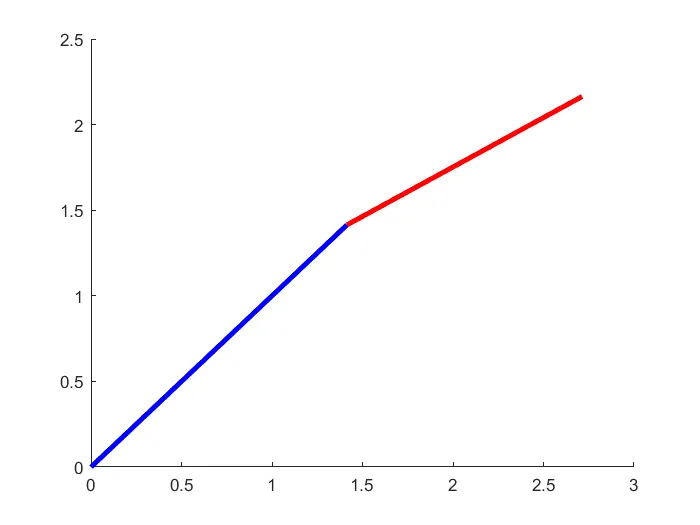
fig.manipulatior of foward kinematics
EXPLANATION:- In this program we took values l1=2,l2=1.5 and theta1=45 in degree and theta2=30 in degree.
when i used this formulae in matlab program,
x1=l1*cosd(theta1);
y1=l1*sind(theta1);
x2=x1+l2*cosd(theta2);
y2=y1+l2*sind(theta2);
I got values of x1=1.414, y1=1.414 and x2=2.71, y2=2.16.
Then i gave command plotting,
% Plotting
line([x0 x1],[y0 y1],'linewidth',3,'color','r');
line([x1 x2],[y1 y2],'linewidth',3,'color','b');
In this Command we took coordinates point and used 'linewidth',3,'color','b'. This 'linewidth' is using for gave command line of the link.
This '3' indicates the thickness of line, and 'b' indicates colour name.
we have seen this figure first link colour is blue, this link creat a angle with base and this angle is 45 degree. Second link show color red,
this link creat a angle with base and this angle is 30 degree.
Forward kinematics of a 2R robotic arm with for loop
%Forward kinematics of a 2R robotic arm
clear all
close all
clc
% Inputs
l1=2;
l2=1.5;
theta1=linspace(0,90,10)
theta2=linspace(0,90,10)
ct=1;
for i=1:length(theta1)
THETA1=theta1(i)
for j=1:length(theta2)
THETA2=theta2(j)
x0=0;
y0=0;
x1=l1*cosd(THETA1);
y1=l1*sind(THETA1);
x2=x1+l2*cosd(THETA2);
y2=y1+l2*sind(THETA2);
% Plotting
hold on
figure(ct)
line([x0 x1],[y0 y1],'linewidth',3,'color','r');
line([x1 x2],[y1 y2],'linewidth',3,'color','b');
pause(0.3)
ct=ct+1;
end
end
EXPLANATION:-Before writing the code, it's important to start with clear all, close all and clc command since
clear all- Workspace data removed, freeing up system memory.
close all- current figure deleted.
clc- all input and output cear from the command window display.
before started program, then i took linspace command linspace(0,90,10). This command start point 0 to end point
we give 10 values. Then i used for loop coommand.
for i=1:length(theta1)
THETA1=theta(i)
disp('hello')
end
i ran this program that time 'hello' word display in 10 times .
I used ct command that time we got 26 graph, because i used linspace(0,90,5). when we used ct command we got 26 graph in various angle of graph.
when i removed ct in plot command and used pause command that time i got figure,
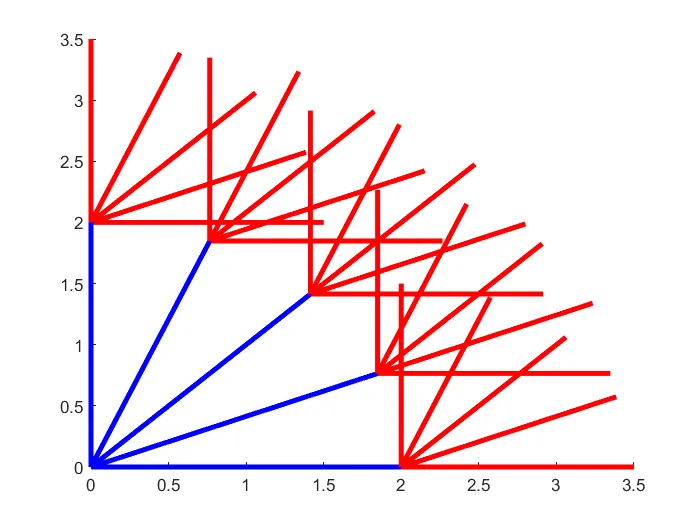
Fig. various direction of graph
Above figure we got 26 plots in different angle of position. In this position blue colour indicates link1. This link1 is moves 0 to 90 degree angle in different position. Link2 colour is red.
This link is also moves 0 to 90 degree angle in different position.Link1 moves five different position, that time link2 moves 25 different position. At a link1 take one position that time link2
take five different position.
Pause command was used to for pausing the command for a certain time and this project pause time was 0.3s used.
Forward kinematics of a 2R robotic arm with for loop
%Forward kinematics of a 2R robotic arm
clear all
close all
clc
% Inputs
l1=2;
l2=1.5;
theta1=linspace(0,90,10)
theta2=linspace(0,90,10)
ct=1;
for i=1:length(theta1)
THETA1=theta1(i)
for j=1:length(theta2)
THETA2=theta2(j)
x0=0;
y0=0;
x1=l1*cosd(THETA1);
y1=l1*sind(THETA1);
x2=x1+l2*cosd(THETA2);
y2=y1+l2*sind(THETA2);
% Plotting
plot([x0 x1],[y0 y1],[x1 x2],[y1 y2],'linewidth',3);
axis([-0.2 3 0 3])
pause(0.3)
M(ct)=getframe(gcf);
ct=ct+1;
end
end
movie(M)
videofile=VideoWriter('roboticarm.AVI');
open(videofile);
writeVideo(videofile,M)
close(videofile)
EXPLANATION:-The M command was used to capture the current frame every time the for loop runs. The last step of loop is ct+1, this will increment the frame everytime
the for loop run. End command was used to plot and for the for loop to stop both from running.
In this program last part of code movie command was used to create a movie of the animation of the robotic arm. The VideoWriter command was used to assign
the video format. For this project .avi was used as the format. The open command was used to open the video. writeVideo command was used to write the video with plot frames.
And lastly, the close command was used to close the video file.
Error faced while programming:- The first error i had in the code for this project i typed 'videowriter' by mistake instead of 'VideoWriter' since matlab is a case sensitive
programing language, command window alert me like,
Unrecognized function or variable 'videowriter'.
Error in challenging_forward (line 41)
videofile=videowriter ('roboticarm.AVI');
Then i corrected my mistake i rewrote 'VideoWriter'.
Here is the animation video link,