Week 2- 2R Robotic Arm Challenge
Objective:
To write a Matlab program to simulate the forward kinematics of a 2R Robotic Arm and create an animation file of the plots obtained.
Solution:
Robotic Arm: A robotic arm is a type of mechanical arm, usually programmable, with similar functions to a human arm; the arm may be the sum total of the mechanism or may be part of a more complex robot. The links of such a manipulator are connected by joints allowing either rotational motion (such as in an articulated robot) or translational (linear) displacement. The links of the manipulator can be considered to form a kinematic chain. The terminus of the kinematic chain of the manipulator is called the end effector and it is analogous to the human hand (Wikipedia, 2020).
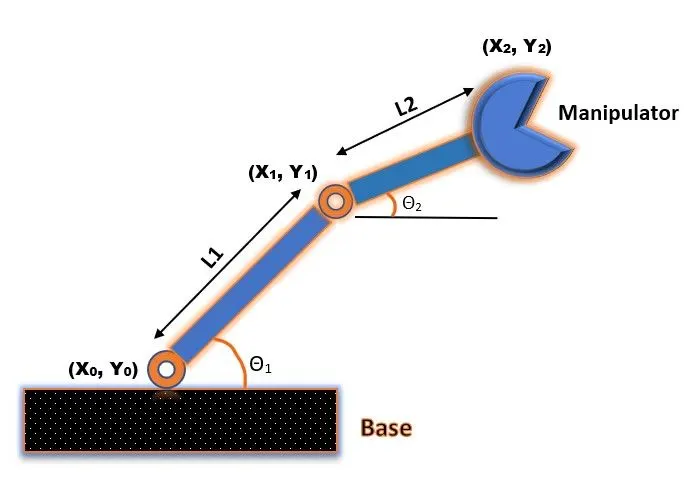
A 2R robotic arm is shown below and it consists of:
- a base.
- two links with lengths L1 & L2 that make angles `theta_1` and `theta_2` respectively.
- a manipulator.
Solution:
- In order to find the positions of the links, let's assign coordinates (`X_0`, `Y_0`) for the start of Link 1, (`X_1`, `Y_1`) for the start of Link 2 and (`X_2`, `Y_2`) for the end of Link 2.
- So, `X_1` = 0; `Y_1` = 0 and
- `X_1` = L1 * Cos `theta_1` ; `Y_1` = L1 * Sin`theta_1`.
- And, `X_2` becomes `X_1` + L2 * Cos `theta_2`, and `Y_2` becomes `Y_1` + L2 * Sin `theta_2`.
- Now, the total position sets are [`X_0`, `Y_0`], [`X_1`, `Y_1`], [`X_2`, `Y_2`].
- Length of Link 1, L1 = 1 m.
- Length of Link 2, L2 =0.5 m.
% Forward Kinematics of a 2R Robotic Arm Manipulator

clear all
close all
clc

% inputs %
L1 = 1;
L2 = 0.5;

theta1 = 45;
theta2 = 90;

% Coordinates
Xo = 0;
Yo = 0;
X_1 = L1*cosd(theta1);
Y_1 = L1*sind(theta1);
X_2 = X_1 + L2*cosd(theta2);
Y_2 = Y_1 + L2*sind(theta2);

% Plotting
line ([Xo X_1], [Yo Y_1], 'linewidth',2, 'color', 'r');
line ([X_1 X_2], [Y_1 Y_2], 'linewidth',2, 'color', 'b');
grid on;
Results:
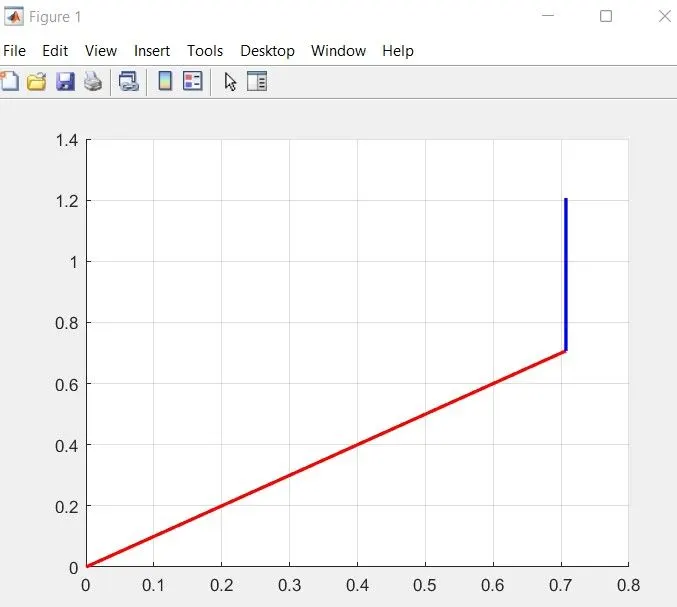
It can be observed that the length of Link 1 (red) is more than that of Link 2 (blue), with values of `theta_1` = 45 and `theta_2` = 90 degrees respectively.
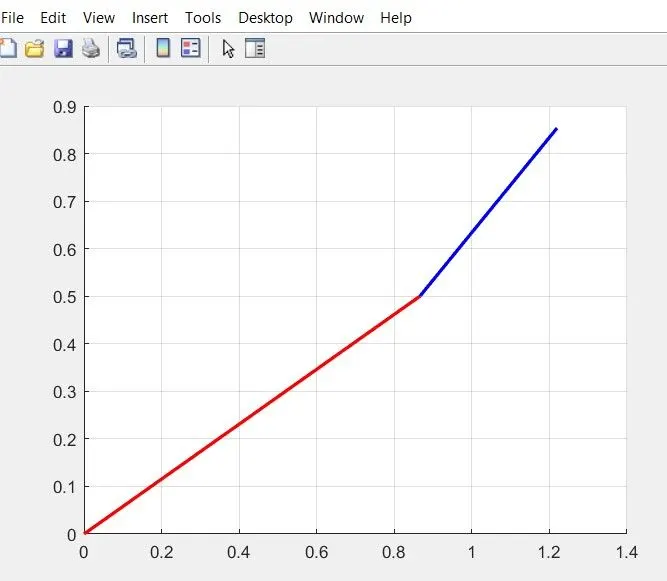
Upon changing the `theta_1` and `theta_2` values to 30 and 45 degrees, the following plot is obtained:
Animating the plots:
% Forward Kinematics of a 2R Robotic Arm Manipulator using Forloop

clear all
close all
clc

% inputs

L1 = 1;                             % Length of Link 1
L2 = 0.5;                           % Length of Link 2

theta1 = linspace(0,90,15);         % Creating an array with 15 values for theta1 between 0 and 90
theta2 = linspace(0,90,15);         % Creating an array with 15 values for theta2 between 0 and 90

ct = 1;                             % individual frame

for i = 1:length(theta1)            % i = 1 to 15 values 0f theta1
    THETA1 = theta1(i);             % value of i will change from 1 to 15, and each time it will execution the set of commands within the loop
    for j = 1:length(theta2)        % j = 1 to 15 values 0f theta2
        THETA2 = theta1(j);         % value of j will change from 1 to 15, and each time it will execution the set of commands within the loop

% Cordinates
Xo = 0;
Yo = 0;
X_1 = L1*cosd(THETA1);
Y_1 = L1*sind(THETA1);
X_2 = X_1 + L2*cosd(THETA2);
Y_2 = Y_1 + L2*sind(THETA2);

% Plotting
plot ([Xo X_1], [Yo Y_1], [X_1 X_2], [Y_1 Y_2], 'linewidth', 2 , 'Color','r', 'LineStyle','-.');
axis([-.1 1.5 0 1.5]);              % Assigning the axis
pause(.02);                         % holds the execution temporarily for the specified time period
M(ct) = getframe(gcf);              % saving the figure window in an array named M
ct = ct+1;                          % each time, incrementing the individual frame by 1

    end
end

movie(M);                           % generates a movie using all the frames

videofile = VideoWriter('forward_kinematics_using_forloop.AVI','Uncompressed AVI'); % creates a video file
open(videofile);                    % opens the video file
writeVideo(videofile,M);            % writes the captured frames to the video file
close(videofile);                   % closes the video file
Result:
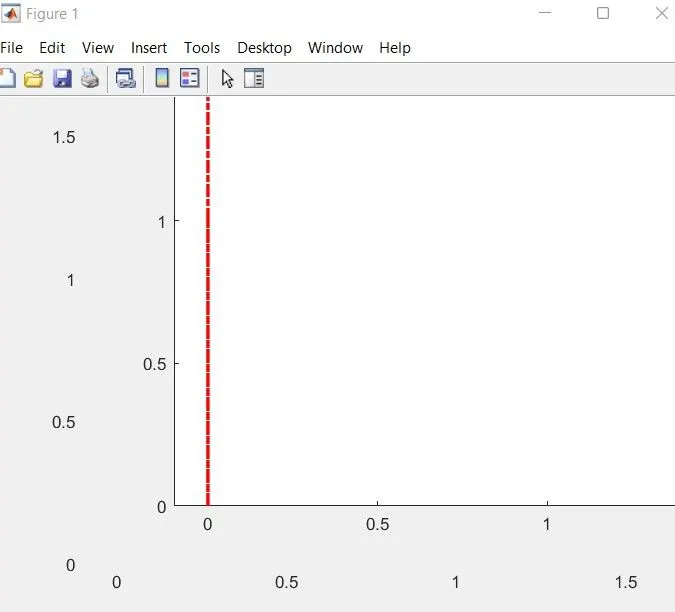
The YouTube link of the obtained animation/movie is https://youtu.be/Sxz7qcUCrnk
Error encountered during code execution:
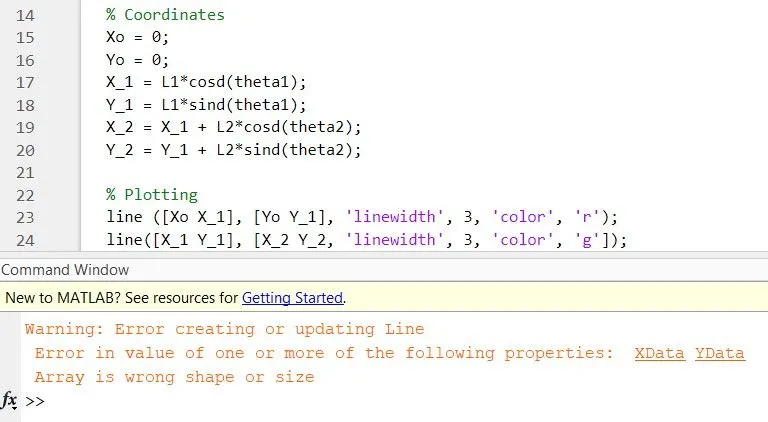
In line 24, instead of grouping the X coordinates together, I accidentally typed X_1, Y_1. The mistake was identified after a few attempts and rectified.
To conclude, the forward kinematics of a 2R robotic arm manipulator was successfully simulated and demonstrated.
References:
Wikipedia. (2020). Robotic arm. [online] Available at: https://en.wikipedia.org/wiki/Robotic_arm.