2R Robotic Arm Challenge
Write a program in Matlab to simulate the forward kinematics of a 2R Robotic Arm.
program :
% simulate the forward kinematics of a 2R Robotic Arm.

% input
% length of two Robotic Arm [in meter]
l1=1;
l2=0.5;
% Angle between Robotic Arm and base,and both Robotic Arm.
theta1=linspace(0,90,10);
theta2=linspace(0,90,10);

ct=1;
for i = 1:length(theta1)
    p = theta1(i);
    for j = 1:length(theta2)
    q = theta2(j);

x0= 0;
y0= 0;

x1= l1*cosd(p);
y1= l1*sind(p);

x2= x1+l2*cosd(q);
y2= y1+l2*sind(q);

% plotting workspace of both arm.

plot([x0 x1],[y0 y1],[x1 x2],[y1 y2],'linewidth',3)
axis([-0.1 1.5 0 1.5])
pause(0.3)
M(ct)=getframe(gcf);
ct=ct+1;
    end
end
movie(M)
videofile = VideoWriter('forward_kinematic_of_a_2R_robotic_arm.avi','Uncompressed AVI');
videofile.FrameRate = 10
open(videofile)
writeVideo(videofile,M)
close(videofile)

Result:

videofile =

  VideoWriter

    General Properties:

       Filename:                 'forward_kinematic_of_a_2R_robotic_arm.avi'
       Path:                     'C:UsersxpertDesktopmatlab'
       FileFormat:               'avi'
       Duration:                 0

    Video Properties:

       ColorChannels:            3
       Height:                   []
       Width:                    []
       FrameCount:               0
       FrameRate:                10
       VideoBitsPerPixel:        24
       VideoFormat:              'RGB24'
       VideoCompressionMethod:   'None'
youtube video link :https://youtu.be/vuFt4foEeO4
Report
- Step-wise explanation of code:
% input
% length of two Robotic Arm [in meter]
l1=1;
l2=0.5;
% Angle between Robotic Arm and base,and both Robotic Arm.
theta1=linspace(0,90,10);
theta2=linspace(0,90,10);
in first step i give basic input into programe here l1 & l2 are length of robotic arm in meter.following to that i give equal value of theta1& theta2 in between(0 to 90 degree) with the help of linspace command.
for i = 1:length(theta1)
p = theta1(i);
for j = 1:length(theta2)
q = theta2(j);
x0= 0;
y0= 0;
x1= l1*cosd(p);
y1= l1*sind(p);
x2= x1+l2*cosd(q);
y2= y1+l2*sind(q);
% plotting workspace of both arm.
plot([x0 x1],[y0 y1],[x1 x2],[y1 y2],'linewidth',3)
axis([-0.1 1.5 0 1.5])
end
end
in second step i use for loop for getting all plot of theta1 & theta2 value.here we define the starting and ending point of robotic arm (x0,y0,x1,y1,x2,y2). and we use sind and cosd because both theta in degree.but after ploting we face problem like all position of robotic arm in single plot so we use counter function to overcome this problem.
ct=1;
figure(ct)
ct=ct+1;
in this step i use counter function(ct) so each and evary time for loop executed seperate plot is created.its means 1st robotic arm rotate by angle 9 degree then 2nd arm also rotate 10 number of time with respective angle and each plot is created its means 100 plot is created.but its not good representation of plot so we use hold,plot,pause command.
hold on
plot([x0 x1],[y0 y1],[x1 x2],[y1 y2],'linewidth',3)
pause(0.3)
here i create the animation of number of plot in single frame so that i use hold on and pause command.and instead of line comand i use plot command. in next step i create movie of this all frame.
M(ct)=getframe(gcf);
movie(M)
videofile = VideoWriter('forward_kinematic_of_a_2R_robotic_arm.avi','Uncompressed AVI');
videofile.FrameRate = 10
open(videofile)
writeVideo(videofile,M)
close(videofile)
for creating movie we use getframe(gcf) command so every frame is saved in M arrays after that we give name to that video file forward_kinematic_of_a_2R_robotic_arm and file format is AVI.also we give frame rate is 10.
- Errors faced while programming :
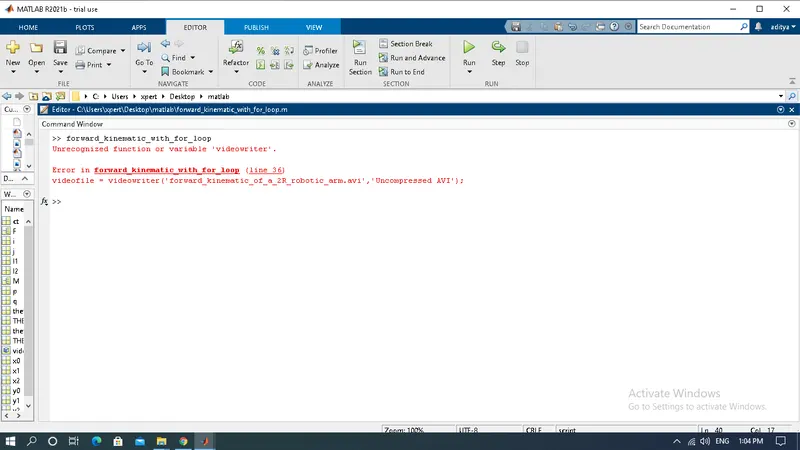
- Steps taken to overcome those errors :
here i manually write the 'videowriter' and 'writevideo' but syntax of videowriter and writevideo is littlebit diffirent this error is corrected with help of HELP comand.