Week 2- 2R Robotic Arm Challenge
PROGRAM
% To simulate the forward kinematics of a 2R Robotic Arm.

clear all
close all
clc

% input datas

% Length of the link 1 ,(in 'm')
l1 = 2;
% Length of the link 2 ,(in 'm')
l2 = 1;

% Various angles of the link 1 with respect to x-axis,(in 'degrees')
theta1 = linspace(0,90,10);
% Various angles of the link 2 with respect to x-axis,(in 'degrees')
theta2 = linspace(0,90,15);


% initial counter value for the loop
ct = 1;

% To find the start and the end coordinates of both links for various angles

for i = 1:length(theta1)
    THETA1 = theta1(i);

    for j = 1:length(theta2)
        THETA2 = theta2(j);

% The coordinates for the starting point of link 1
        x0 = 0;
        y0 = 0;

% The coordinates for the end point of link 1 which is also the starting point of link 2
        x1 = l1*cosd(THETA1);
        y1 = l1*sind(THETA1);

% The coordinates of the end point of link 2
        x2 = x1 + l2*cosd(THETA2);
        y2 = y1 + l2*sind(THETA2);

% Plotting of links for various angles and displaying the various frames
        plot([x0 x1],[y0 y1],[x1 x2],[y1 y2],'linewidth',3,'Marker','*')
        axis([-0.5 3.2 0 3.2])
        pause(0.03)

        M(ct) = getframe(gcf);
        ct = ct + 1;
    end
end

% To create a animation using the frames captured in the figure window
movie(M)
videofile = VideoWriter('Forward_Kinematics_of_2R_Robotic_Arm.avi','Uncompressed AVI');
open(videofile)
writeVideo(videofile,M)
close(videofile)
OUTPUT
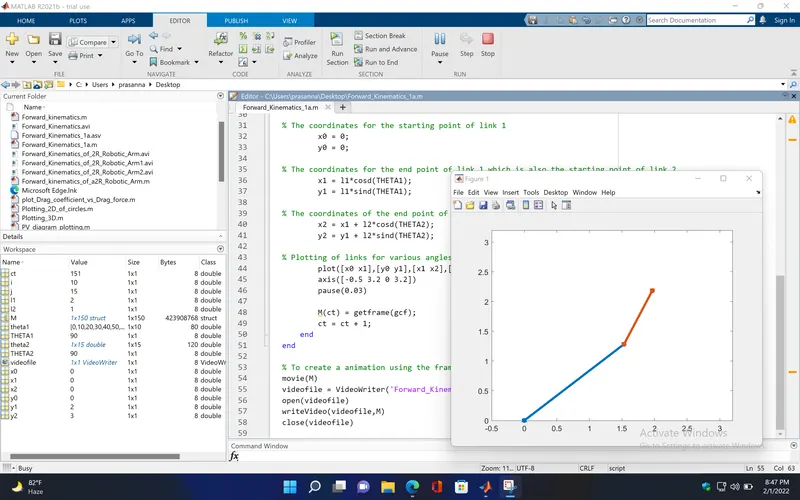
The ouput plot animation is uploaded in youtube and the link is attached below,
OUTPUT LINK : https://youtu.be/TViNaJJYJUM
EXPLANATION
In the above program , forward kinematics is used to find the coordinate points of the 2R Robotic Arm which contains two rotational joints and two links. The main purpose of forward kinematics is to find the workspace(the space that a robot arm can reach) of the manipulator . so , it is required to assign various angles for the links and, to find the corresponding coordinates, so that we can run the plots through frames , animate it, and find the workspace of the manipulator.
INPUT VALUES
Length of the link 1, l1 = 2 (in 'm')
Length of the link 2, l2 = 1 (in 'm')
To animate the plot for different positions of the links , angles are assigned as arrays of different values for link 1 and 2,
Angles of link 1, (in 'degrees')
theta1 = linspace(0,90,10); - is used to make an array of 10 equally spaced values between 0 and 90.
Angles of link 2, (in 'degrees')
theta2 = linspace(0,90,15); - is used to make an array of 15 equally spaced values between 0 and 90.
ct = 1; - it is the initial counter value assigned before starting the loop.
for loop
'for' loop is used to repeat the statements inside the loop for various angles of link 1 and 2, until the condition becomes false
for i = 1 : length(theta1) - The loop is followed by the variable 'i', which gives the no. of iteration for the loop to repeat, 'i' starts from the value '1' to the 'length(theta1)' which means the no. of values in 'theta1' (i.e, 10)
THETA1 = theta1(i); - Here , for each value of 'i' assigned in the loop, the value of 'theta1' is called individually and the value is assigned to the variable 'THETA1'
for j = 1 : length(theta2) - Here, again a 'for' loop is created inside the existing 'for' loop , it is called as nested 'for' loop , this is done because for every position of link 1 , link 2 must vary its angle from its initial position. This loop is followed by the variable 'j' which starts from the value '1' to the 'length(theta2)' (i.e, 15 ,no. of values)
THETA2 = theta2(j); - For each value of 'j' assigned in the loop, the value of 'theta2' is called individually and the value is assigned to the variable 'THETA2'
Coordinates of the links
The coordinates of the starting point of link 1 (it is fixed point of the arm)
x0 = 0;
y0 = 0;
The coordinates of the end point of link 1 which is the starting point of link (for every value of 'THETA1' , the coordinates 'x1' and 'y1' changes)
x1 = l1*cosd(THETA1);
y1 = l1*sind(THETA1);
The coordinates of the end point of link 2(for every value of 'THETA2' , the coordinates 'x2' and 'y2' changes)
x2 = x1+l2*cosd(THETA2);
y2 = y1+l2*sind(THETA2);
Plotting
plot([x0 x1],[y0 y1],[x1 x2],[y1 y2],,linewidth',3,'Marker','*')
- it is used to plot two links for the various angles with the coordinates marked with '*'.
axis([-0.5 0 3.2 3.2])
- axis set to the limits , 'x-axis' (-0.5) to 3.2 and 'y-axis' 0 to 3.2
pause(0.03)
- used to pause the frames in the figure window for '0.03 seconds'
M(ct) = getframe(gcf);
- The 'getframe' command is used to capture the figure in the figure window, which is called by using 'gcf'. This is stored in a variable 'M' for every increment of the counter value 'ct'
ct = ct + 1;
- The counter value is incremented for the next iteration
end
- used to end the 'for' loop
To create animation
movie(M)
- Matlab creates a movie by arranging the frames which is stored in the variable 'M'
videofile = VideoWriter('Forward_Kinematics_of_a_2R_Robotic_Arm.avi','Uncompressed AVI');
- used to save the video in a required format
open(videofile)
- Opens the 'videofile'
writeVideo(videofile,M)
- Writes the video stored in 'M' to the 'videofile'
close(videofile)
- Closes the 'videofile'
ERRORS occured and action taken :
1. open('videofile') is used instead of open(videofile) which is a error caused because of the apostrophe (') that i used . While calling a variable or a function we shouldnot use apostrophes (').
2. writevideo(videofile,M) is not a correct in-built keyword to use ,for which i got error . The correct one is writeVideo(videofile,M) , in 'writevideo' , 'V' should be in uppercase.
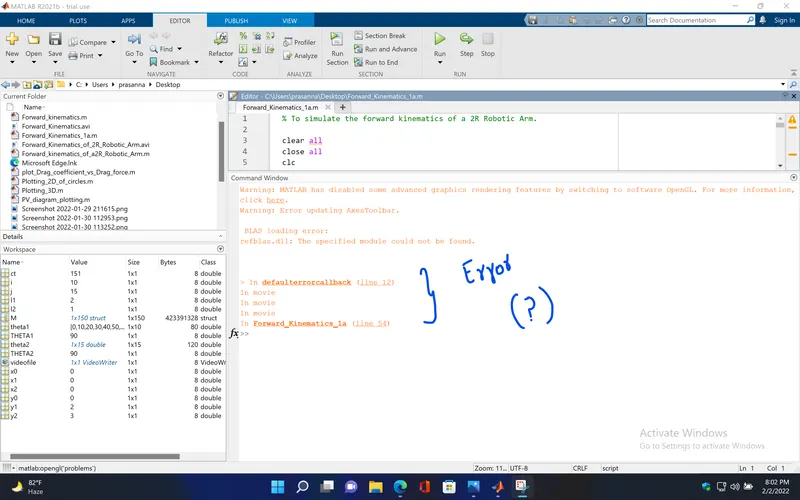
3. defaulterrorcallback shows in my command window everytime i run this program and i can't fix this error.
movie