Week 2- 2R Robotic Arm Challenge
ROBOTIC ARM PROGRAM
% forward kinematics of robotic arm
clear all
clc
close all
%inputs
l1=1;
l2=0.5;
theta1=45;
theta2=30;

%coordinates
        x0=0;
        y0=0;
        x1=l1*cosd(theta1);
        y1=l1*sind(theta1);

x2=x1+l2*cosd(theta2);
y2=y1+l2*sind(theta2);
%plotiting
line([x0 x1],[y0 y1],'linewidth',3,'color','b')
line([x1 x2],[y1 y2],'linewidth',3,'color','r')
Explanation:
we are here writing a program for robotic arm kinematics.
first we are having the input values of l1 and l2. so lets first understand basic program of robotic arm and then come to final program.
In the basic program we will given the first arm angle and second arm angle and we will see the corrseponding plot of the arm
given first arm angle as 45 and second arm angle 30 and aslo the length of the two arms.
since the arm (first) end is connected to second arm starting lets consider first arm starting point coordinates as x0,yo and ending point as x1,y1 and this x1,y1 coordinates will be given toi the second arm starting point (sinces there are connected) and the ending of second arm as x2,y2.
now,
x0=0,y0=0 (considering as base point)
x1 y1 will be given as length of arm*cos(angle) for x1
and length of arm*sin(angle) for y1. here angle is first arm angle.
then we will calculate for x2=x1+length of arm*cos(angle)
y2=y1+length of arm*sin(angle) .here angle is second arm angle.
this gives how the arms positions with respect to the given angles.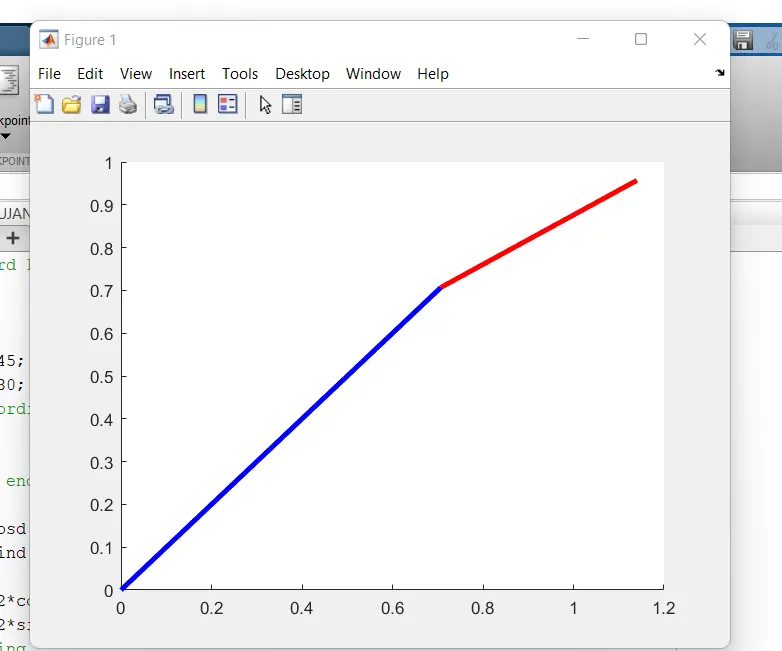
NOW,
lets come to final program where we will slove for each angle of arm one how will the second arm tales the position. this can be done by using for loop.
using for loops i.e., we are using the condition for every angle of arm 1 the second arm takes the position until the next angle of the first arm.
angle for first arm have 10 angles (from 0 to 90). for these every angle between 0 to 90 of fitst angle the second arm takes theangles 0 tp 90.
the conditons goes like these:
for each one valuse of angle of first arm
angle of second arm goes from 0 to 90 and the loop cloise for first angle of first arm.
clear all
clc
close all
l1=1;
l2=0.5
theta1=linspace(0,90,10);
theta2=linspace(0,90,10);
ct=1
for i=1:length(theta1)
    THETA1=theta1(i);
    for j=1:length(theta2)
        THETA2=theta2(j);
        x0=0;
        y0=0;
        x1=l1*cosd(THETA1);
        y1=l1*sind(THETA1);
x2=x1+l2*cosd(THETA2);
y2=y1+l2*sind(THETA2);
%plotiting

plot([x0 x1],[y0 y1],[x1 x2],[y1 y2],'linewidth',3)
axis([0 2 0 2])
pause(0.1)
M(ct)=getframe(gcf);
ct=ct+1;
    end
end
movie(M)
videofile=VideoWriter('forward.avi','Uncompressed AVI');
open(videofile)
writeVideo(videofile,M)
close(videofile)
IT GIVES THE PLOTIING IN SINGLE GRAPH
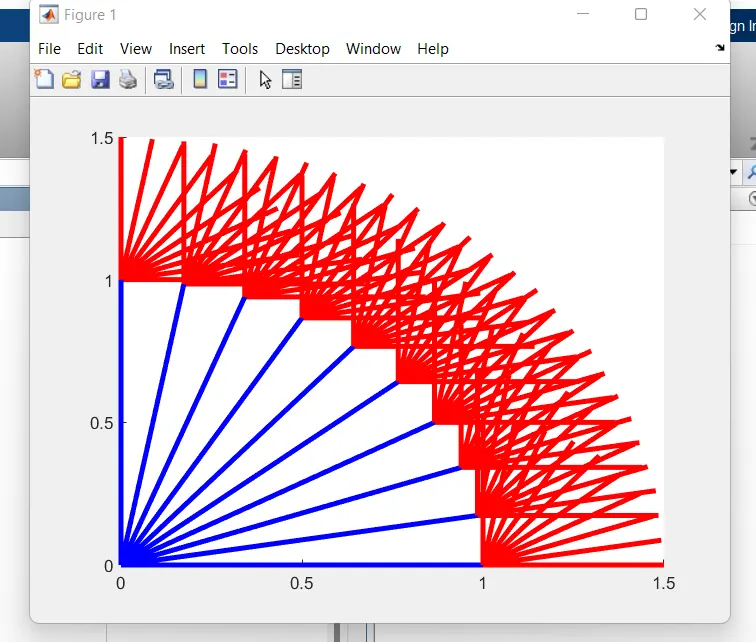
INORDER TO MAKE A VIDEO FILE WE WILL FOLOW FEW INBULIT DEFINED FUNCTIONS.WHICH GIVES VIDEO FILE .https://drive.google.com/file/d/1BoSE7SZ1oABNuVhAoSg31Yeca-4-xen-/view?usp=sharing
ERRORS GOT IN THE PROCESS.
typo errors
and single link plot.
video file making
how did i overcome?
by understanding the video class and by one to one session.