Week 2- 2R Robotic Arm Challenge
CODE :
%to construct an arm we need to provide the arm length first.
l1 = 1;
l2 = 0.5;
%to provide the work space for the arm we are to provide theta value
theta1 = linspace(0,90,10);
theta2 = linspace(0,90,10);
%ct stands for counter
ct = 1;
%the function part
for i = 1:length(theta1)
    THETA1 = theta1(i);
    for j = 1:length(theta2)
        THETA2 = theta2(j);
        %we need three points for constructing an arm
        x0 = 0;
        y0 = 0;
        x1 = l1*cosd(THETA1);
        y1 = l1*sind(THETA1);
        x2 = x1+l2*cosd(THETA2);
        y2 = y1+l2*sind(THETA2);
        %ploting in graph for the virtual representation of arm
        plot([x0,x1],[y0,y1],[x1,x2],[y1,y2],'linewidth',3)
        %axis to make plot readable
        axis([-0.5 2 0 1.5])
        %pausing to show the kinematics of arm
        pause(0.02)
        %converting the data collected into a video file
        M(ct) = getframe(gcf);
        ct = ct+1;
    end
end
%writing the datas collected to make an animation
movie(M)
videofile = VideoWriter('forward kinematics.avi','uncompressed AVI')
open(videofile)
writeVideo(videofile,M)
close(videofile)
EXPLANATION :
%to construct an arm we need to provide the arm length first.
To construct an arm we need to provide the length of the arm. as we humans have, the machanical arm is to contain two parts that is a larger part and a smaller part to make up an arm so the l1 is to be of value 1 and l2 is 0.5 a bit shorter.
l1 = 1;
l2 = 0.5;
%to provide the work space for the arm we are to provide theta value
in order to let the arm know its space or the region to execute its work we are to provide an area. since we are to represent things in a plot we are to provide the value of theta to let the arm know it own space to work.
theta 1 and theta 2, which has about 0 to 90 degrees with division of 10.
theta1 = linspace(0,90,10);
theta2 = linspace(0,90,10);
%ct stands for counter
ct is but the counter. that can help us making the animated video and can also in incrementing the values.
ct = 1;
%the function part
for i = 1:length(theta1)
THETA1 = theta1(i);
for j = 1:length(theta2)
THETA2 = theta2(j);
there are like two functions, one with in one. i represent the angle to be drafted for the first arm the bottom attached arm and j represents the angle to be drafted for the second arm the free end arm.
the basic representation of the code is
for i(angle of first arm) trace angles from 1 to the length of theta 1. that is the arm 1 is to move 10 times from 0 to 90 degree.
for j(angle of second arm) trace angles from 1 to the length of theta 2. that is the arm 2 is to move 10 times from 0 to 90 degree.
since we are to trace an arm work space the arm two executes its code once arm one completes its code.
%we need three points for constructing an arm
if we link two line we will obtain three points, the two free ends and the connecting point. hence we are to provide values for the three points. since its a plot representation we need (x0 y0) (x1 y1) (x2 y2) which values are drafted with the help of basic plot representation and basic trigonometry.
x0 = 0;
y0 = 0;
x1 = l1*cosd(THETA1);
y1 = l1*sind(THETA1);
x2 = x1+l2*cosd(THETA2);
y2 = y1+l2*sind(THETA2);
%ploting in graph for the virtual representation of arm
using plot command to link all points together.
plot([x0,x1],[y0,y1],[x1,x2],[y1,y2],'linewidth',3)
%axis to make plot readable
makes things readable
axis([-0.5 2 0 1.5])
%pausing to show the kinematics of arm
we use it to show the drafting of the arm in its space.
pause(0.02)
%converting the data collected into a video file
every move of the arm in the plot is collected and made into an animation with the help of movie command and counter command.
M(ct) = getframe(gcf);
ct = ct+1;
%writing the datas collected to make an animation
to make a movie or an animation, the movie command is helpfu in writing the animation in a video format.it writes the video file with its name and as AVI file as we desired. once done creating video file we open the file, write the video that is paste the video in it and close it.
movie(M)
videofile = VideoWriter('forward kinematics.avi','uncompressed AVI')
open(videofile)
writeVideo(videofile,M)
close(videofile)
ERRORS :
1.i forgot to mention the cos and sin values with d so the plot took things as a radian and gave the plot in ways other.
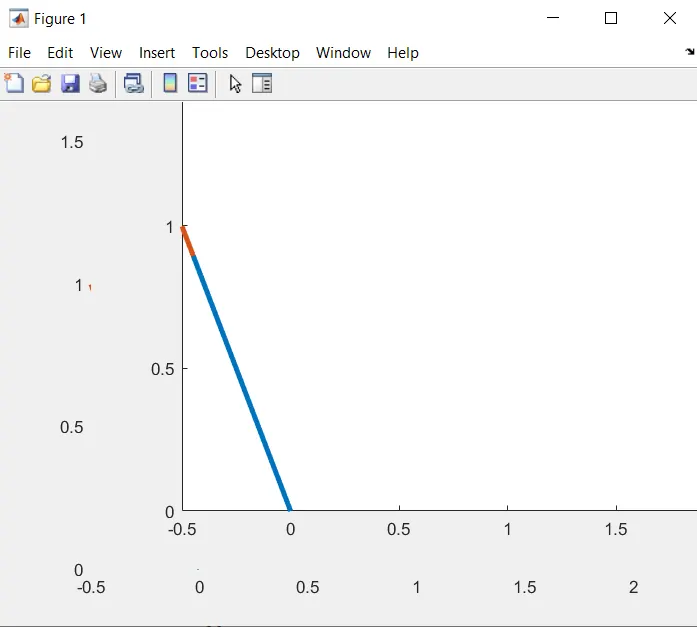
2.forgot to take two different variables for representing theta 1 and theta 2, but the code did run since they have same values.
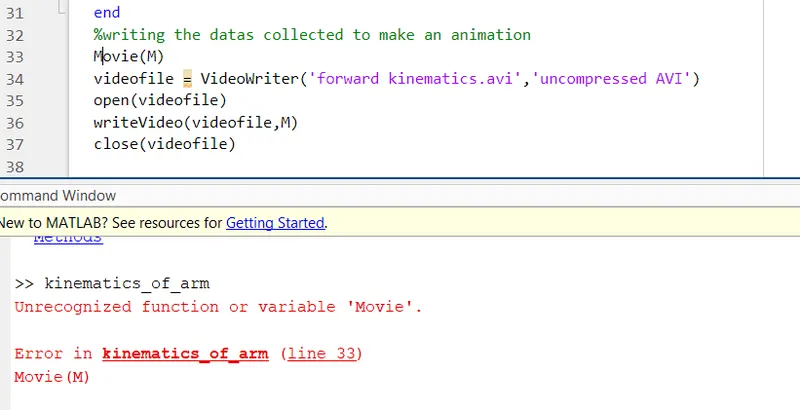
3.made error by capitalising the initial letter m in the movie(M).
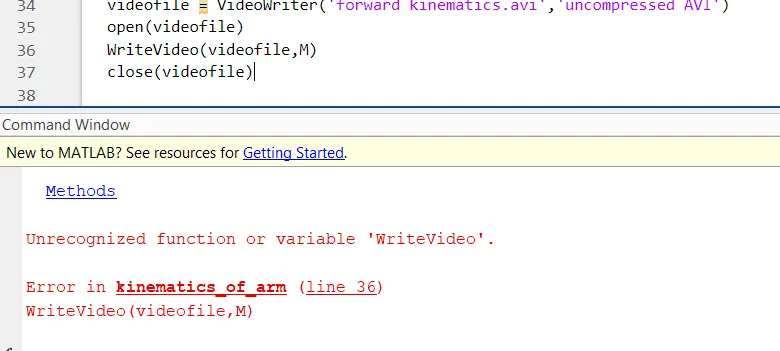
4.capitalised w for writeVideo(videofile,M).
ERROR CORRECTION :
1.corrected the value of cos and sin by adding d at the end and got the right arm trace.
2.did change the variables of theta1 and theta2 as i and j, for better understanding.
3.corrected the capital letter for Movie(M) to movie(M) and got rid of the error.
4.likewise by removing the capital W in WriteVideo(videofile,M) and made it to writeVideo(videofile,M) the code ran and didn't get any issues.
LINK:
link for animation :https://youtu.be/lMD8QYDy2Pg