Week 2- 2R Robotic Arm Challenge
OBJECTIVES
Write a program in Matlab to simulate the forward kinematics of a 2R Robotic Arm
THEORY
Kinematics is a subfield of physics, developed in classical mechanics, that describes the motion of points, bodies, and systems of bodies without considering the forces that cause them to move.
The forward kinematics problem involves finding the end-tip position of a manipulator in a coordinate space given its joint parameters. This means that given a certain pose of a robotic arm, the xyz coordinates of the hand must be determined.
If we know the geometrical parameters of the robotic arm and the range of angle of its working, then we can predict its workspace. Workspace is the possible locations that the robot manipulator can reach. To find out its workspace we need to findout it's end tip x and y co-ordinates of link 1 and link 2.
robotic arms are now commonly found across a broad range of industries and sectors, including:
- Laboratories
- Testing & sample handling
- Manufacturing
- Industrial automation
- Automated assemblyMachine feeding
- Machine access
- 2R ROBOTIC ARM
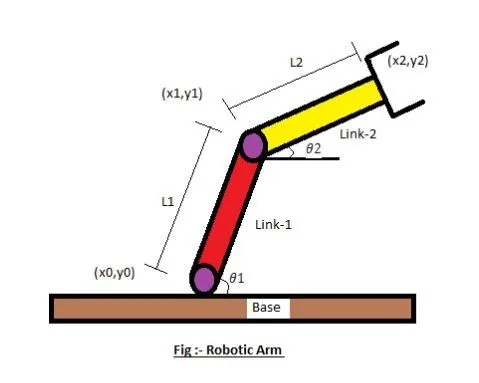
In order to solve this problem we need to find the end tip co-ordinates of link 1 and link 2, which are called as starting position and ending position.
Starting position of link 1 `(x_0,y_0)` = (0,0)
Ending position of link 1 `(x_1,y_1)` = `(l_1costheta_1,l_1sintheta_1)`
Starting position of link 2 `(x_1,y_1)` = `(l_1costheta_1,l_1sintheta_1)`
Ending position of link 2 `(x_2,y_2)` = `(x_1+l_2costheta_2,y_1+l_2sintheta_2)`
MATLAB CODE
% MATLAB Program to simulate the forward kinematics of a 2R Robotic Arm
clear all
close all
clc

% link 1
l1 = 1;

% link 2
l2 = 0.5;

% angle
theta1 = linspace(0,90,10);
theta2 = linspace(0,90,10);

% base
x0 = 0;
y0 = 0;

% counter variable
ct = 1;

% for loop
for i=1:length(theta1)
    T1 = theta1(i);

    for j=1:length(theta2)
        T2 = theta2(j);

        % link 1
        x1 = l1*cosd(T1);
        y1 = l1*sind(T1);

        % link 2
        x2 = x1+l2*cosd(T2);
        y2 = y1+l2*sind(T2);

        % plotting
        plot([x0 x1],[y0 y1],[x1 x2],[y1 y2],LineWidth=2)
        axis([-0.2 1.6 -0.2 1.6])
        title('2R robotic arm animation')
        pause(0.03)
        M(ct) = getframe(gcf);
        ct = ct+1;
    end
end

% creating animation
movie(M)
videofile=VideoWriter('forward kinematics of a 2R Robotic Arm.avi','Uncompressed AVI');
open(videofile)
writeVideo(videofile,M)
close(videofile)
CODE EXPLANATION
- To clear all variables from the current workspace.
- close all - This is used to closes all figures whose handles are visible.
- clc - It clears all the text from the Command Window, resulting in a clear screen.
- linspace - The linspace function generates linearly spaced vectors. It is similar to the colon operator ":", but gives direct control over the number of points.
- cosd() - This function returns cosine of the values, expressed in degrees.
- sind() - This function returns sine of the values, expressed in degrees.
- plot() - This command creates a 2-D line plot of the data in the arrays, which described inside it.
- axis() - axis specifies the limits for the current axes.
- title() - Add a title to a plot and return the text object.
- pause() - pause( n ) pauses execution for n seconds before continuing.
- getframe - getframe captures the current axes as it appears on the screen as a movie frame.
- gcf - gcf returns the current figure handle. If a figure does not exist, then gcf creates a figure and returns its handle.
- movie(M) - movie(M) plays the movie frames in array M once.
- VideoWriter(filename,profile) - Create a video object with a specified profile, make an array containing an RGB image, and then write the array into a video file. Create a videoWriter object for a new uncompressed AVI file for RGB24 video. VideoWriter(filename,profile) additionally applies a set of properties tailored to a specific file format (such as 'MPEG-4' or 'Uncompressed AVI'
- open() - open('___') opens the object specified by the string name.
- writeVideo(videofile,M) - writes data from an array to the video file associated with videofile.
- close() - close('___') close the object specified by the string name.
RESULT
- 2D Robotic arm animation
https://drive.google.com/file/d/1prz_3o-6KQCMMUX71Pj9TYvsVvzu-l00/view?usp=sharing