Week 2- 2R Robotic Arm Challenge
Report for Forward kinematics of a 2R Robotic Arm
1) Aim of the project
To write a program in Matlab to simulate the forward kinematics of a 2R Robotic Arm and execute the result in animation to understand better the movements of link 1 and link 2 of a 2R robotic arm.
2) Objective
a) To study the movements of manipulator that is connected to linkages.
b) To study the different angles of link 1 and link 2.
c) To plot a graph of link 1 and link 2 at the end.
d) To create a animation of movements made by link 1 and link 2 at different angles.
3) Theory
What is Kinematics?
> Kinematics is the sudy of forces that are acting on an object under a particular mechanism.
What is forward kinematics?
> Forward kinematics allows us to determine the position and orientation of the end-effector in terms of the joint variables.
Forward Kinematics of a 2R Robotic Arm
It contains 2 links and 2 rotational joints with manipulator connected at the end points of link 2
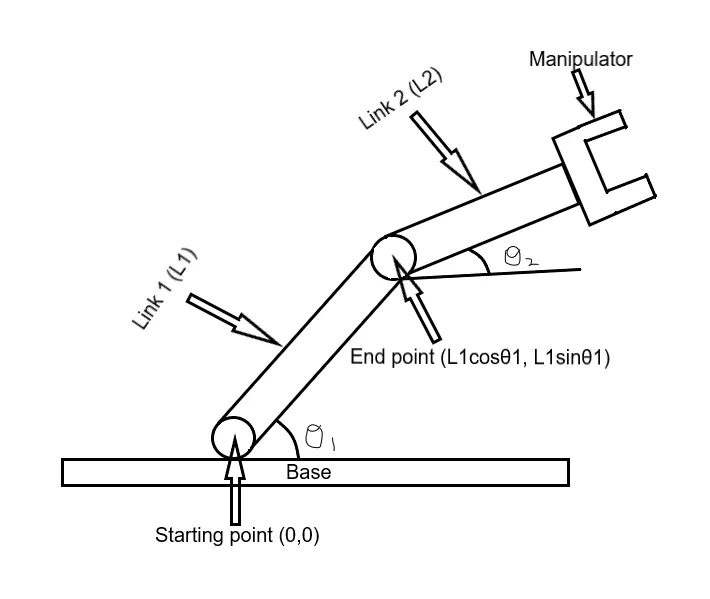
Above is the image created by paint 3D software for reference. With respect to forward kinematics we can reduce the problem as following. If θ1 and θ2 is given then what will be the final position of the manipulator? Let's find it through the simple calculations and MATlab codes (Note: Manipulator can be a welding tool or a machining tool)
4) Calculation
Step 1: Calculate the position of the link 1
The 2R robotic arm consist of base, two links (link1 and link 2) and a manipulator. Link 1 has two end points the starting point is fixed to the base of the robot and ending point is connected to link 2.
Co-ordinate of starting point of link 1 (0,0)
Co-ordinate of ending point of link 1 (L1*cosθ, L1*sinθ) (θ=θ1) (Note: X1 = L1*cosθ1, X2 = L1*sinθ1)
Step 2: Calculate the position of link 2
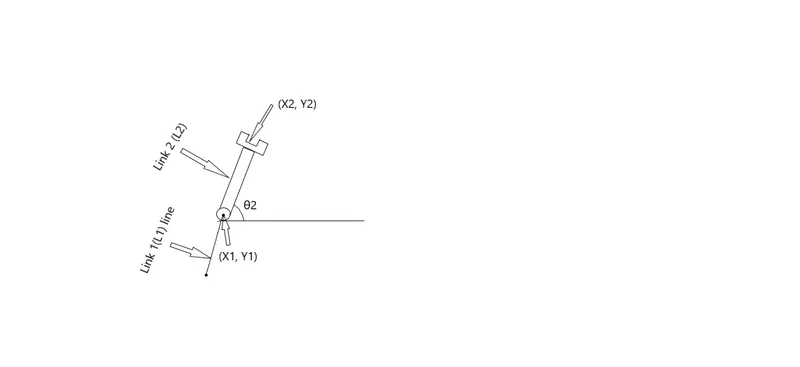
Here i have taken the link 2 diagram seperately to explain it in a better way. The ending point of link 1 is the starting point of link 2 at an angle of θ2 and the co-ordinates is as follows.
Co-ordinate of starting point of link 2 (x1, y1)
Co-ordinate of ending point of link 2 (x2, y2)
where wkt x2 = x1+L2*cosθ2 and y2 = y1+L2*sinθ2 (θ=θ2)
So far we have determined the co-ordinates of 3 points
1) The origin point (x0, y0).
2) The end point of the first link L1 or the starting point of the second link L2 (x1, y1).
3) The end point of the link 2 (x2, y2).
5) Programming using MATLAB Codes
% Forward kinematics of a 2R robotic arm manupulator


clear all
close all
clc

%Inputs
l1 = 1;
l2 = 0.5;

theta1 = linspace(0,90,10);
theta2 = linspace(0,90,10);

ct = 1;

%for loops

for i = 1:length(theta1)
    THETA1 = theta1(i);
    for j = 1:length(theta2)
        THETA2 = theta2(j);
        x0 = 0;
        y0 = 0;

        x1 = l1*cosd(THETA1);
        y1 = l1*sind(THETA1);

        x2 = x1+l2*cosd(THETA2);
        y2 = y1+l2*sind(THETA2);


        %Plotting

        plot([x0 x1],[y0 y1],[x1 x2],[y1 y2],'linewidth',3)
        axis([-0.1 1.5 0 1.5])
        pause(0.03)
        M(ct) = getframe(gcf);
        ct = ct+1;

    end

end

%Inserting frames in the animation to make movie

movie(M)
videofile = VideoWriter('forward_kinematics.avi','Uncompressed AVI');
open(videofile)
writeVideo(videofile,M)
close(videofile)
6) Step wise Explanation of the code
a) clear all, close all and clc clears workspace, closes all figures and clear command window.
b) Inputs - l1=1 and l2=0.5 are the length of link 1 and link 2.
c) theta1 = linspace(0,90,10) and theta2 = linspace(0,90,10), As we know linspace is a command that is similar to semicolon (:) theta1 and theta2 will get 10 values between 0 and 90.
d) ct = 1 ( ct is a variable that increments or decrements by a specfic step value in every iteration of loop here ct=1 is used for iterations of the frame and save it and display it in the form of a movie).
e) %for loops
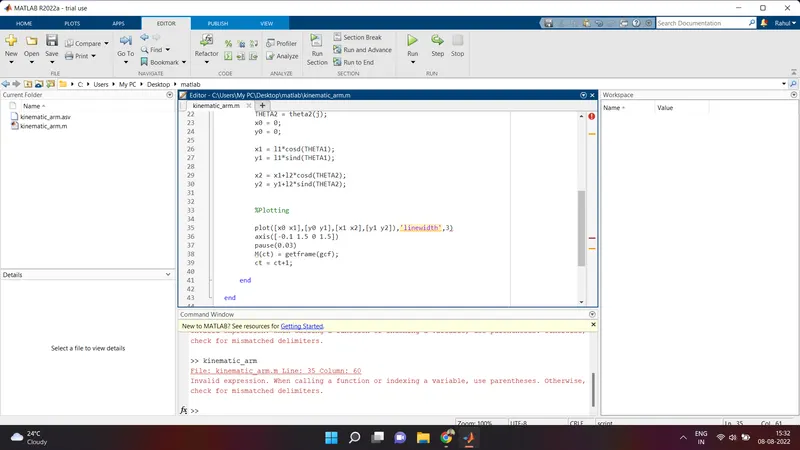
Invalid expression. When calling a function or indexing a variable, use parentheses. Otherwise,
check for mismatched delimiters".
After couple of tries i found the error rectified it removed the closing bracket there and executed the program and the program was successfully executed.
8) Result of the program we get an animation that is attached below with my youtube link "Title of the video"= "Skill lync project (Forward kinematics of a 2R robotic arm manipulator)
https://www.youtube.com/watch?v=gFwUQwNR71A
9) References
a) Skill lync sarang videos to help understanding better of codes and the way to execute it
b) MATlab website for definitions and code understanding
c) Google for definitions and better understanding of the concept