Week 2- 2R Robotic Arm Challenge
AIM :
To write a program and to create an animation based on the forward kinematics of 2R robotics arm
OBJECTIVE :
- To Write a program to understand forward kinematics of 2R robotics arm.
- To create an animation of working robotics arm
INTRODUCTION :
A robotic arm consists of base, two arms or kinematic links and two rotational joints.A robotic arm is a type of mechanical arm, usually programmable, with similar functions to a human arm; the arm may be the sum total of the mechanism or may be part of a more complex robot. The links of such a manipulator are connected by joints allowing either rotational motion or translational (linear) displacement. The links of the manipulator can be considered to form a kinematic chain. The terminus of the kinematic chain of the manipulator is called the end effector and it is analogous to the human hand.
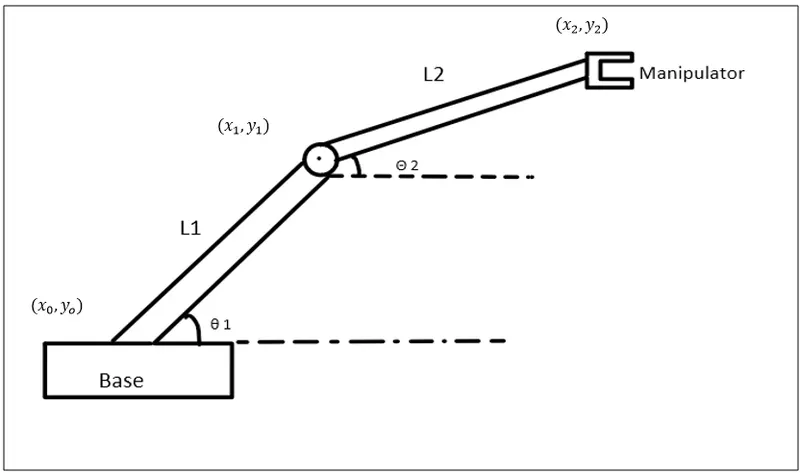
As below figure shows the robotic arm having two links , Link1 and Link2,lengths (L1 and L2) and angles `(θ 1 and θ 2)`.
MATLAB CODE AND ITS EXPLANATION OF THE CODE :
Step-1: Calculating the position of Link-1.
From the fixed Support, the initial value of X and Y for the Link-1 (X0, Y0) and the final value is (X1, Y1)
x0 = 0
y0 = 0
x1 = L1*cosd(THETA1)
y1 = L1*sind(THETA1)
Step-2: Calculating the position of the Link-2.
For the Link-2 starting point is the Ending point if the Link-1 ie (X1, Y1) and Ending point is (X2, Y2)
x2 = x1+L2*cosd(THETA2)
y2 = y1+L2*sind(THETA2)
Step-3: Writing Basic Program.
Basic Program represents the basic idea about the plot where we get only 2D plot but no animation.
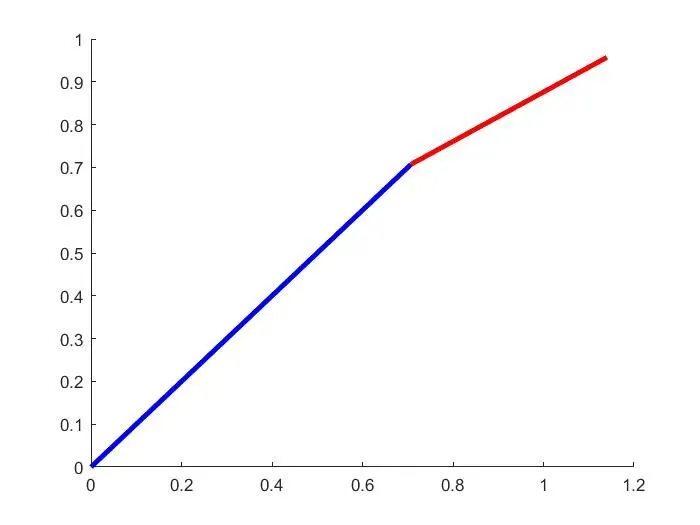
To get the basic plot first We are Providing the basic input as L1= 1 and L2=0.5
In meters also theta1 = 45 and theta2 = 30 in degree
And providing basic condition as above in step-1 and step-2, and for plotting we are using the command Line not plot because plot command gives us an error
Line ([X0 X1], [Y0 Y1])
Similarly,
Line ([X1 X2], [Y1 Y2])
The basic code is has follows:
close all
clear all
clc
%  Program for the kinematices of robotices arm
%inputs
l1 = 1
l2 = 0.5
theta1=45
theta2=30

%coordinates
x0=0
y0=0
x1 = l1* cosd(theta1)
y1 = l1* sind(theta1)
x2 = x1+l2* cosd(theta2)
y2 = y1+l2* sind(theta2)

line([x0 x1], [y0 y1],'linewidth', 3, 'color' ,'b')
line([x1 x2], [y1 y2],'linewidth', 3, 'color' ,'r')
Step-4 : Use of linspace and for-loop command
Linspace:
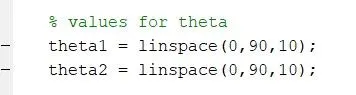
In linsapce command the first value represents the starting point of angle, similarly, the second point represents the ending point of the angle and at last, the third point represents the number of values between them
for-loop:
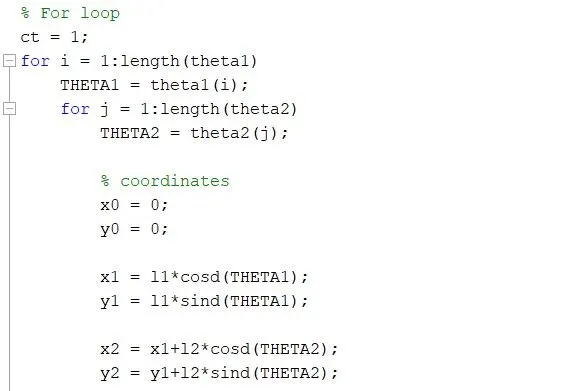
A for loop is a repetition control structure that allows you to efficiently write a loop that needs to execute a specific number of times.
Step-5: Creating a movie
- To create movie type m(ct)=getframe(gcf) just below the pause(0.03) and at extreme end command type Movie(m)
Where:-
ct represents every frame and getframe command represents to getting the current figure in the gcf window. Further, we are going to save all the figures in the array called (M).

FINAL CODE FOR THE 2R ROBOTIC ARM MANIPULATOR:
% forward kinematics of a 2R Robotic Arm Manipulator
clear all
close all
clc

% inputs
% length of both the arms
l1 = 1;
l2 = 0.5;

% values for theta
theta1 = linspace(0,90,10);
theta2 = linspace(0,90,10);

% For loop
ct = 1;
for i = 1:length(theta1)
    THETA1 = theta1(i);
    for j = 1:length(theta2)
        THETA2 = theta2(j);

        % coordinates
        x0 = 0;
        y0 = 0;

        x1 = l1*cosd(THETA1);
        y1 = l1*sind(THETA1);

        x2 = x1+l2*cosd(THETA2);
        y2 = y1+l2*sind(THETA2);

        % plotting


        plot([x0 x1],[y0 y1],[x1 x2],[y1 y2],'linewidth',3)
        axis([-0.1 1.5 0 1.5])
        pause(0.03)

        % frames
        m(ct) = getframe(gcf);
        ct = ct+1;

    end
end

movie(m)
videofile = VideoWriter('forward_kinematics.avi','Uncompressed AVI');
open(videofile)
writeVideo(videofile,m)
close(videofile)
RESULT:
Thus the plot is obtained for the basic code
The animation video can be seen through the below link
ERRORS FACED WHILE PROGRAMMING:
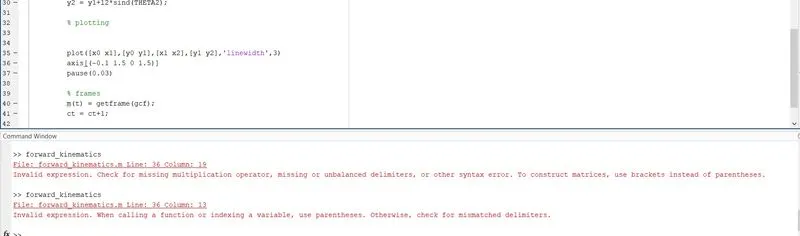
i did a mistake by changing the brackets and then i rectified it.
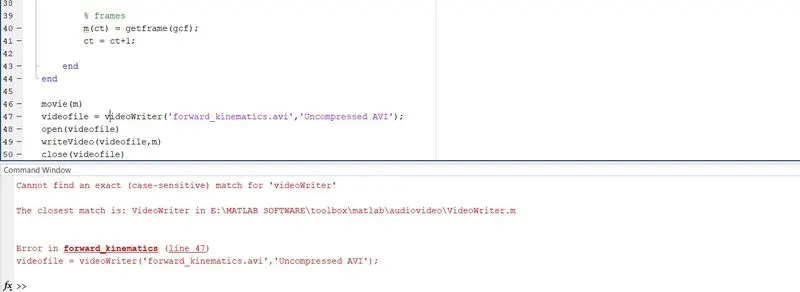
i have used small letters instead of capital letters and i rectified it.
CONCLUSION:
hence we are able to obtain the desired result that we were expecting.we can also get different speed and function of the robotic arm by changing the desired values.
theta1 = linspace(0 100 10)
theta2 = linspace(0 90 20)