Week -2 Simulink Model of a Doorbell & a Sensing Temperature of a Heater
Que. 1 :
AIM : To make a Simulink model of a doorbell using a solenoid block.
OBJECTIVES :
- To create a Simulink block of a doorbell.
- Make some arrangements for the bell to produce sound.
- To create a situation where the switch is closed for 2 seconds and then released.
- To observe the position of the plunger.
DIAGRAM :
THEORY :
The magnetic motor is the most significant component of a doorbell. The magnetic motor is an electromagnet in the traditional sense. An electromagnet, as we know, is a device in which a wire coil is wrapped around a magnetic material and creates a magnetic field when electricity is carried through it. The more the coiling of the wire, the larger the magnetic field amplification. When a magnetic material is brought into proximity to this magnetic field, it has a significant effect. This implies that if an iron item is placed in this magnetic field, it will be drawn to it owing to the polar orientation created by electromagnetism.
Here a solenoid is an electromagnet that creates a regulated magnetic field and is made out of a helical coil of wire with a length significantly greater than its diameter. When an electric current is fed through the coil, it may generate a homogenous magnetic field in a volume of space.
The word "solenoid" is used in engineering to describe complete equipment that includes an electromagnet and an actuator that transfers electrical energy to mechanical energy.
SIMULINK MODEL :
BLOCKS USED :
Here is the list of blocks used in this model -
- Pulse Generator
- Scope
- Switch
- Battery
- Solenoid
- Electrical Reference
- Solver Configuration
- Simulink-PS converter
- PS-Simulink converter
- Mechanical Translation Reference
- Ideal Translational Motion Sensor
EXPLANATION :
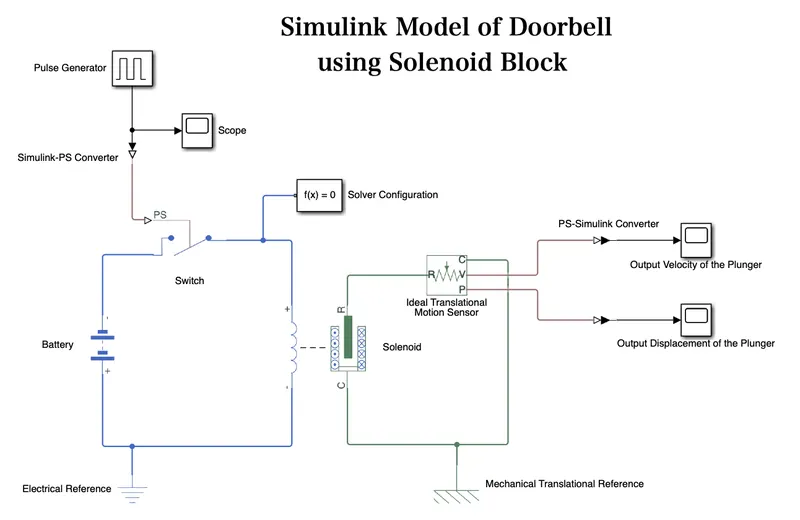
- To create a doorbell model in Simulink first we have shortlisted all the required blocks as mentioned above.
- The process starts with a Pulse Generator, which provides an input to the system based on a given condition which is 2 seconds delay. Here we have used a pulse width of 50% to get a much wider output waveform.
- This Pulse Generator is connected to a Simulink-PS converter which converts the signals to a physical signal.
- This Simulink-PS converter is connected to an electrical element based Switch which is further connected to a Battery & a Solenoid block.
- We have placed an Electrical Reference port (for electrical ground) along with a Solver Configuration which defines solver settings to use for simulation.
- The Solenoid is connected to an Ideal Translational Motion Sensor in which the physical signal ports V and P report the velocity and position respectively. The R & C port is connected to the R & C port of the solenoid.
- Finally, the signals from port V & P, the motion sensor is converted to a Simulink signal using a PS-Simulink converter.
- The output velocity and movement of the plunger (position) can be seen through their respective Scope plots.
- Note the Blue lines represents the Electrical System whereas the Green lines represent the Mechanical System.
RESULTS :
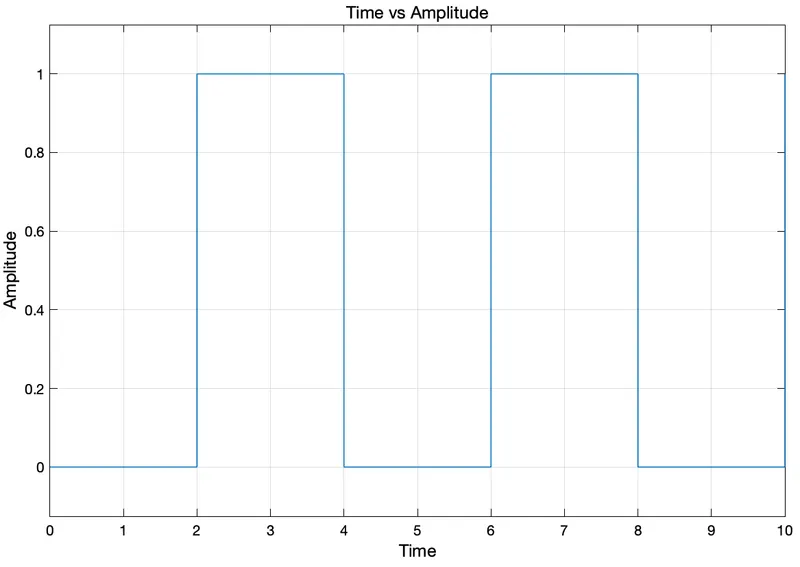
Input Scope -
The time-based pulse is generated for every 2 seconds based on its cycle period which is of 4 seconds.
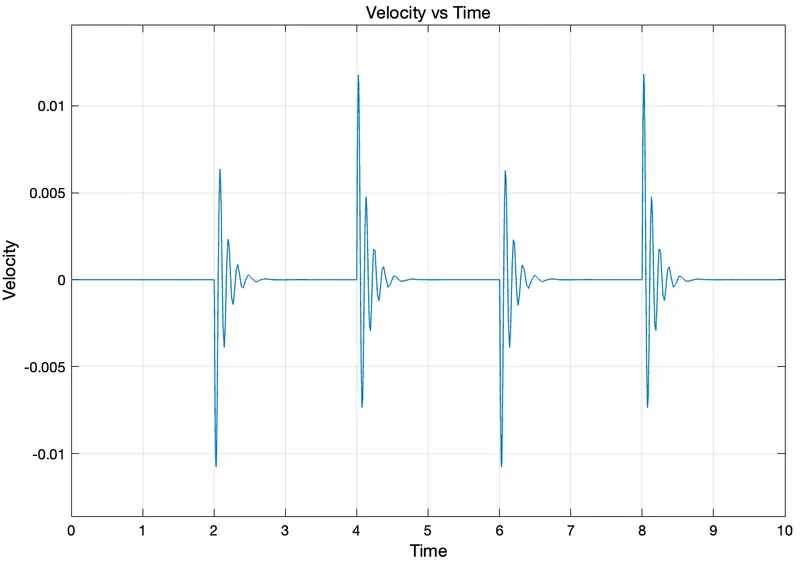
Output Scope 1 - Velocity of the Plunger
The time-based pulse is generated for every 2 seconds based on its cycle period which is of 4 seconds. Hence we can see some disturbances every 2 seconds.
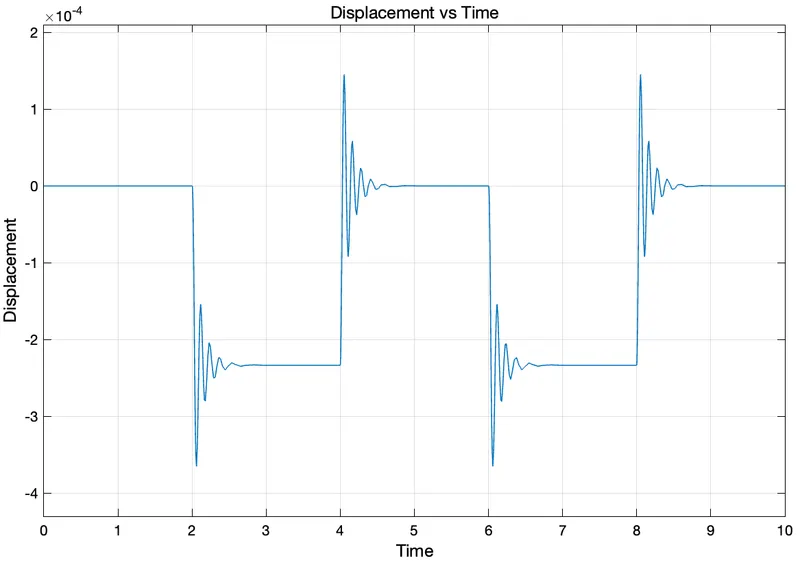
Output Scope 2 - Displacement of the Plunger
The time-based pulse is generated for every 2 seconds based on its cycle period which is of 4 seconds. Hence we can observe the change in the physical movement of the plunger.
CONCLUSION :
From the above results, we have arranged the switch which receives electrical power from the battery and pulls the metal arm to hit the bell producing sound. Also, have figured out the velocity and position of the plunger for a given situation where the switch is closed for 2 seconds with the help of plots.
REFERENCES :
Que. 2 :
AIM : To use a thermistor to sense the temperature of a heater & turn on or turn off the fan.
OBJECTIVES :
- To make a temperature difference model using a thermistor.
- To make the fan turn on or off based on the heating conditions.
GIVEN CONDITIONS :
|
Time (sec) |
Temperature (°C) |
ON / OFF |
|
0 - 10 |
20 |
OFF |
|
10 - 30 |
27 |
ON |
|
30 - 50 |
23 |
OFF |
Note: If the temperature goes above 25 °C then ON, otherwise OFF.
SIMULINK MODEL :
BLOCKS USED :
Here is the list of blocks used in this Simulink model
- Signal Builder
- Scope
- Simulink-PS converter
- Controlled Temperature Source
- Thermal Reference
- Thermistor
- Battery
- Electrical Reference
- Voltage Sensor
- Resistor
- Solver Configuration
- PS-Simulink converter
- Switch
- Constants
- Display
EXPLANATION :
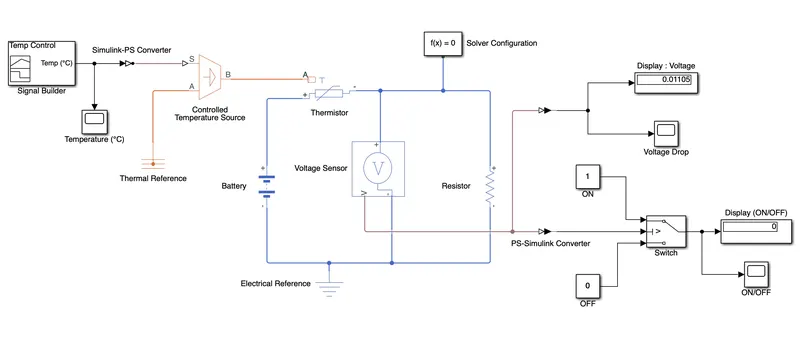
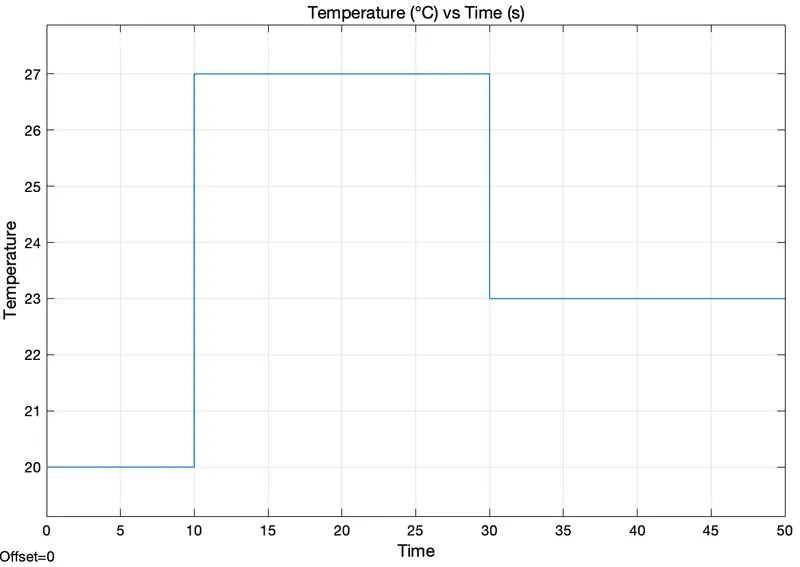
- We have used a Signal Builder and arranged the signals as 20°C, 27°C & 23°C. The results can be seen through its connected Scope (Temperature °C). These signals are converted using a Simulink-PS converter.
- These signals are passed through Thermal Blocks which has a Controlled Temperature Source which represents an ideal energy source in a thermal network that can maintain a controlled temperature difference regardless of the heat flow rate.
- It has a Thermal Reference point in a thermal network where the temperature is equal to absolute zero.
- The Electrical Blocks consists of a Battery, Voltage Sensor and a Resistor.
- We have placed an Electrical Reference port (for electrical ground) along with a Solver Configuration which defines solver settings to use for simulation.
- The output signals from the voltage are converted using PS-Simulink converters.
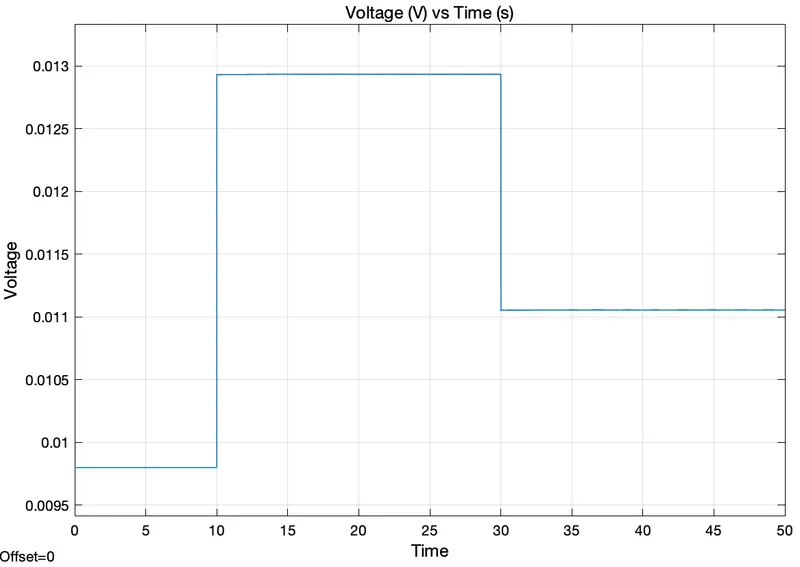
- The first converter helps to get the Voltage Drop using a plot through a scope and its result is shown in the Display block.
- The second converter is further connected to a Switch having two constant inputs 0 & 1 named as OFF & ON respectively. To get the desired result we need to give some threshold value to the switch.
- In our condition, the Threshold value is 0.01196.
- Finally, the output from the switch is connected to a Display which shows the results in 0 & 1 and its Scope represents the OFF & ON conditions.
RESULTS :
Input Scope : Temperature
Output Scope 1 : Voltage Drop
Output Scope 2 : Fan ON/OFF Condition
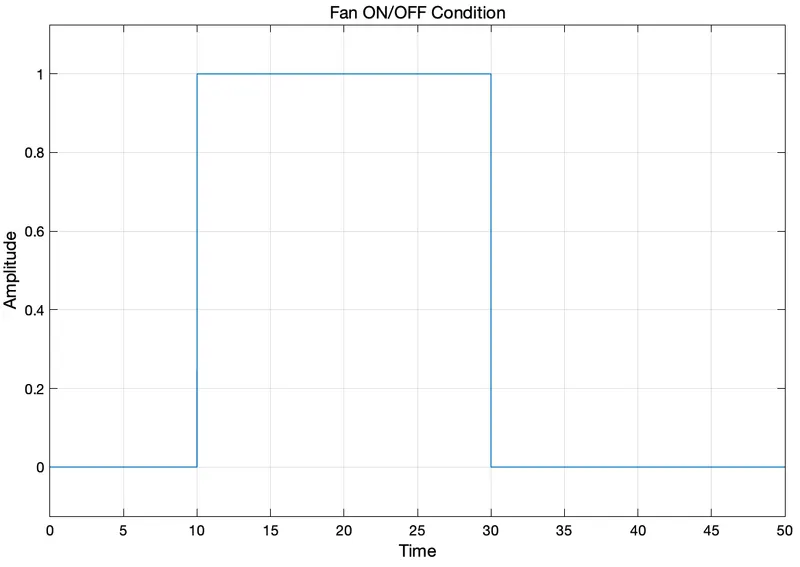
From the ON / OFF plot, we can figure out a few conditions. They are
- For 0-10 seconds Fan is OFF because the temperature is 20°C which is below the threshold temperature of 25°C.
- For 10-30 seconds Fan is ON because the temperature is 27°C which is above the threshold temperature of 25°C.
- For 30-50 seconds Fan is OFF because the temperature is 23°C which is also below the threshold temperature of 25°C.
- OFF and ON are represented by 0 and 1, respectively.
CONCLUSION :
We figured the ON/OFF settings for a Fan based on the preceding data and a threshold temperature of 25°C. The Simulink model detects the temperature of a heater and controls whether the fan needs to be turned ON or OFF.
REFERENCES :