Week -2
WEEK 2 CHALLENGE
AIM:
1. Make a Simulink model of Doorbell using solenoid block
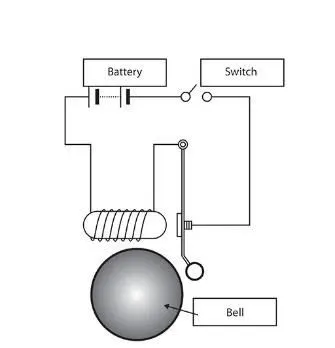
n the above arrangement, when the switch is closed the electromagnet receives electrical power from the battery and pulls the metal arm to hit the bell producing sound.
Create a situation where the switch is closed for 2 seconds and then released. Observe the physical movement of the plunger.
Assume remaining parameters.
2. Use a thermistor to sense the temperature of a heater & turn on or turn off the fan as per the below conditions:
Temperature source: 20 °C from 0 to 10 seconds, 27 °C from 10 to 30 seconds, 23 °C from 30 to 50 seconds
Fan conditions: ON if the temperature above 25 °C, OFF otherwise
SOLUTION:
Study 1:
1. Make a Simulink model of Doorbell using solenoid block
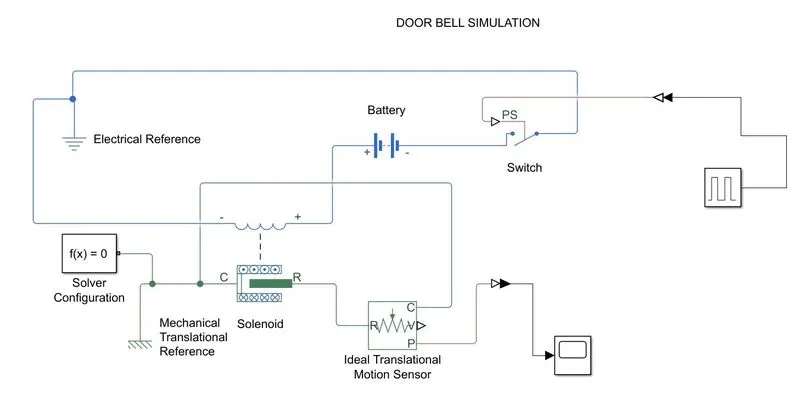
simulink Block Diagram of doorbell using solenoid block
Scope result:
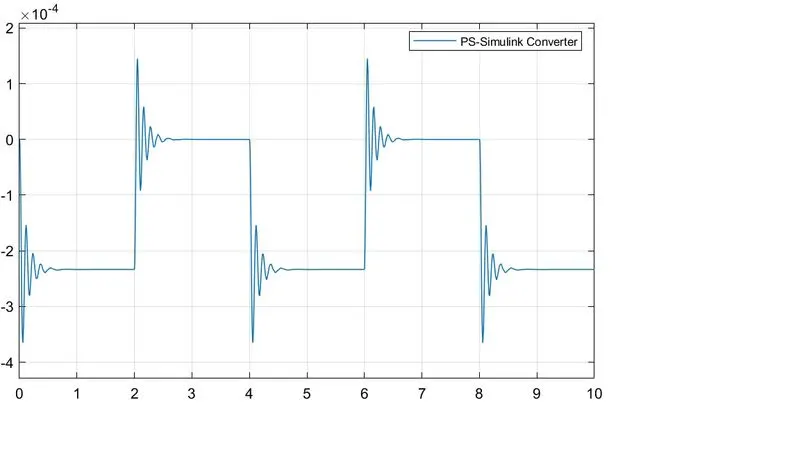
x axis shows the time and y axis shows the displacement of plunger.
it shows the plunger move forward for 2 secs and return for 2 secs.
Explanation:
- Add the required blocks battery,switch and solenoid as given in the problem
- To create a situation where switch is closed for 2 seconds and release we have to use pulse generator and give period 4 secs and 50% pulse width to make switch on and off for 2 secs
- pulse generator is connect to the switch block using simulink -ps converter block and switch block is then connect to the battery to get the supply from battery
- positive terminal of battery is connect to solenoid block and electrical blocks are connect to the electrical reference.
- solenoid plunger port C connect to the mechanical translational reference
- Port R is connect to the ideal translation motion sensor to check the motion and sensor block is connect to ps-simulink
- ps-simulink block convert the physical signal to simulink signal
- scope block is added to get the result.
Study 2:
2. Use a thermistor to sense the temperature of a heater & turn on or turn off the fan as per the below conditions:
Temperature source: 20 °C from 0 to 10 seconds, 27 °C from 10 to 30 seconds, 23 °C from 30 to 50 seconds
Fan conditions: ON if the temperature above 25 °C, OFF otherwise
Simulink Block Diagram of Thermistor challenge:
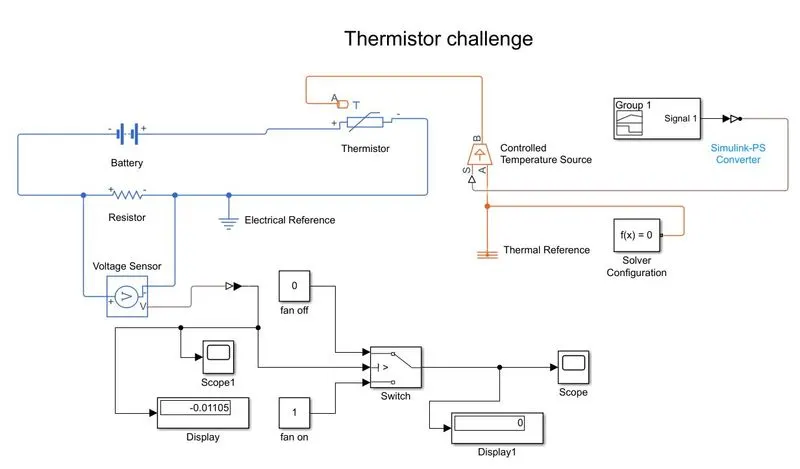
Block diagram Explanation:
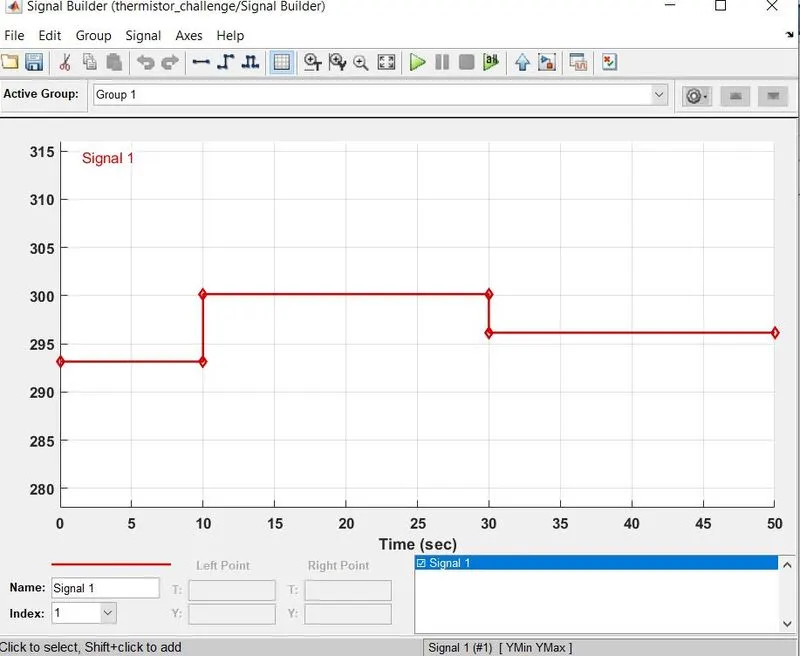
- Signal builder block is used to create the below signals and values are given in K.
- 20 °C from 0 to 10 seconds, 27 °C from 10 to 30 seconds, 23 °C from 30 to 50 seconds
- it is then connected to the simulink-ps converter to convert signal to physical signal,input handling method is given as first order filter derivatives to avoid error and get smooth output.
- output is connect to the port S of controlled temperature source block A port connect to thermal reference and solver configuration block is added.
- port B of controllled temp source is connect to the thermistor port A which gives the controlled temp to thermistor block.
- Battery and resistor block is connected to the thermistor block
- voltage sensor block added parallel to the resistor to calculate the voltage across the resistor
- electrical blocks are connected to the electrical reference.
- the output voltage is given to the switch block where it has 3 ports port 2 is input it validate if it satisfies it gives port 1 as output else port 3 is output.
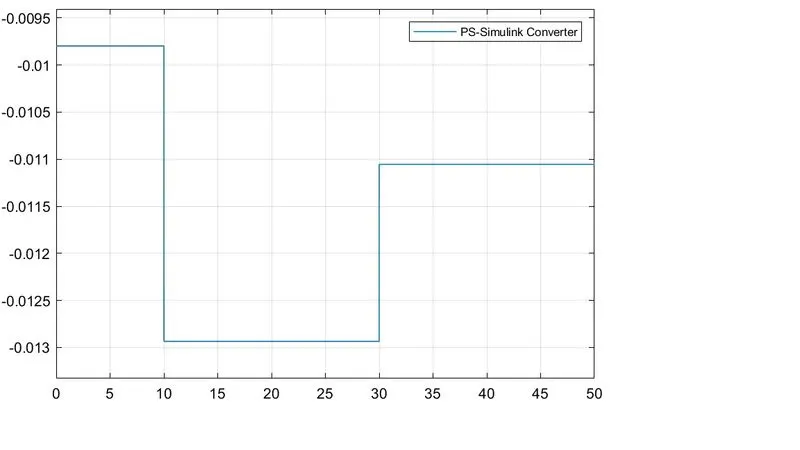
- for greater than 25 deg celcius the fan must be in off conditions so the voltage for 25 deg celcius is calculated using the scope 1 block and that voltage value is used as thresold value for switch block.
- two constant blocks are defined for fan off and on conditions
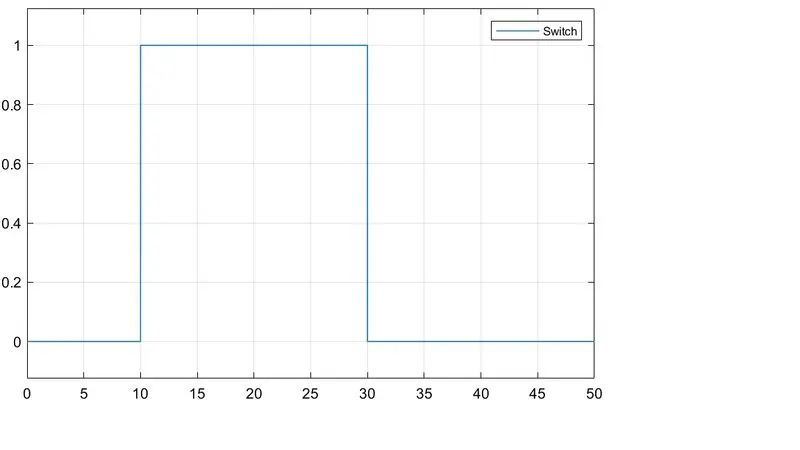
- scope block is added to get the output whether the fan is off or in position for the total time period of 50 secs.
Scope result of fan on and off conditions:
Scope 1 result of voltage sensor for the given signal:
Signal builder:
Errors occured during challenge:
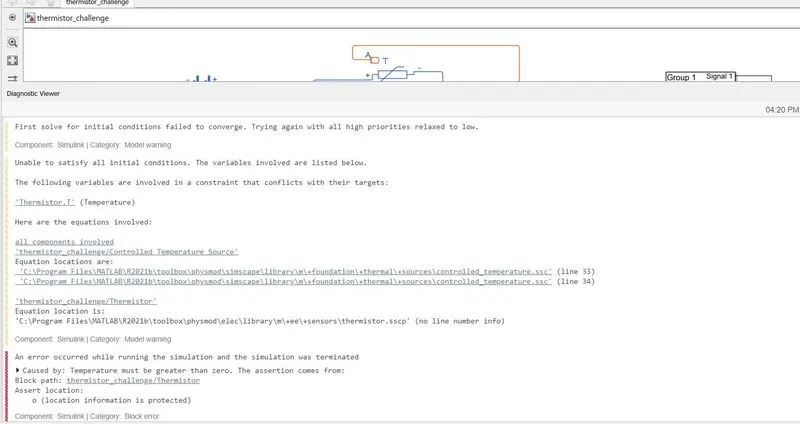
error caused is eliminated by changing the input handling in simulink-ps converter block and initially 3 separate signals are given and then changed into single signal having 50 secs time period.
Conclusion:
- Door bell simulation is done using solenoid block and results are plotted.
- Thermistor block is used to controll the fan of heater is done using simulink electrical and thermal blocks and results are plotted.